
Every AI email assistant works the same way underneath: it reads all of your mail, and most of them send some of it to a model run by somebody else. So the useful question is not which tool is most private in the abstract, it is which one tells you, in public and before you connect a mailbox, where your messages go and what is kept. Below are eight private AI email assistants ranked on exactly that, from each vendor's own security page rather than its marketing, with the question each one leaves unanswered named alongside the rest.
How we ranked these private AI email assistants
One criterion decides the order: how much of the data path you can verify today, and how little of your mail leaves in readable form. That is four questions. Does the vendor name the AI providers it sends your content to? Does it say plainly that your mail is not used to train models? Does it say what is stored and for how long? Is there a published audit behind the claim rather than a sentence on a landing page? A tool that answers all four ranks above a tool with better features and a quieter security page.
Every quotation below comes from the vendor's own security, privacy or pricing page, read on September 21, 2026, and every price is a list price on that date. Where a pricing table does not return to a plain fetch, which is the case for Superhuman and for Microsoft, the figure comes from dated third party reporting named in the sources, so treat those two as true at the time of writing.
Proton Mail with Scribe
The only assistant here that can keep your draft on your own machine
Best for
Anyone whose mail carries client confidences, legal matters or health information
Price
Included on Workspace Premium, add-on on lower plans
Scribe is the privacy benchmark in this category for a structural reason rather than a policy one. Proton says it can be run entirely locally on your device, so that no data ever leaves your device, and where it does run on Proton servers the company states that once you are done drafting, nothing you typed gets logged or saved. On the training question Proton does not make a promise, it makes a claim about what is possible: Scribe does not train on your inbox data, and it cannot, because of Proton Mail's zero-access encryption. The code is open source, so the claim is checkable by people who are not Proton.
The honest limit is scope. Scribe composes, shortens, proofreads and adjusts tone. It does not read your mailbox and tell you which of last night's ninety messages deserves you first, which is the job most people mean when they say AI email assistant. It is included with Workspace Premium and sold as an add-on with a free trial on Workspace Standard, so if triage is your real problem, treat Proton as your mail host and pair it with a tool below.
Microsoft Copilot
AI that never leaves the Microsoft 365 tenant you already pay for
Best for
Companies already on Microsoft 365 that need an answer they can show a compliance officer
Price
Add-on licence, about $21 per user per month on an annual commitment
Microsoft's documentation is the most specific in this roundup, and it is public rather than available on request. Prompts, responses and data accessed through Microsoft Graph are not used to train foundation models, including the ones Copilot itself uses. Copilot honours the permissions a user already has, so it can only surface content that person could open anyway. Azure OpenAI offers abuse monitoring that includes human review of content, and Microsoft states that Copilot has opted out of it. Coverage includes GDPR, ISO 27001, HIPAA and ISO 42001, the AI management standard.
Two caveats that Microsoft publishes itself and most listicles skip. For EU users, Copilot is an EU Data Boundary service, but models provided by Anthropic as a subprocessor are currently excluded from that boundary, so the choice of model changes the answer to "where does this run". And your prompts and Copilot's responses are stored as activity history, encrypted, with retention set by your admins through Purview, which means the retention answer is your organisation's, not Microsoft's. Copilot is an add-on on top of a qualifying Microsoft 365 plan, reported in August 2026 at about $21 per user per month for the business tier on an annual commitment. We covered what it does for triage in the best AI email assistants for Outlook.
Gemini in Google Workspace
Included in the plan you already buy, with a training commitment in writing
Best for
Google Workspace customers who want AI without adding a fourth party to the data path
Price
Included in paid Google Workspace plans
Google's Workspace privacy hub states it in one line: your content is not used for any other customers, and your content is not human reviewed or otherwise used for generative AI model training outside your domain without permission. That is the commitment that matters most to a founder worried about a competitor's model absorbing their deal flow, and it applies to the Gemini features already inside Gmail. Gemini is included in the paid Workspace plans, limited on Business Starter and expanded from Business Standard upward.
The thing to read twice is retention. Google's own hub puts prompt retention for Gemini in Workspace at ninety days to indefinite, as determined by admins, so a Workspace tenant with default settings may be keeping every prompt an employee has ever typed. That is a governance task, not a vendor failure, but it is the opposite of the no-storage claims further down this list, and nobody finds it unless they go looking.
Shortwave
The independent tool that names every company touching your mail
Best for
Gmail users who want a real AI client and want to see the whole subprocessor chain
Price
$30 per seat per month, Business plan
Shortwave earns the highest place of any independent assistant here by answering the question the others leave open. Its security page names the list and closes it: besides Google Cloud, it uses only OpenAI, Anthropic and Pinecone. It goes further and says the vast majority of its AI workloads run on open source models on hardware it controls, the only claim in this roundup that reduces the number of outside parties rather than promising they will behave. Your data will never be used to train third party LLMs, content is encrypted with AES256 at rest and TLS 1.2 or better in transit, and it holds CASA Tier 2 with annual audits.
Two practical limits. SOC 2 Type II and GDPR documentation are available on request rather than published, and the page explains how to delete your account and all associated data without stating a retention period for data you keep. Shortwave also needs a Google account, so an Outlook mailbox is not an option. Plans run $30, $45 and $120 per seat per month with a fourteen day trial and no free tier, and we compared the field in the best Shortwave alternatives.
Superhuman Mail
The deepest certification stack, with a published subprocessor list
Best for
Buyers whose security review wants ISO paperwork more than a privacy essay
Price
$40 per month, about $33 billed annually
Superhuman runs a public trust centre, and for a procurement team that is worth more than any promise on a marketing page. It publishes SOC 2 Type 2 alongside ISO/IEC 27001:2022, 27017:2015, 27018:2019 and 27701, a broader stack than anyone else here, and it publishes its subprocessor list rather than describing it, naming OpenAI, Google Cloud, Turbopuffer, Iterable and Fivetran among others. If your blocker is a security questionnaire, this is the fastest tool here to clear it.
It sits fifth rather than higher because the trust centre publishes the certifications and the subprocessors but no retention periods, so the question of how long your mail and your AI queries are kept still has to be asked by email. On price, the route into Mail is Starter at $30 per month or $25 billed annually, with Business at $40 or about $33 annually, according to third party reporting from July 2026, because the pricing table does not return to a plain fetch. See also the best Superhuman alternatives.
Serif
Says your mail is never stored on its servers at all
Best for
Founders who want drafts in their own voice and a no-storage commitment in writing
Price
$30 per month, Lite plan
Serif makes the strongest single claim on this page: your emails are never stored on our servers. Everything the assistant learns is encrypted at rest, your emails are never used to train general AI models, no one other than you and your assistant can access them, and the company states it has never and will never sell your data. Behind that sit real artifacts: CASA Tier 2, SOC 2 Type 2, stated GDPR and HIPAA compliance, Google Verified status and an audit by a third party security firm.
What is missing is the subprocessor list. Serif does not name the AI providers it sends your mail to on its security page, which means a claim of no storage on Serif's own servers cannot be read as a claim about the model vendor's servers. Plans run Lite at $30 per month, Standard at $50, Team at $50 per seat and Pro at $200, all with a seven day trial.
Nolario
Removes personal data from your messages before a model ever sees them
Best for
Founders whose urgent message is as likely to be in Slack or Teams as in the inbox
Price
€29/mo (waitlist)
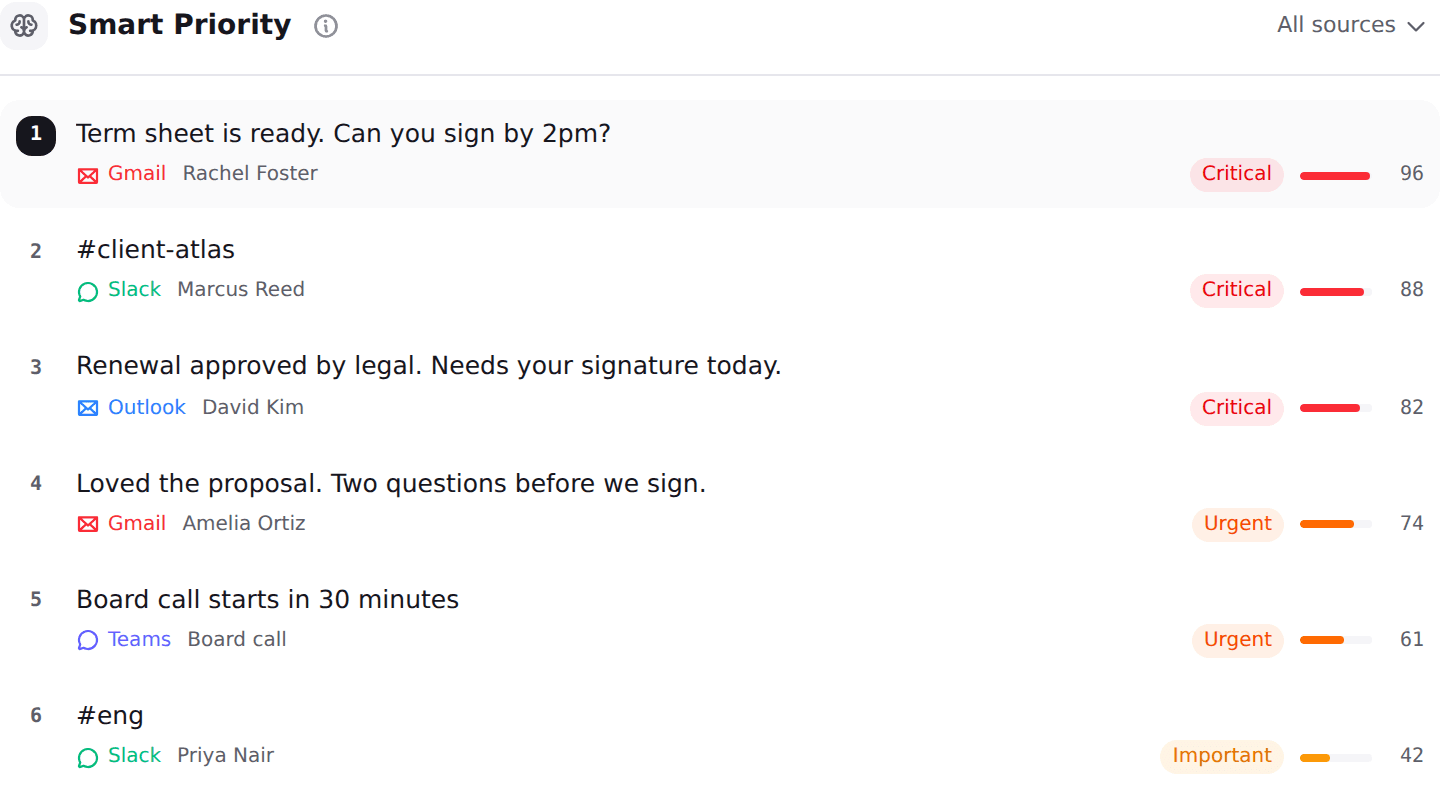
Nolario approaches the problem from the other end. Instead of asking a model vendor to promise it will not remember your mail, message content is scrubbed of personal data before anything reaches an AI provider, so the names, addresses and identifiers that make an email sensitive are not in the request at all. It also pulls Gmail, Outlook, Slack, Microsoft Teams, Google Calendar and any IMAP mailbox into one feed, scores every message for importance from 0 to 100, ranks the feed so the important thing is at the top, and drafts replies in your own voice. It ranks and drafts. It never sends, archives or answers on your behalf.
It sits seventh on this page's own criterion, and it should. There is no published SOC 2 report or ISO certificate to hand a security reviewer today, and access is by waitlist, so unlike every tool above it you cannot connect a mailbox and judge it yourself. A scrubbing boundary you cannot yet test is an argument, not evidence. The integrations and pricing pages have the current detail.
Fyxer AI
Well certified, and quiet about where your mail actually goes
Best for
Teams that need drafts across mail and chat and will accept a trust centre request
Price
$30 per user per month, $22.50 billed annually
Fyxer is not last because it is careless. Its security page carries SOC 2 Type II, ISO 27001, stated GDPR and HIPAA compliance and CASA Tier 2, which is a stronger paperwork position than most of this category, and it states that your data is never used to train third party AI models. It is also careful in practice: it writes drafts and never sends without your approval, and it notifies meeting participants before joining a call.
It ranks last on disclosure. The security page names no AI subprocessors, states no data residency and gives no retention period, pointing you to a trust centre instead. That is a normal enterprise pattern and a poor fit for a founder deciding in ten minutes. Starter is $30 per user per month or $22.50 billed annually, Professional is $50 or $37.50 annually, Enterprise is bespoke with a fifty user minimum, and the trial is seven days. We compared it in the best Fyxer alternatives.
What changed on August 2, 2026
The reason to ask this question now rather than last year is that the transparency obligations in Article 50 of the EU AI Act became applicable on August 2, 2026. They require providers to disclose that a person is interacting with an AI system unless that is obvious, and AI generated audio, image, video and text to carry machine readable marking and a detection mechanism, with an extended deadline of December 2, 2026 for generative systems already on the market. Penalties reach fifteen million euros or three percent of worldwide annual turnover, whichever is higher.
The scope is what makes it your problem and not only your vendor's: the rules apply to providers, deployers, importers and distributors placing AI on the EU market, or whose output is used inside the EU. None of that makes any tool on this page illegal. It does mean that a vendor which cannot tell you today which model providers it uses has not finished its own homework.
Three questions to ask any AI email assistant before you connect it
The list above will age. The test will not, and it takes ten minutes on any vendor. First, who else sees it? Find the subprocessor list. If the security page says "industry leading AI providers" without naming them, you cannot assess the risk, because the risk lives with whoever holds the content, not with whoever sold you the app. Shortwave and Superhuman name theirs; Serif and Fyxer do not.
Second, what is kept, and for how long? The honest answers differ wildly: Serif says mail is never stored on its servers, Google says Gemini prompts are kept from ninety days to indefinitely depending on your admin, and several vendors say nothing. Third, is the claim checkable? A published SOC 2 or ISO certificate, an open source client or a report available on request all count. A sentence on a landing page does not. If you are earlier in the search than this, start with the best AI email assistants for founders and come back to privacy once you have a shortlist, or read what a unified inbox is if the real problem is that the important message keeps arriving somewhere other than email.
Private AI email assistants compared
| Nolario | Shortwave | M365 Copilot | Fyxer AI | |
|---|---|---|---|---|
| Names its AI subprocessors publicly | ||||
| States mail is not used for training | ||||
| Publishes a retention position | ||||
| Published SOC 2 or ISO certificate | ||||
| Strips personal data before the model | ||||
| Channels beyond email | ||||
| You can connect a mailbox today | ||||
| Starting price | €29/mo (waitlist) | $30/seat/mo | ~$21/user/mo yearly | $30/user/mo |
Where Nolario fits
If your mail carries anything you would not want a third party to hold, take Proton and write your own replies. If you already pay Microsoft or Google, the built in assistant is the cheapest and most defensible choice: it adds no new company to the data path, and both vendors put the training commitment in public documentation. If you want an independent tool and want to see the whole chain, Shortwave shows it to you, and Superhuman is the one your security reviewer clears fastest.
Nolario answers a narrower question: what if the problem is not that AI reads your mail, but that the message which needed you was in Slack while you were being careful about Outlook. Nolario pulls every channel into one ranked feed, scores what deserves you first, drafts the reply in your voice, and scrubs personal data out of the content before any model sees it. What it does not have today is the thing this page ranks on: a published audit you can read, and an account you can open this afternoon. Access is by waitlist and plans start at €29/mo. Until then the tools above are the honest recommendation, and the three questions are worth more than any list, including this one.
