

A unified inbox app puts your email and chat in one place, but the products that promise it do two very different things. Our pick is Nolario, our own product, because it merges email, Slack and Teams into one feed ranked by importance; access is by waitlist. Wavebox, Shift and Rambox keep Gmail, Outlook, Slack and Microsoft Teams signed in side by side in one window, today. Front, Missive, Mailbird and Spark merge accounts into one list, mostly email. Here are the 8 best unified inbox apps in 2026, ranked on how much of your email, Slack and Teams each one brings together, and who each one is for.
How we ranked these unified inbox apps
We ranked on the job the title names: combining email, Slack and Microsoft Teams. Every app answered four questions, in this order. Does it bring all three into one place? Does it merge them into one list, or keep each in its own tab? Can you install it today? And what does it cost one person? Prices are list prices from each vendor's own pricing page, checked on September 26, 2026, in US dollars.
That order puts Nolario first: it covers all three channels and is the only one that merges and ranks them, though it is not available yet. The three work browsers follow, because they are the only apps you can install this week that cover all three channels, so start there if you need something today. The merged inboxes come last: they combine email better than any tab can, but none of them lists Teams chat as a channel on the pages we checked.
The 8 best unified inbox apps in 2026
1. Nolario
One ranked feed for email, Slack and Teams, with replies drafted in your voice
- Best for
- Founders whose urgent messages hide across Gmail, Outlook, Slack and Teams
- Price
- €29/mo (waitlist)
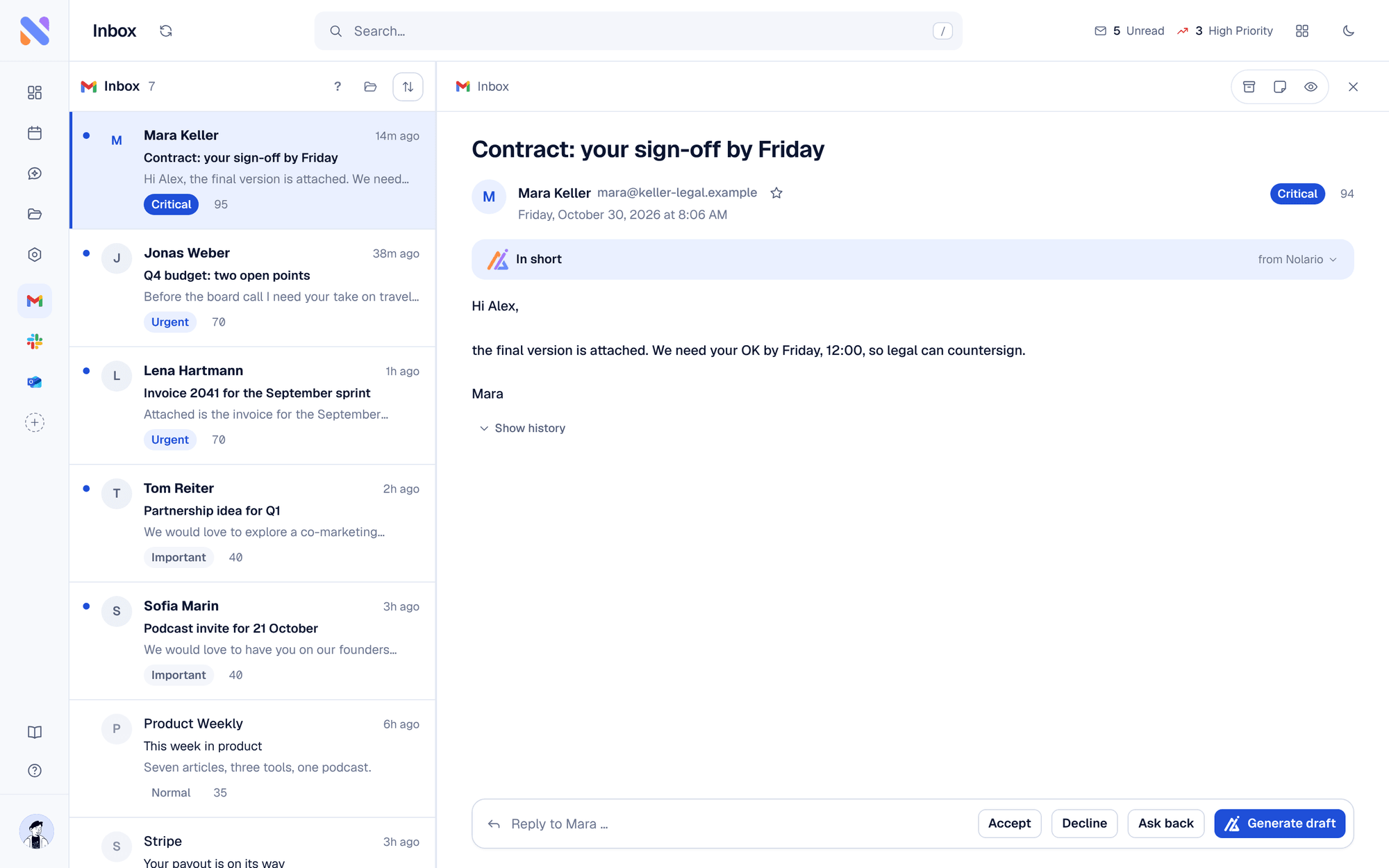
Nolario pulls Gmail, Outlook, Slack, Microsoft Teams and Google Calendar into one feed, scores every item for importance, and ranks the feed so the important thing is at the top, whichever channel it came from. It drafts replies in your own voice from what you actually send. It ranks, it never answers for you.
Nolario is our product, so weigh this pick accordingly. We rank it first because it is the only app in this list that merges all three channels into one list instead of tabs, and the only one that orders that list by what needs you. What it does not do: it is not available today, since access is by waitlist and the product opens to waitlist members between May and August 2027; it runs on the desktop only; and it has no shared queue or assignment for a team. See the integrations and pricing pages.
2. Wavebox
A work browser that keeps every Gmail, Outlook, Slack and Teams account signed in
- Best for
- People who work across several Google and Microsoft accounts at once
- Price
- Free (2 groups, 2 apps each); Pro $8.33/mo billed annually
Wavebox is a desktop browser built for work apps. You group Gmail, Outlook, Slack and Microsoft Teams in a sidebar, stay signed in to several accounts of the same app at once, and search across them with its unified search. Unread badges show which app has something new, and split screen puts two apps side by side.
It runs on Mac, Windows and Linux and takes Chrome Web Store extensions. The free Basic plan is small, 2 groups with 2 apps in each, so most people who stay end up on Pro, which starts with a 7 day trial and no card.
The limit is the one every work browser shares: Slack still looks like Slack and Gmail like Gmail. You see which tab has something unread, not which message matters.
3. Shift
A desktop browser organized around your inboxes, chats and apps
- Best for
- Anyone juggling several email accounts, Slack workspaces and Teams tenants
- Price
- Free (5 Spaces, 10 apps each); Advanced $199.99/yr
Shift puts your mail, chat and work apps in one window and groups them into Spaces. Each Slack workspace gets its own entry in the sidebar, and you can stay signed in to several Microsoft Teams accounts or tenants at once, which is what consultants and people who work for more than one company tend to need.
The free plan allows 5 Spaces with 10 apps in each and limited use of Shift's AI. Advanced costs $199.99 a year, paying monthly costs $40 more over a year, and removes the Space and app limits. Check that the free plan covers every app you need before you rely on it.
Like Wavebox, Shift merges the window, not the messages. It is a fast way to stop hunting for tabs; it does not tell you which of the apps needs you first.
4. Rambox
A workspace organizer for more than 700 web apps
- Best for
- People who want every mail and chat app in one window on a free plan
- Price
- Free Basic; Pro $7/mo or $70/yr
Rambox brings Slack, Microsoft Teams, email and more than 700 other web apps into one interface. The free Basic plan has unlimited apps with up to 2 instances of each, plus notifications and a focus mode, which is enough to run two Gmail accounts, Slack and Teams side by side.
Pro adds workspaces, multi-login and unlimited instances for $7 a month or $70 a year, and every new account starts with a 30 day Pro trial without a card. A Teams plan costs $14 per user a month from 5 users. Rambox runs on Windows, macOS and Linux.
It gathers apps rather than messages: each app keeps its own notifications, and deciding what matters stays with you.
5. Front
A shared inbox for customer-facing teams that can take Slack messages too
- Best for
- Support, success and operations teams working one queue
- Price
- From $25/seat/mo; Slack from $65/seat/mo
Front merges email and other channels into one shared inbox that a team works together. On the Professional plan and above it takes Slack as a channel, so you can respond and react to messages from public and private Slack channels in the same queue as your email.
The Starter plan, $25 per seat a month for up to 10 seats with a 14 day trial, supports a single channel type: email, Front Chat or SMS. Combining email with Slack therefore means Professional at $65 per seat a month. Microsoft Teams does not appear on Front's pricing page.
It is built and priced for a team, so for one founder it is a lot of tool for the job. If a shared queue is what you need, our guide to shared inbox software goes deeper.
6. Mailbird
A unified email client with Slack and WhatsApp in the sidebar
- Best for
- Windows and Mac users who mainly live in email
- Price
- Free (1 account); Premium $4.03/user/mo billed yearly
Mailbird merges your email accounts into one inbox and docks other apps in a sidebar, so Slack and WhatsApp open in a panel next to your mail instead of in another window. It runs on Windows and on macOS Ventura or later.
The free plan covers a single account and no app integrations, so the unified inbox and the sidebar apps need Premium: $4.03 per user a month billed yearly at the time of writing, or $99.75 once. There is no trial, but there is a 14 day money-back guarantee. Microsoft Teams is not listed on the Mailbird pages we checked.
7. Missive
A team inbox for email, texts and social messages
- Best for
- Small teams answering email, SMS and WhatsApp together
- Price
- From $14/user/mo; 30 day trial, no free plan
Missive merges Gmail, Outlook and IMAP accounts with SMS through Twilio, WhatsApp, Messenger and Instagram, so a small team can answer every customer conversation from one list. Each user can connect up to 10 personal and 5 shared accounts.
Plans cost $14, $24 and $36 per user a month, with 20% off when billed yearly, and there is a 30 day trial of the Productive plan without a card, but no free plan. Slack and Microsoft Teams are not among the channels its pricing page lists, so it unifies everything except the chat your team runs on.
8. Spark Mail
A free email client that merges every account into one Smart Inbox
- Best for
- Individuals who want every email account in one clean, free inbox
- Price
- Free; Plus $10/user/mo, Pro $20/user/mo
Spark's free plan already covers the core of a unified inbox for email: unlimited email accounts, the Smart Inbox, smart notifications and a calendar, on iOS, Mac, Windows and Android.
Plus, at $10 per user a month, and Pro, at $20, add more, including a Microsoft Teams integration in the calendar for meetings. Slack does not appear on Spark's pricing page and Teams shows up only for meetings, so as a unified inbox it covers email only. If email is the whole problem, it is the best free answer here.
Unified inbox apps compared
| Feature | Nolario | Wavebox | Shift | Front | Spark |
|---|---|---|---|---|---|
| Gmail and Outlook | One feed | Tabs | Tabs | One inbox | One inbox |
| Slack | One feed | Tab | Tab | Professional plan | Not listed |
| Microsoft Teams | One feed | Tab | Tab | Not listed | Meetings only |
| Ranked by importance | Yes | No | No | No | Smart Inbox |
| Free plan | No | Yes | Yes | No | Yes |
| Available today | Waitlist | Yes | Yes | Yes | Yes |
| Starting price | €29/mo (waitlist) | $8.33/mo (Pro) | $199.99/yr | $25/seat/mo | $10/user/mo (Plus) |
Tabs or one feed: the two kinds of unified inbox
The eight apps split into two shapes, and knowing which one you need saves a week of trials. A work browser (Wavebox, Shift, Rambox) keeps every app intact and signed in, in one window. Nothing changes about how Slack or Teams work, which is the appeal: setup takes minutes and nothing is lost in translation. The cost is that you still visit each tab and triage it yourself. The cost of context switching drops because the windows are gone, but the decisions are still made one app at a time.
A merged inbox (Front, Mailbird, Missive, Spark) pulls messages out of their apps into one list, so a reply from a customer and a newsletter sit in the same column. That works well for email and texts and less well for workplace chat: of the four, only Front takes Slack in as a channel, and only on its Professional plan. Our explainer on what a unified inbox is covers the difference in more depth.
Nolario is a third shape: one merged feed across email, Slack and Teams, ordered by importance instead of by time. If what you want is an assistant that reads across those channels rather than an inbox, see our list of AI assistants for Gmail, Slack and Teams.
Which unified inbox app should a founder pick?
If the problem is which message matters, not where your messages live, Nolario is our pick, with the waitlist caveat above. If you need email, Slack and Teams in one window this week, start with Wavebox if you live in several Google and Microsoft accounts, Shift if you want to separate clients or companies into Spaces without paying, or Rambox if you want unlimited apps on a free plan. All three take minutes to set up, and none of them locks your data in, because each app stays the app it was.
If email is most of the problem, Spark is free and merges every account, and Mailbird adds Slack and WhatsApp in a sidebar for a few dollars a month. If a team answers customers together, go to Front or Missive, and compare them in our Front alternatives and Missive alternatives guides.
If the problem is not where your messages live but which one matters, a merged list does not solve it either: three hundred messages in one column are still three hundred messages. That is the case for ranking, and it is where Nolario fits.
Where Nolario fits
Nolario is not the answer if you need a unified inbox this week: it is not available until the waitlist opens, between May and August 2027, and it runs on the desktop only. It is not a team tool either. There is no shared queue and no assignment, which is what Front and Missive are for.
Where it fits is the gap every other app on this list leaves open. The work browsers put email, Slack and Teams in one window but leave the triage to you; the merged inboxes triage email but leave Teams out. Nolario pulls Gmail, Outlook, Slack, Teams and Google Calendar into one feed, scores each item, puts the one that needs you at the top, and drafts the reply in your voice for you to send. If that is the problem you have, join the waitlist below. Until it opens, one of the three work browsers on this list is the practical choice.
