

"Email management software" covers four products that have almost nothing in common: filters that hide noise, clients that make you faster, AI assistants that write for you, and shared inboxes that let a team work one address. Buying from the wrong group is the most common and most expensive mistake here, so this ranking is organised by the job you are hiring the tool to do, with real list prices.
The four jobs, and who wins each
Cut the noise: SaneBox, Spark. Go faster in one mailbox: Superhuman, Shortwave. Have the work done for you: Fyxer, Nolario. Share one address with a team: Front, Missive, Hiver, Help Scout. If more than one of those describes you, buy for the one that is costing you the most hours and ignore the rest.
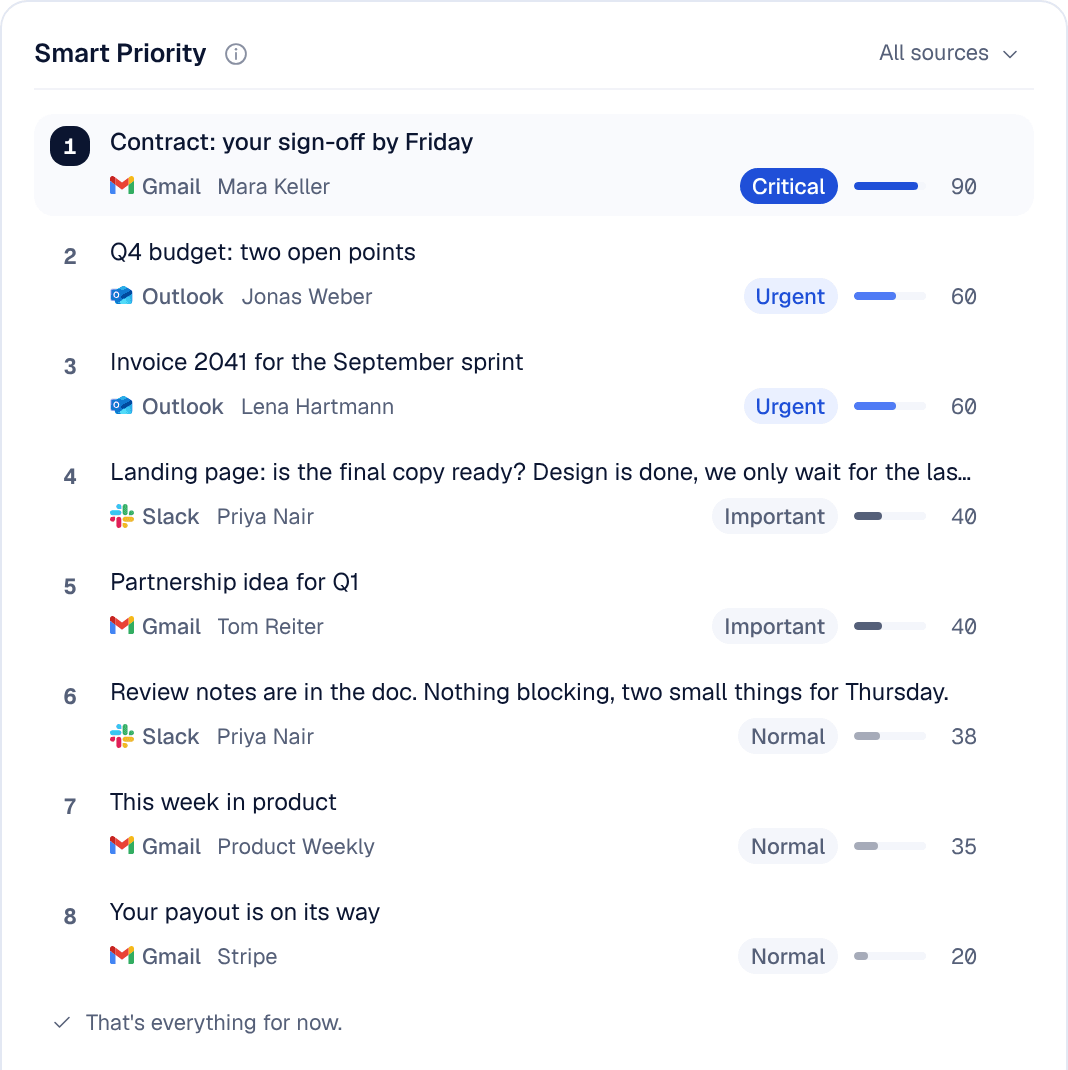
The 10 best email management tools in 2026
1. Nolario
Our pickRanks everything you receive, on one scale, across every channel.
- Best for
- Founders and executives whose urgent work is not only in email
- Price
- €29/mo (waitlist)
Nolario is our product, so weigh this pick accordingly. Nolario pulls Gmail, Outlook, Slack, Teams and calendar into a single feed and gives every item an importance score, so the handful that need you sit at the top. It drafts replies in your voice, learned from what you have really sent, and surfaces the decisions and follow-ups you owe.
It is not a shared team inbox and it does not keep you in your current mail app. If either of those is a requirement, take Front or SaneBox respectively.
2. Superhuman
The fastest way through a single mailbox.
- Best for
- One person who wants speed, polish and AI writing
- Price
- From ~$30/mo (Starter), ~$40/mo (Business)
Keyboard-first, Split Inbox for triage, AI drafting, summaries and tone control, on Gmail and Outlook. At the time of writing, Mail has no free plan. Expensive per person and email only, but nothing else feels as good to use.
3. Shortwave
AI-native email that answers questions about your inbox.
- Best for
- Gmail power users who want AI depth
- Price
- From ~$30/user/mo
Bundles, thread summaries and conversational search that genuinely understands your mail history. Gmail-only, and the AI is metered in daily requests on the lower tiers.
4. SaneBox
Server-side filtering for any mailbox, any client.
- Best for
- People who refuse to change email apps
- Price
- From ~$65/year (annual)
Moves unimportant mail into folders and leaves the rest alone, working with Gmail, Microsoft 365 and IMAP alike (pricing and providers checked September 2026). Cheapest real improvement on this list. It never drafts and never ranks what survives the filter.
5. Fyxer AI
An AI assistant that organizes and pre-writes.
- Best for
- People who want drafts waiting when they open the laptop
- Price
- Free plan; Pro from ~$37/user/mo (annual)
Categorizes the inbox, writes replies in your style and takes meeting notes, on Gmail and Outlook. The strongest "it already did the work" experience for pure email. The free plan does not sort the inbox or draft replies; that starts at Pro.
6. Spark
A tidy multi-account inbox with AI attached, free to start.
- Best for
- Several personal accounts on no budget
- Price
- Free; paid from ~$8/user/mo (annual)
Smart Inbox moves newsletters and notifications into their own inboxes, and the free tier covers unlimited accounts with a limited preview of the AI. Light team features too. The AI assists rather than decides.
7. Front
The standard for teams sharing one address.
- Best for
- Support and sales teams of 5 to 50
- Price
- From ~$25/seat/mo (annual)
Assignment, internal comments, rules, SLAs and analytics across email, SMS and social, with omnichannel from the Professional plan. The most complete shared inbox, and priced accordingly.
8. Missive
Team collaboration at roughly half Front's seat price.
- Best for
- Small teams that want a shared inbox without the enterprise bill
- Price
- From ~$14/user/mo (annual)
Chat beside the thread, assignment, rules and multiple channels. Denser interface, much gentler invoice.
9. Hiver
A shared inbox that never leaves Gmail.
- Best for
- Google Workspace teams where adoption is the risk
- Price
- From ~$25/user/mo (annual)
Assignment, notes, reporting and (on the Pro tier) SLAs layered onto Gmail itself. Nobody has to learn a new app, which is worth more than most feature comparisons admit.
10. Help Scout
Shared inbox shaped like a help desk, free to five users.
- Best for
- Customer support mailboxes
- Price
- Free up to 5 users; from ~$25/user/mo
Saved replies, knowledge base and customer history, without a heavyweight ticketing system. The best zero-budget entry point for a team.
Quick comparison
| Feature | Nolario | Superhuman | SaneBox | Fyxer | Front |
|---|---|---|---|---|---|
| Ranks by importance | Yes | Split inbox | Filter only | Categories | No |
| Beyond email (Slack, Teams) | Yes | No | No | No | SMS, social |
| Drafts in your voice | Yes | Yes | No | Yes | AI compose |
| Built for teams | No | No | No | No | Yes |
| Starting price | €29/mo (waitlist) | ~$30/mo | ~$65/yr | ~$37/user/mo | ~$25/seat/mo |
The bottom line
There is no single best email management software, only the right answer to your job. For a team on one address, Front or Missive. For quiet at the lowest price, SaneBox. For speed, Superhuman. And if the real issue is that important work arrives in email, Slack and Teams and you keep opening the wrong one first, Nolario is the only tool here that puts all of it on one ranked list.
