
If your mail does not live at Google, most of this category is closed to you. The AI email assistants that get reviewed the most, Shortwave and Cora among them, sign you in with a Google account and stop there, and the two biggest assistants of all only exist inside a subscription you already pay for: Gemini if you are on Google Workspace, Copilot if you are on Microsoft 365. This is a ranking of the five tools we could verify will actually connect an iCloud, Fastmail, Proton, Zoho or self-hosted mailbox over IMAP, what each of them does once connected, and the two provider-side rules that decide whether any of them can sign in at all.
How we ranked these AI email assistants
Ranked by how many mailboxes each tool can actually connect, read from the vendor's own pages on 25 September 2026, and then by how much AI work you get once it is connected. A tool that names IMAP in its own documentation beats one that only implies it. Every price below is a list price at the time of writing, taken from the vendor's pricing page except where that page returns no price table to a plain fetch, which is noted in the sources. Tools we could not verify as supporting anything beyond Gmail and Outlook are covered further down rather than ranked, because a list that quietly includes them is the reason you are reading this page.
The 5 best AI email assistants that work beyond Gmail
Missive
The most capable AI inbox that still takes a plain IMAP account.
Best for
Small teams whose mail is spread across Gmail, Outlook and a hosted domain
Price
From ~$14/user/mo billed yearly
Missive's pricing page names Gmail, Google Workspace, Outlook and IMAP as connectable email accounts, alongside SMS through Twilio, WhatsApp, Facebook Messenger and Instagram. That combination is rare: most tools that take IMAP are mail clients with AI bolted on, and most tools with real AI are locked to one provider. Missive is the one place where a Fastmail account and a shared support address can sit in the same workspace with an assistant that can read the thread.
Plans are Starter at ~$14, Productive at ~$24 and Business at ~$36 per user per month billed yearly, with a 30 day trial of Productive and no card required. The thing to understand before you buy is that Missive is built around a shared team inbox: comments, assignment and a queue. If you are one person with four mailboxes, you are paying for collaboration you will not use, and our Missive alternatives comparison is the better starting point.
SaneBox
The widest provider coverage in the category, by a distance.
Best for
Anyone whose provider nothing else supports, who wants triage rather than drafting
Price
From ~$9.49/mo for one account
SaneBox's own home page names Gmail, Microsoft 365, Apple iCloud, Yahoo Mail and Fastmail, and then says it works with any IMAP, Microsoft Exchange or ActiveSync server. Nothing else here is that broad, and the reason is architectural: SaneBox never asks you to change email apps. It sits on the account and moves messages between folders, so whatever you read mail in on your phone and laptop keeps working.
The trade is that SaneBox sorts and defers, it does not write. There is no drafting in your voice and no assistant to ask. Its pricing page returns no price table to a plain fetch, so the figures here come from third party reporting that read the page in August 2026: Snack at ~$9.49 a month for one account, Lunch at ~$15.99 for two and Dinner at ~$42.99 for four, with annual billing cutting those substantially. If sorting is all you need, read our email triage tools comparison next.
Spark
A free cross-device mail client that takes almost any account type.
Best for
People who want one app for several mailboxes on Mac, Windows and phone
Price
Free plan; Plus from ~$8.25/user/mo annually
Spark lists IMAP, iCloud, Exchange, Outlook, Yahoo and Google as supported account types on its own site, which covers nearly everything a founder is likely to be holding. It runs on Mac, iOS and Windows, and the free plan is genuinely usable: smart inbox, unlimited accounts, calendar and notifications, with a limited preview of the AI assistant on top.
Paid plans are Plus at ~$10 a month, or ~$8.25 billed annually, and Pro at ~$20, or ~$16.58 annually, and the AI is metered by credits rather than unlocked outright. Spark is the right answer if your problem is four mail apps on three devices. It is the wrong answer if your problem is that the message you needed was in Slack, because it is a mail client and nothing else.
Canary Mail
Broad provider support including Proton, with the AI on the paid tier.
Best for
Privacy-minded users who want one client across Mac, Windows and Android
Price
Free plan; Growth from ~$3/mo billed yearly
Canary Mail names Gmail, Outlook, Office 365, iCloud, Exchange, ProtonMail, Zoho and Yahoo on its home page, and runs on Mac, iOS, Windows, Android and Chrome. It is the cheapest paid AI here by a wide margin: Growth is ~$3 a month billed yearly and Pro+ is ~$10, both also sold as one-time lifetime licences, with a 7 day trial.
The free tier is permanent but excludes the AI, so treat the free plan as a mail client and the ~$3 tier as the actual product. Its AI Copilot covers compose, summaries and inbox prioritisation, which is the standard feature set of this category rather than a differentiator. What you are paying for is that it will connect the account you have.
Nolario
One ranked feed for every channel, including any IMAP mailbox.
Best for
Founders whose urgent messages hide across mail, Slack and Microsoft Teams
Price
€29/mo (waitlist)
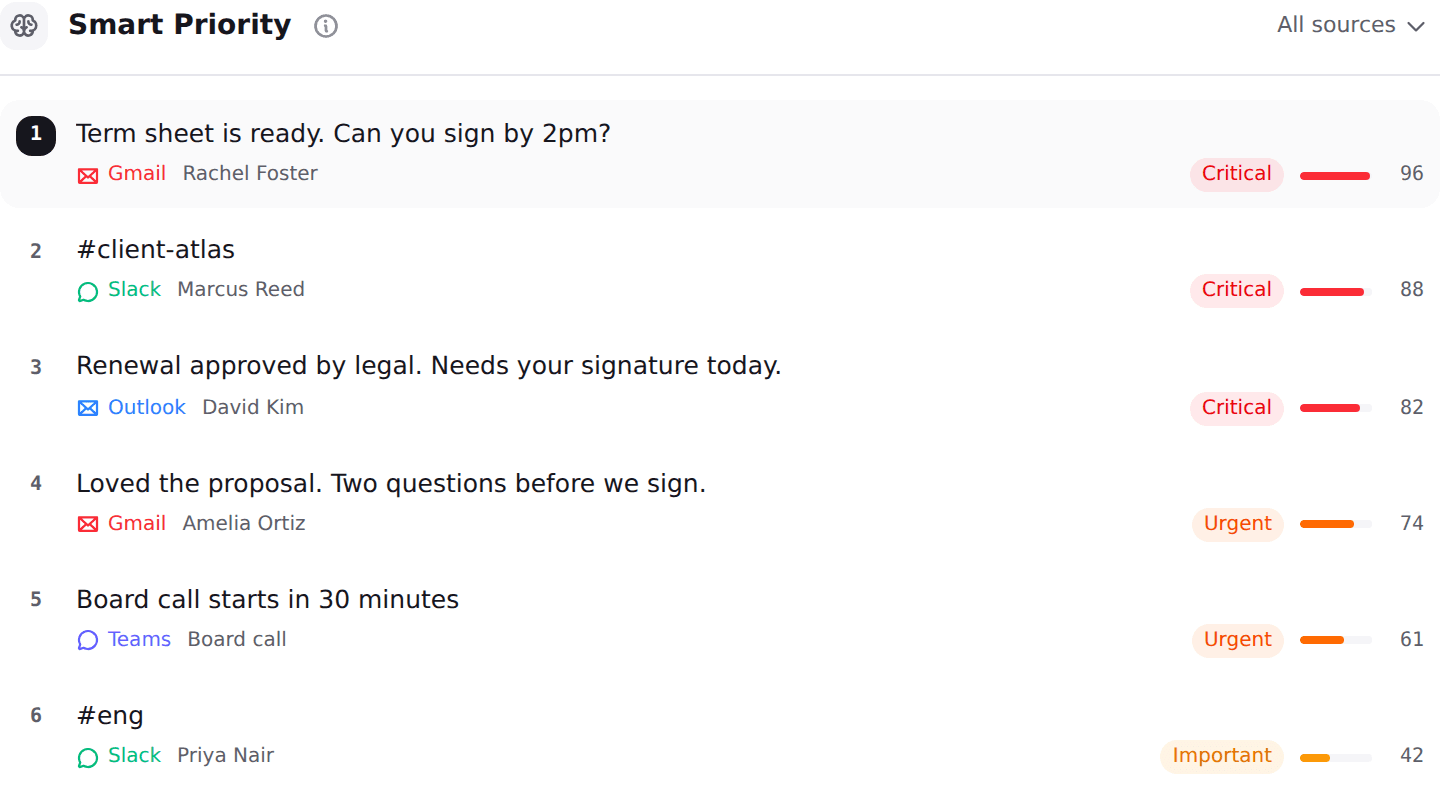
Nolario connects Gmail, Outlook and any IMAP mailbox, and then keeps going into Slack, Microsoft Teams and Google Calendar. Everything lands in one feed, every item is scored for importance so the feed can be ranked with the thing that needs you at the top, and replies are drafted in your own voice from what you actually send. It ranks and it drafts, it never answers or sends on your behalf.
It sits fifth rather than first for one honest reason: you cannot start using it this afternoon. It starts at €29/mo (waitlist), access today is by joining the waitlist, and the product opens to waitlist members between May and August 2027. It is also a desktop web app with no mobile app, and it has no shared queue and no assignment, so a support team should take Missive instead. See the integrations and pricing pages for what is connected today.
Why "supports IMAP" does not mean it can read your mailbox
This is the part that no listicle in this category tells you, and it explains most of the support tickets. IMAP is a protocol, not a permission. Three providers add a rule on top of it, and each one decides whether a tool can sign in at all.
Microsoft 365 and Exchange Online. Microsoft removed the ability to use Basic authentication for IMAP, POP, Exchange ActiveSync, EWS and several other protocols, and its documentation is blunt about how final that is: Basic authentication "is now disabled in all tenants", and "no one (you or Microsoft support) can re-enable Basic authentication in your tenant". Microsoft also notes that this "prevents the use of app passwords with apps that don't support two-step verification". In practice that means a tool advertising IMAP support can only reach a Microsoft 365 mailbox if it implemented OAuth 2.0 for IMAP, which Microsoft has supported since 2020 but which plenty of smaller tools never did. If Outlook is your main mailbox, our guide to AI email assistants for Outlook is the more useful list.
Apple iCloud. Apple requires an app-specific password for third-party apps that want your iCloud mail, contacts and calendars, and generating one requires two-factor authentication on the Apple Account. Apple's own guidance adds that "for supported third-party apps that access your iCloud Mail, Calendar, and Contacts, you can authorize the app using your Apple Account instead of using an app-specific password", which is the smoother path where a vendor has built it.
Proton Mail. Proton is the one people assume will work and it does not, at least not directly. Standard IMAP access runs through Proton Mail Bridge, a desktop application that "runs in the background, encrypting and decrypting messages as they enter and leave your computer" by creating a local mail server on the machine. Proton states plainly that "Proton Mail Bridge is available only with a paid plan that includes Proton Mail". So a Proton mailbox needs a paid Proton plan, a computer that stays on, and a tool that can point at a local server. That rules out every cloud-only assistant here.
The tools that are Gmail only, or Gmail and Outlook only
These are not bad products. They are simply not answers to this search, and every one of them turns up on lists that do not say so.
Shortwave is the clearest case, and to its credit it documents the limit itself: it requires a Gmail or Google Workspace account to sign in, and Microsoft 365 and Exchange are "not supported at this time", with no timeline given. Its own help page tells Yahoo, iCloud, Fastmail and Zoho users to forward mail into a Gmail account with an app password, and warns that Outlook.com and ProtonMail forwarding cannot send from the original address. Forwarding to Gmail works, but it means a second mailbox to maintain and a reply that arrives from the wrong address. Our Shortwave alternatives post covers where its users go.
Fyxer signs you in with Gmail or Outlook, and its pricing page offers no other route in. Starter is $30 per user per month, or $22.50 billed annually, and Professional is $50, or $37.50 annually, with a 7 day trial and no permanent free plan. If you are on one of those two providers it is a strong product, and our Fyxer alternatives comparison goes deeper.
Gemini and Copilot are the assistants most people end up using, and both are features of a subscription rather than tools you can point at a mailbox. Gemini works on Gmail, Copilot works on Microsoft 365, and neither will look at a Fastmail account no matter what you pay. That is the whole reason this page exists.
| Nolario | Missive | SaneBox | Shortwave | |
|---|---|---|---|---|
| Connects any IMAP mailbox | ||||
| Connects iCloud or Fastmail | ||||
| Channels beyond email | ||||
| AI importance scoring | ||||
| Drafts in your voice | ||||
| Shared queue and assignment | ||||
| Starting price | €29/mo (waitlist) | ~$14/user/mo | ~$9.49/mo | ~$30/user/mo |
Which one to pick for your provider
If you are on iCloud, Fastmail, Zoho or a hosted domain and you want the message order fixed, start with SaneBox, because it will connect and it will not ask you to change mail apps. If you want one app on every device instead, Spark and Canary Mail both take those accounts and both have a free tier you can test in ten minutes. If mail is a team activity and some of it arrives at a shared address, Missive is the only tool here that handles that and IMAP at once.
If you are on Proton, accept the Bridge requirement before you shop, or you will spend an evening on credentials that were never going to work. And if your real problem is not which mailbox but how many places you are being interrupted from, a mail-only tool cannot solve it whichever provider it supports, which is the argument our unified inbox apps roundup and our guide to inbox overload across channels both make.
Where Nolario fits
If you need something working on a Fastmail or iCloud account today, take SaneBox or Spark and stop here. Nolario is on a waitlist, it starts at €29/mo (waitlist), and the product opens to waitlist members between May and August 2027, so it cannot solve a problem you have this week.
Where it is the honest answer is the case the whole provider question is a symptom of. If you are hunting for a tool that reads your non-Gmail mailbox because you are already checking Slack and Microsoft Teams separately, then connecting the mailbox only fixes one fifth of it. Nolario pulls Gmail, Outlook, any IMAP mailbox, Slack, Microsoft Teams and Google Calendar into one feed, scores every item so the feed can be ranked by what actually needs you, and drafts the reply in your own voice. It does not archive, resolve or answer anything for you, and it will not give you a shared queue. If your problem is genuinely one mailbox at an unusual provider, the four tools above are better value than waiting for us.
