

Superhuman made email feel fast again, and for a lot of people it was worth every keystroke. But at roughly $30/month for Mail on its own (Mail is included in the Superhuman Business plan at $40 billed monthly), email-only, and centered on a single mailbox, it is not the right fit for everyone, especially founders whose urgent work is scattered across Slack, Teams, calendar and two inboxes.
Below are the 9 best Superhuman alternatives in 2026, free and paid, compared on price, AI features, and whether they go beyond email. We start with our own pick and are upfront about why. Prices are list prices at the time of writing.
One piece of context: Grammarly renamed itself Superhuman in October 2025, so the email app is now Superhuman Mail, sold inside a wider suite. In September 2026 that company also acquired the meeting notetaker Fathom.
How we picked
We weighted four things founders actually feel every day: how many channels a tool covers, whether it has AI that helps you triage (not just write), price, and time-to-value. Speed and keyboard shortcuts matter, but in 2026 the bigger win is not opening the wrong thing first.
The 9 best Superhuman alternatives in 2026
1. Nolario
Our pickOne AI-prioritized feed for every channel, not just a faster inbox.
- Best for
- Founders and operators drowning across email, Slack, Teams and calendar
- Price
- €29/mo (waitlist)
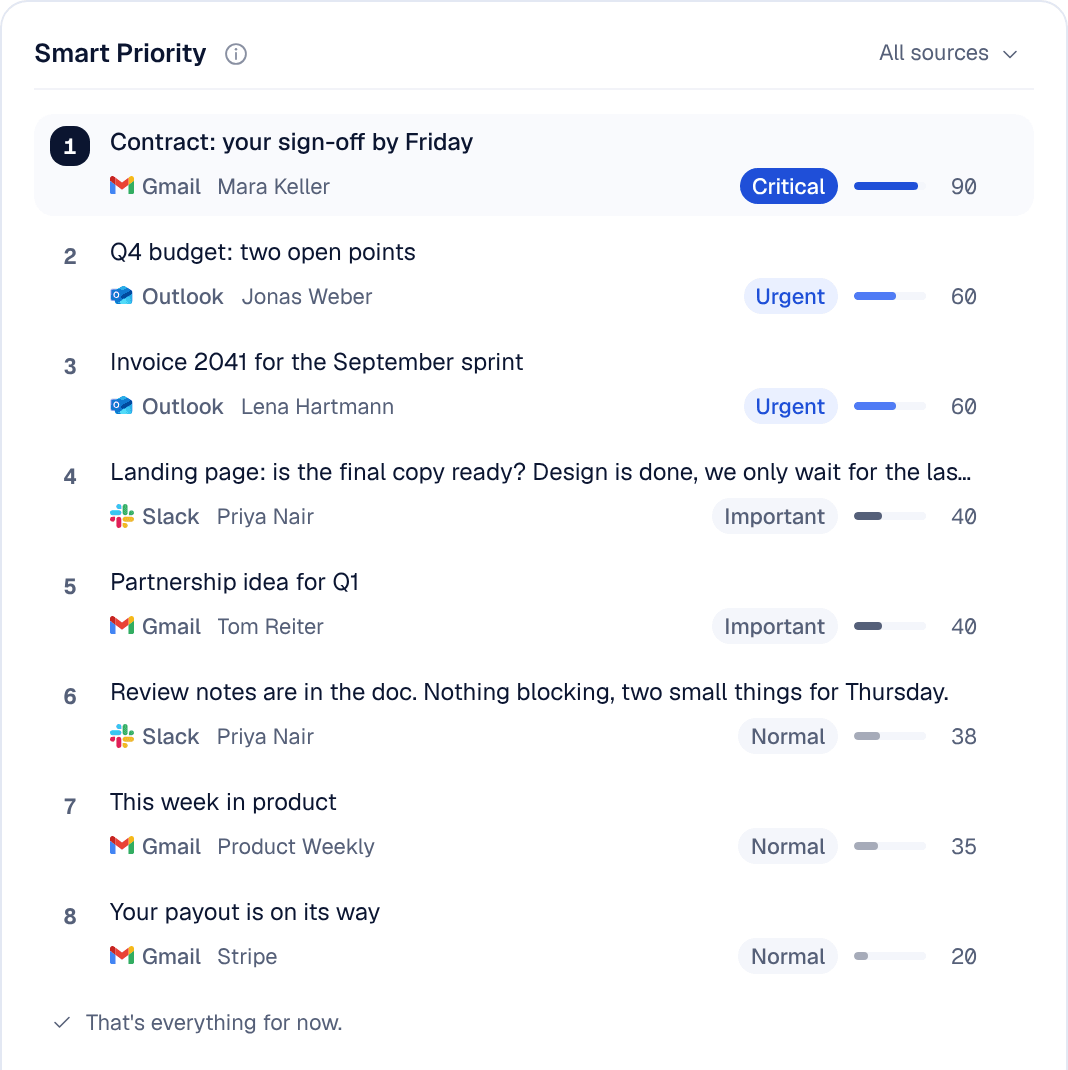
Nolario is our product, so weigh this pick accordingly. Superhuman speeds up the mailbox you already have. Nolario changes the unit of work: instead of one email account, it pulls Gmail, Outlook, Slack, Teams and calendar into a single feed and scores every item for importance with AI, so the term sheet and the at-risk customer float to the top and the noise sinks.
It also drafts replies in your own voice by learning from what you have actually sent, and surfaces decisions and follow-ups so nothing slips between apps. If your real problem is not typing speed but the sheer number of places urgent things hide, this is the most direct fix on the list.
2. Shortwave
AI-native email for Gmail power users.
- Best for
- Gmail-only users who want strong AI summaries and search
- Price
- From ~$30/seat/mo (14-day trial)
Shortwave is the closest thing to an AI-first Superhuman. Excellent summaries, AI search and scheduled send, with paid plans from $30 per seat per month. The catch: it needs a Gmail or Google Workspace account and does not support Microsoft 365 or Exchange, Slack and Teams are out, and it stays firmly inside email.
3. Spark Mail
A smart, free inbox across all your devices.
- Best for
- Individuals who want a good free email app with light AI
- Price
- Free; Plus from ~$8/mo (billed yearly)
Spark's "Smart Inbox" groups and prioritizes email nicely, it supports multiple providers, and the free tier is genuinely usable. AI writing is solid (on the paid plans) but it is still an email client, with no Slack or Teams.
4. Missive
Shared inboxes and chat for small teams.
- Best for
- Teams handling a shared support or sales address together
- Price
- From ~$14/user/mo (annual); 30-day trial
Missive shines when several people work one mailbox: internal comments, assignments, shared drafts. For a single founder it is more collaboration tool than personal command center, and the per-seat pricing adds up.
5. Canary Mail
AI assistant plus security-first email.
- Best for
- Users who want an AI assistant and strong encryption
- Price
- Free tier; Growth from ~$3/mo (billed yearly)
Canary bundles an AI Copilot, smart replies and PGP encryption (on its Pro+ plan) across platforms. A strong all-rounder, though its AI is aimed at composing and cleanup rather than cross-channel triage.
6. Spike
Email that reads like chat.
- Best for
- People who find threaded email exhausting
- Price
- Free tier; Pro from ~$6/mo (billed yearly)
Spike turns email into a conversational, messaging-style view and adds team spaces and notes. Delightful if classic threads stress you out; still email-centric at its core.
7. Front
The customer-communication hub for teams.
- Best for
- Support, success and ops teams with shared queues
- Price
- From ~$25/seat/mo (annual)
Front is a heavyweight for customer-facing teams: shared inboxes, routing, SLAs, analytics. Powerful and pricey, and clearly built for teams rather than an individual founder's personal inbox.
8. Fyxer AI
An assistant that sorts your inbox and pre-writes replies.
- Best for
- People who want drafts waiting for them inside Gmail or Outlook
- Price
- Free plan; Pro from ~$37/user/mo (annual)
Fyxer sits on top of Gmail or Outlook, categorizes the inbox, drafts replies in your tone and takes meeting notes, according to its pricing page. It fills the slot Notion Mail used to hold on lists like this one: Notion shut Notion Mail down on 22 September 2026. Like the rest, it stays inside email.
9. Proton Mail
Privacy-first email for the security-conscious.
- Best for
- Users who value encryption over AI
- Price
- Free tier; paid from ~$4/mo
If you were drawn to Superhuman for polish but care most about privacy, Proton is the principled pick: encrypted, no ad tracking, cross-platform. It is deliberately not an AI triage tool, so pair it with a system for prioritization.
Quick comparison
How the most-searched options stack up on what matters for founders:
| Feature | Nolario | Superhuman | Shortwave | Spark | Missive |
|---|---|---|---|---|---|
| Beyond email (Slack, Teams, calendar) | Yes | No | No | No | No |
| AI importance scoring | Yes | No | No | Partial | No |
| AI drafts in your voice | Yes | Yes | Yes | Yes | No |
| Free option | Waitlist | No | Trial | Yes | Trial |
| Starting price | €29/mo (waitlist) | ~$30/mo | ~$30/seat/mo | ~$8/mo | ~$14/user |
Which should you choose?
If you mostly live in one Gmail account, Spark is excellent and cheaper than Superhuman, and Shortwave is the AI-first pick at a similar price. If a team shares a mailbox, look at Missive or Front. But if your real problem is that urgent things are scattered across email, Slack, Teams and calendar and you keep opening the wrong one first, a faster email client will not fix that. That is exactly what Nolario is built for.
