
The short answer in 2026: the best free AI email assistant for most people is already in their mailbox, because Gmail's Gemini summaries and drafting are free to everyone, and the best free option that also covers Outlook is MailMaestro's permanent three requests a week. Almost everything else marketed as a free AI email assistant is either a time limited trial or a free email client whose AI is the part you pay for. This list ranks the seven that still cost nothing this month, says exactly where each one stops, and names the tools that quietly dropped their free tier during the last year.
How we ranked these free AI email assistants
Ranked by how much real AI work you get for nothing, with no deadline attached. A permanent free plan beats a trial, unlimited beats capped, and a tool you can use today beats one that needs an afternoon of setup. Every price and every free tier below was read from the vendor's own page on 24 September 2026, except where the vendor's pricing page returns no price table to a plain fetch, which is noted in the sources. List prices change, so treat all figures as correct at the time of writing.
The 7 best free AI email assistants in 2026
Gmail with Gemini
The most capable free AI in this category, already in the inbox you use.
Best for
Anyone on Gmail who wants summaries and drafts without installing anything
Price
Free with any Gmail account
On 8 January 2026 Google announced that AI Overviews of long email threads, Help Me Write and suggested replies were rolling out to everyone at no cost. That covers the two jobs most people actually want from an AI email assistant: tell me what this thread says, and write the first version of my reply.
Where it stops is worth knowing before you go shopping. Asking your inbox a question, and Proofread, were kept for Google AI Pro and Ultra subscribers, and none of it reaches Outlook, Slack or Microsoft Teams. It also does not rank anything: Gmail still decides order by arrival and by its own categories, so a long quiet thread and an urgent one sit in the same list with better summaries on both.
Spark
A complete free email client with a quota of AI on top.
Best for
People who want one free app for several mailboxes across their devices
Price
Free plan; Plus from ~$10/mo, Pro ~$20/mo
Spark's free plan is the most generous non AI part of this list: smart inbox, unlimited email accounts, smart notifications and calendar, at no cost. The AI assistant is available on the free plan with a limited quota, and once that quota is gone free users cannot buy a top up, they upgrade.
The catch for a founder shopping this category is scope. Spark is a mail client for Mac, iOS, Windows and Android, so it is the right answer if your problem is four mailboxes in four apps, and the wrong one if your problem is that the message you needed was in Slack.
MailMaestro
The best permanent free plan that covers Outlook as well as Gmail.
Best for
Outlook users who want AI drafting without a licence
Price
Free plan; Professional from ~$15/seat/mo
MailMaestro's free plan is permanent rather than a trial, and gives you three compose, reply or improve requests per week inside Gmail or Outlook, with access to frontier models behind it. There is a separate 14 day trial of the full product, after which you drop back to the free plan rather than losing access.
Three requests a week is a real limit, not a soft one, and summaries, attachment summaries and the priority inbox all sit on the paid tier. Treat it as a free way to get the hardest three emails of your week drafted, which is a fair trade, and read our guide to AI email assistants for Outlook if that is the mailbox you live in.
Inbox Zero
Open source, self-hosted, and free of licence cost below five business users.
Best for
Technical users happy to run their own instance and pay the model bill
Price
Free to self-host; hosted plans are paid
Inbox Zero is an open source AI email assistant for Gmail and Outlook that you can run yourself. Its licence is AGPL v3 with two extra terms worth reading before you deploy it at work: you may not monetise the software itself without written permission, and any organisation with five or more employees, contractors or business users needs an enterprise licence. Personal, educational and research use are exempt.
It ranks fourth rather than first because free here means free of licence cost, not free of effort or of bills. Self-hosting needs Docker and Node, OAuth credentials for Google or Microsoft, and your own model API key, so the AI is billed to you per call. If you want the same job done without the deployment, the hosted version is a paid product.
Canary Mail
A free forever plan where the AI is the part you pay for.
Best for
People who want a free client first and may add AI later
Price
Free tier; Growth from ~$3/mo, Pro+ ~$10/mo
Canary's free plan is genuinely permanent and includes the unified inbox, prioritized tabs, snooze, pin and templates on up to two devices. What it does not include is the AI: the comparison table on Canary's own pricing page puts AI compose and AI reading summaries on the paid Growth and Pro+ tiers, with a seven day trial to test them.
It is on this list because Growth is one of the cheapest routes to AI drafting anywhere in the category, so the free tier works as a long look before a small spend. If you want the AI on day one, this is not the free answer.
Edison Mail
Free with no paid tier at all, and one AI feature.
Best for
Phone first users who want AI drafting at zero cost
Price
Free, no paid tier
Edison Mail describes itself as a free email client and advertises AI Compose, with no subscription tier to upgrade to. In a category where the free plan is usually the narrow end of a funnel, a product with no paid tier is a different proposition, and the price will not change under you next quarter.
The trade is narrow AI and a mobile first footprint: iOS, Android, Windows and Mac, with no desktop web app named on its site. If you work from a browser on a laptop all day, check that before you move your mail.
A general assistant beside your inbox
The free tier you already have, with the mailbox left out.
Best for
Occasional drafting when you do not want another connected app
Price
Free tiers of the major assistants
Pasting a thread into a general assistant and pasting the reply back is free, needs no mailbox connection, and is how a large number of people actually use AI on email. For a hard message once a week it is entirely reasonable, and it is the only option here that gives a model no standing access to your mail at all, which matters if you have read our comparison of what each AI email tool stores.
It ranks last because nothing happens until you ask. There is no triage, no ranking, no draft waiting when you open the laptop, and the copying is work. It is a writing aid, not an assistant.
Free plan or free trial: the distinction that decides this
Most lists of free AI email assistants mix the two, and the difference is the whole purchase. A free plan is a place you can stay. A trial is a countdown with a card on file at the end of it. Here is where each tool in and around this list actually sits, at the time of writing.
| Gmail with Gemini | MailMaestro | Spark | Canary Mail | Shortwave | |
|---|---|---|---|---|---|
| Permanent free plan | |||||
| AI included at no cost | Limited quota | ||||
| Works with Outlook | |||||
| Free trial of the paid tier | 14 days | 7 days | 14 days | ||
| Paid from | Google AI Pro | ~$15/seat/mo | ~$10/mo | ~$3/mo | ~$30/seat/mo |
The AI email tools that no longer have a free tier
This is the reason the question is worth asking again in September 2026 rather than trusting a roundup from January. Free is shrinking in this category, and three of the changes happened in the last few months.
Shortwave used to be the standard recommendation for a free AI inbox. Its pricing page today shows Business at 30 dollars, Premier at 45 and Max at 120 per seat per month, with a 14 day free trial and no free tier at all. Comparison pages published earlier this year still describe the old free plan, so the roundups and the vendor now disagree. Our Shortwave alternatives post covers where its users have been going.
Notion Mail was effectively free for anyone already paying for Notion, and it shut down on 22 September 2026, two days before this article. Notion told TechCrunch in June that it was folding the inbox into its agents because more than half of Notion Mail users were managing email without ever opening the inbox. Users had until 21 September to export drafts, snippets, auto label instructions and reminders; mail itself stayed in Gmail. If that is you, start with our Notion Mail alternatives guide.
Fyxer and Superhuman never offered one. Fyxer's pricing page lists Starter at 30 dollars and Professional at 50 per user per month, with a seven day trial and no permanent free plan. Superhuman's pricing page returns no price table to a plain fetch, so we are relying on third party reporting updated on 2 September 2026, which puts Starter at 30 dollars a month and Business at 40, with a seven day trial and no free tier.
When a free AI email assistant is actually enough
If you have one mailbox, fewer than roughly fifty messages a day, and your problem is that writing replies is slow, a free tool solves it. Gmail's own AI or MailMaestro's three weekly requests will cover the drafting, and you should not pay for anything until they stop being enough.
The free tier stops being enough at a specific point, and it is not the one people expect. It is not drafting quality, it is order. Free tools help you handle the message you are looking at; none of them decide which of ninety messages across four apps you should have looked at first. That is the gap our email triage tools comparison is about, and the one paid tools in this category are really selling. If you are weighing the whole category rather than just the free end of it, our ranking of AI email assistants for founders is the better starting point.
Where Nolario fits
Honestly: not in the ranking above, because Nolario has no free tier. It starts at €29/mo (waitlist), access today is by joining the waitlist rather than signing up, and the product opens to waitlist members between May and August 2027. If your requirement is "free, this afternoon", take Gmail's own AI or MailMaestro and stop reading here.
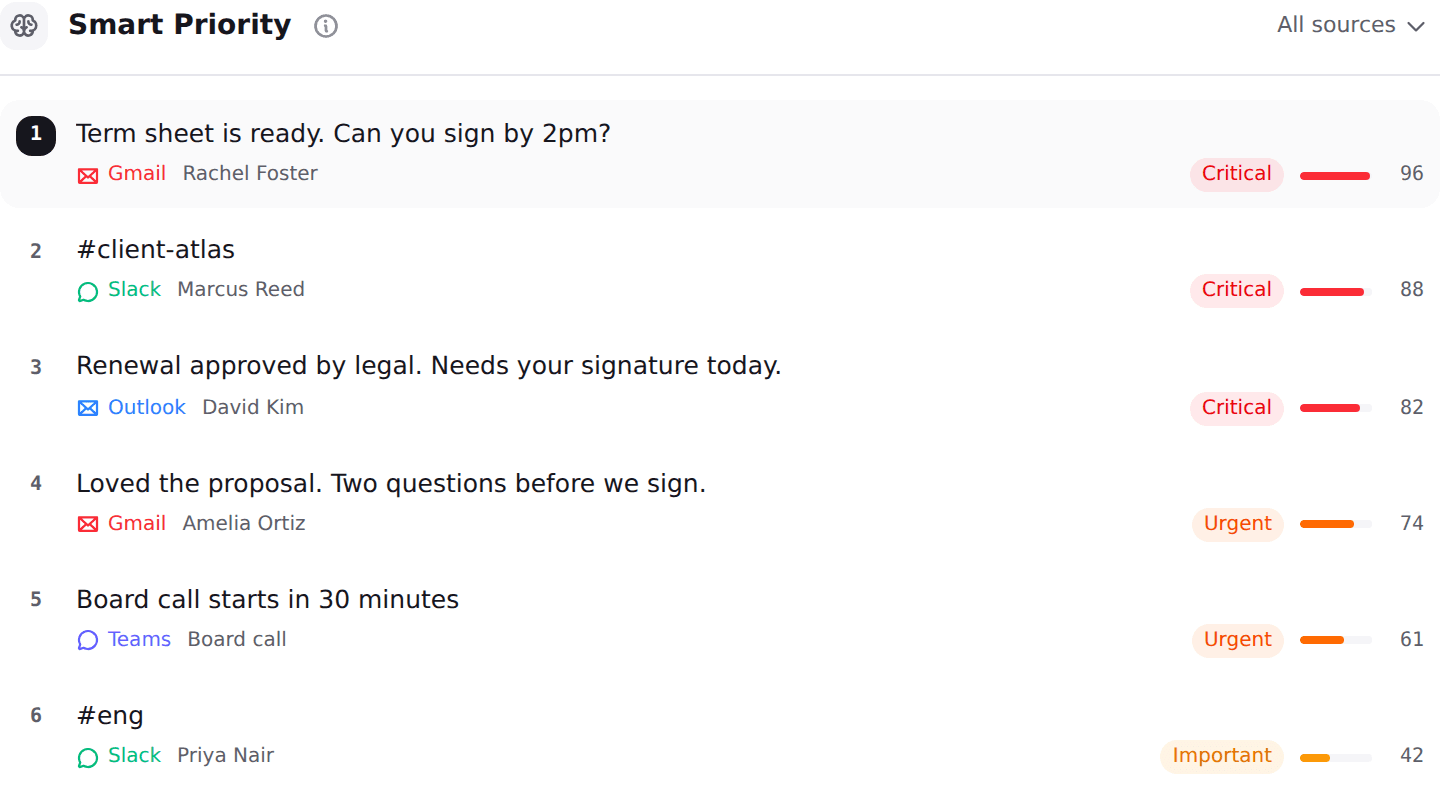
What it does, and what none of the free tools above do, is decide order across channels. Nolario pulls Gmail, Outlook, Slack, Microsoft Teams, Google Calendar and any IMAP mailbox into one feed, scores every item for importance so the thing that needs you is at the top, and drafts replies in your own voice from what you actually send. It ranks and it drafts, it never sends on your behalf, there is no shared queue and no assignment, and it is a desktop web app. See the integrations and pricing pages if that is the problem you have. If it is not, the free options above are a better use of your money than any of them are of your attention.
