
If you read Outlook all day, most of the AI email assistants you have heard about are not options. Shortwave needs a Google account to sign in, and Cora supports Gmail only, so the honest shortlist of AI email assistants for Outlook is much shorter than the generic lists suggest. Below are the seven that genuinely connect to an Outlook or Microsoft 365 mailbox, ranked by what an Outlook user gets out of them this month, starting with the one already inside the app you use.
How we ranked these Outlook AI assistants
The first filter is brutal and it removes most of the field: can you sign in with an Outlook or Microsoft 365 account at all? A tool you cannot connect is not a cheaper option, it is no option. After that we weighted whether the tool decides what matters before you read (triage) as well as helping you write, then list price, then whether you can start using it this month. All prices are vendor list prices checked on September 20, 2026, or, where a pricing page does not return its table to a plain fetch, third party reporting with its date named in the sources below. Prices change, so treat every figure as true at the time of writing.
The reason to ask this question now is Microsoft. The refreshed Copilot experience in Outlook became generally available in September 2026, and Copilot already assigns a priority to incoming mail and explains its reasoning. So the live question for an Outlook user is no longer "is there any AI for my inbox" but "does the native one cover me, and what covers the rest". If you want the wider view first, see the best AI email assistants for founders.
Microsoft 365 Copilot
AI inside the Outlook you already open
Best for
Anyone whose company already pays for Microsoft 365
Price
~$18 per user per month, paid yearly
Prioritize my inbox reviews messages as they arrive and assigns high, normal or low priority based on signals such as who is on the thread, their job titles and the content of the message. High priority mail gets an up arrow, and when you open a message Copilot shows a short summary plus a few lines of reasoning about why it believes the message is important to you. You can teach it in settings with phrases like "it is from" or "mentions", which is the closest thing here to a VIP list, and it runs on Windows, Mac and mobile with the setting syncing everywhere.
Two caveats. It is an add-on licence rather than something your Microsoft 365 plan already includes, so it is a real new line item: Microsoft lists Copilot Business at $18.00 per user per month paid yearly at the time of writing, a promotional rate against a $21.00 list, on an annual subscription that auto renews. And it works inside Microsoft 365, so it is the answer for your Outlook mailbox and not for a second mailbox on Gmail or a conversation sitting in Slack.
Fyxer AI
Drafts in your voice across Gmail, Outlook, Slack and Teams
Best for
Founders who want the reply written for them and live in chat as well as mail
Price
$30 per user per month, $22.50 billed annually
Fyxer connects a Gmail or an Outlook account, sorts the inbox into categories and writes drafts that learn from the mail you actually send. It also connects Slack and Microsoft Teams, where you can ask about your inbox and meetings and get drafts ready to send without leaving the chat window, which is unusual in this category and the main reason it sits second here.
Professional is $50 per user per month, or $37.50 billed annually, and adds a HubSpot integration and the ability to upload files to train it. The trial is seven days. Per seat pricing is the thing to watch: a founder, a co founder and an assistant on Professional is $150 a month at list. We compared it against the rest of the field in the best Fyxer alternatives.
Superhuman Mail
The fastest keyboard driven inbox, with AI on top
Best for
High volume senders who value speed over triage
Price
$30 per month, $25 billed annually
Superhuman describes Mail as built for teams that use Gmail or Outlook, so an Outlook user is a first class citizen rather than an afterthought. What you are buying is speed: keyboard shortcuts for everything, split inboxes, and AI that drafts and summarizes inside that flow. If your complaint is that answering mail is slow rather than that you cannot tell what to answer, this is the strongest entry on the list.
Packaging changed after Grammarly acquired Superhuman and the group took the Superhuman name. The cheapest route to the mail client is Mail Starter at $30 per month, or $25 per month billed annually, with Business at $40 or $33 annually, according to third party reporting from April 2026, because Superhuman's own pricing table does not return to a plain fetch. See also the best Superhuman alternatives.
SaneBox
Noise filtering that works with almost any mailbox, Exchange included
Best for
Outlook users whose problem is volume, not writing
Price
$9.49 per month, or $65 per year
SaneBox is the most compatible tool here by a distance. It states that it works with every major email service, naming Gmail, Microsoft 365, Apple iCloud, Yahoo Mail and Fastmail, plus any IMAP, Microsoft Exchange or ActiveSync server, which covers the older Exchange mailboxes that defeat most AI email apps. It moves unimportant mail out of the way into a SaneLater folder and leaves what it judges important where you will see it.
It writes nothing, and that is the point. Lunch is $15.99 per month or $109 per year and Dinner is $42.99 per month or $319 per year, the free trial runs seven days, and nonprofits and schools get 25 percent off. For filtering alone nothing here is cheaper. We cover the field around it in the best SaneBox alternatives.
Nolario
One ranked feed for Outlook, Gmail, Slack, Teams and calendar
Best for
Founders whose urgent message is as likely to be in Teams as in Outlook
Price
€29/mo (waitlist)
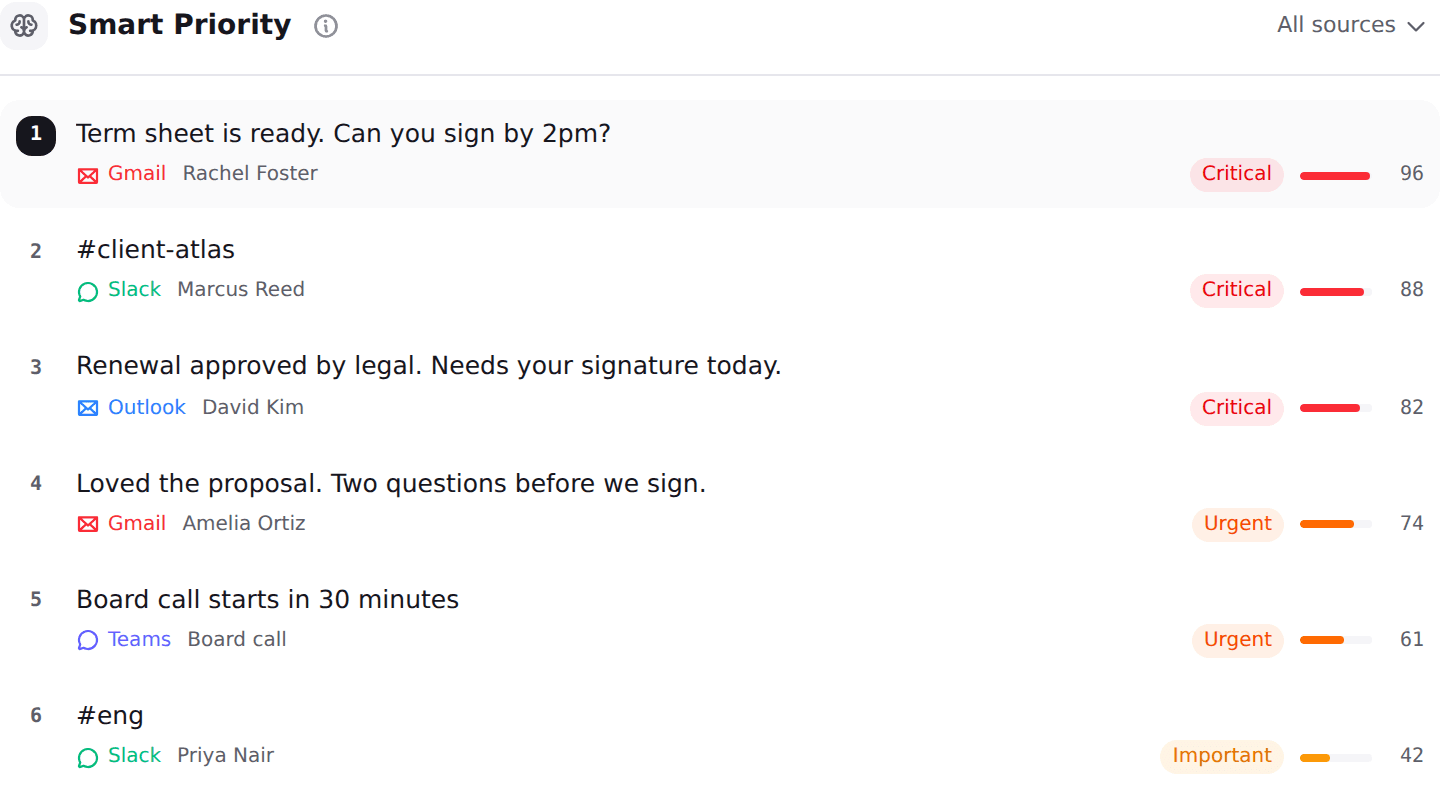
Nolario pulls Outlook, Gmail, Slack, Microsoft Teams, Google Calendar and any IMAP mailbox into one feed, scores every item for importance from 0 to 100, ranks the feed so the important thing is at the top, and drafts replies in your own voice learned from the mail you already send. Message content is scrubbed of personal data before anything reaches an AI provider. It scores, ranks and drafts. It never answers for you.
It is fifth for one honest reason: access is by waitlist, so you cannot install it this month, which is exactly what someone searching for an Outlook assistant usually wants to do. It is also a desktop web app with no mobile app, and it has no shared queue and no assignment, so a support team answering one address together should look at shared inbox software instead. The integrations and pricing pages have the full picture.
Mailbutler
A cheap AI add-in that never leaves Outlook
Best for
Solo users who want drafting help without changing email client
Price
$9 per user per month, $7 billed annually
Mailbutler says it functions across the three most popular email clients, Apple Mail, Gmail and Outlook, and its Smart Assistant composes messages, drafts replies, summarizes threads and pulls tasks out of mail. Because it is an add-in, nothing about your Outlook changes and there is no migration to plan, which makes it the lowest friction entry on this list.
Smart is $14 per user per month or $11 annually and Business is $32 or $24, with a free Starter tier that covers tracking and signatures rather than AI, and a 14 day trial of everything. What it does not do is decide what deserves you first, so it pairs with a filter rather than replacing one.
Missive
Team email with Outlook, IMAP and chat channels in one client
Best for
Small teams who answer one shared address together
Price
$14 per user per month
Missive supports Gmail and Google Workspace, Outlook and IMAP, and adds SMS, WhatsApp, Messenger and Instagram, with internal comments on a thread instead of forwarding it around. Productive is $24 per user per month and Business is $36, with 20 percent off when billed yearly.
It is last not because it is weak but because it is a different shape: a shared inbox for a team rather than an assistant for one person's attention. If two people answer the same address, it climbs several places. If you are one founder with five channels, it does not.
Two popular AI email tools that will not work with Outlook
This is the part the generic listicles skip, and it is the reason this page exists. Shortwave requires a Gmail or Google Workspace account to sign in. Its own documentation lists Microsoft 365 and Exchange as not supported at this time, and treats Outlook.com as forwarding only, meaning mail can arrive but you cannot send from that address. It is an excellent Gmail client at $30 to $120 per seat per month with a 14 day trial and no free plan, and it is simply not available to you. Our Shortwave alternatives page covers the swap in detail.
Cora is the other one people recommend without checking. Its FAQ is explicit that it currently works with Gmail and Google Workspace and that Outlook and other providers are not supported yet, at $20 per month for two accounts or $39 for unlimited. One honest correction in the opposite direction: Inbox Zero describes itself as an open source AI email assistant for Gmail and Outlook, so unlike the two above it belongs on an Outlook shortlist if you are willing to run or self host a younger tool. For the triage side of the question, see the best email triage tools.
Outlook AI assistant prices and coverage in 2026
| Nolario | M365 Copilot | Fyxer AI | SaneBox | |
|---|---|---|---|---|
| Works with Outlook and Microsoft 365 | ||||
| Connects Slack and Microsoft Teams too | ||||
| Drafts replies for you | ||||
| Explains why a message is important | ||||
| You can start today | ||||
| Starting price | €29/mo (waitlist) | ~$18/user/mo yearly | $30/user/mo | $9.49/mo |
Which one should a founder on Microsoft 365 pick
If your company already pays for Microsoft 365 and your work really does live in Outlook and Teams, buy the Copilot add-on and stop reading. It is the cheapest incremental step, there is nothing to migrate, and the priority flags plus the short explanation of each one solve the first half of the problem, which is knowing what to open.
If your inbox is fine but answering is slow, Superhuman Mail is the better spend. If the volume is the problem and you do not want AI writing anything, SaneBox at under ten dollars a month is the most honest purchase on this page. And if you keep finding that the message that mattered was in Slack while you were tidying Outlook, the category you want is not an email assistant at all: it is one ranked feed over every channel, which is what a unified inbox means and why context switching is the cost worth measuring.
Where Nolario fits
Nolario is not the answer to "make Outlook better". If Outlook is the only place your work arrives, Microsoft 365 Copilot is closer to the problem and cheaper to add, and we will keep saying so. Nolario is the answer to a different sentence: the thing that mattered was in Teams, or Slack, or the second mailbox, and you found it late because no single screen ranked all of them together.
That is what it does. Outlook, Gmail, Slack, Microsoft Teams, Google Calendar and any IMAP mailbox in one feed, every item scored from 0 to 100, the feed ranked so the important thing is at the top, and a draft waiting in your own voice when you open it. It does not archive, resolve or reply on your behalf, there is no shared queue and no assignment, it runs on the desktop web with no mobile app, and access today is by waitlist from €29/mo. Join it if that second sentence is the one you recognise, and buy Copilot if it is not.
