

Outlook now has a unified inbox: the All Accounts view in the new Outlook for Windows shows mail from several accounts in one list, without merging the mailboxes. It covers email accounts only. Search still finds messages in the primary account only, shared mailboxes are not included yet, and nothing in the published descriptions mentions Slack or Teams. This guide is for founders and managing directors who live in Outlook and want to know what the new view fixes and what it leaves open.
What the Outlook unified inbox does
Microsoft's roadmap entry describes a view that shows email from multiple accounts in one inbox, with each account's mailbox kept separate. From that list you can read, delete, move, archive and mark messages across accounts without switching mailboxes. It works with Copilot for AI assisted email workflows. Cross-account search and shared mailbox support are listed as planned for later releases.
Topedia's write-up of 5 September 2026 adds the practical details: the view is enabled by default, and you turn it off under Outlook Settings, Mail, Folder pane by disabling the option to show all accounts. It also says the unified inbox is not available in Outlook on the web.
What we found when we checked the sources
When we read Microsoft's roadmap entry (ID 564609) on 11 October 2026, it still showed the status In development, with general availability targeted for August 2026 and a last modified date of 27 May 2026. Since then an independent write-up from 5 September describes the feature as already on by default. The roadmap page also lists the platform as Web while its own description refers to the new Outlook for Windows, and Topedia says the web version does not have it. The practical reading: treat the feature as live in the new Outlook for Windows, check your own build, and do not count on it in the browser.
What the Outlook unified inbox does not cover
Three limits come straight from the sources. Search covers the primary account only. Shared mailboxes are not in the list yet. And the view is about mail: the descriptions we read mention email accounts and Copilot workflows, not chat. For a founder whose client writes in Slack on Tuesday and Outlook on Wednesday, one list of mail accounts is progress, but the second channel is still a separate place.
There is also a question the descriptions do not answer: whether the combined list ranks anything. Neither page we read describes ordering by importance across accounts, so assume the order is the order of arrival and decide for yourself what to open first. The routine in how to check Gmail, Slack and Teams without missing a client works the same way in Outlook.
Who should simply use it
If your urgent work arrives in two or three mail accounts and nowhere else, turn the view on and stop looking for another tool. That is the honest answer, and what a unified inbox is explains why a mail only list is the simplest version of the idea. If your Outlook accounts are Microsoft 365 and you want AI help inside Outlook, the options are compared in the best AI email assistants for Outlook.
Where Nolario fits
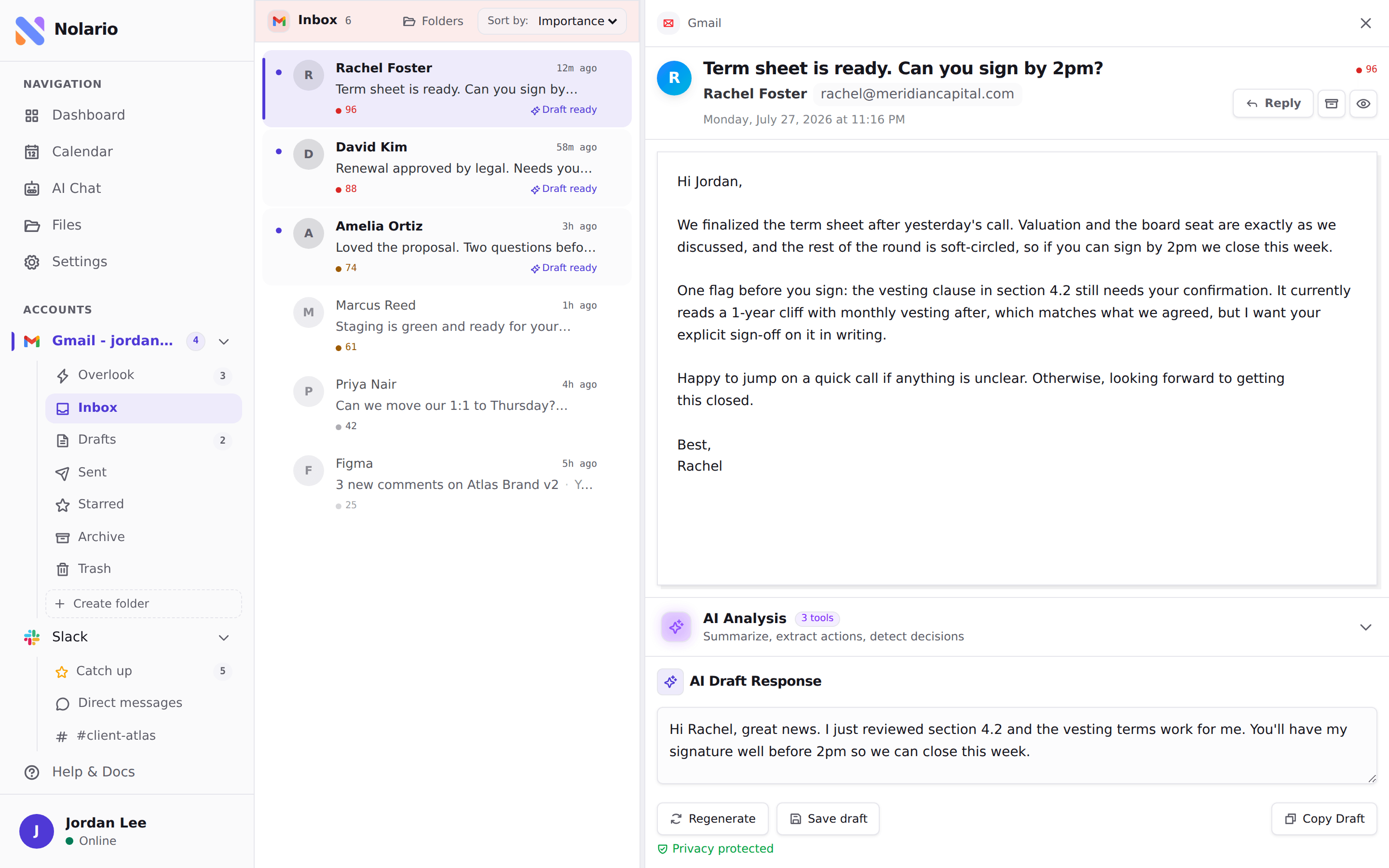
Nolario starts where the Outlook view stops. It pulls Gmail, Outlook, Slack, Microsoft Teams, Google Calendar and any IMAP mailbox into one feed, scores every item for importance and ranks the feed, so the message that needs you is at the top whichever channel it came from. It drafts replies in your voice and never sends one for you. Message content is scrubbed of personal data on our side before a model sees it.
It has limits too. Teams chats only work for work and school accounts, because Microsoft Graph does not expose chats for personal Microsoft accounts. It is a desktop web app, it has no shared queue, and access is by waitlist. If mail is your only channel, Outlook's own view is enough. See the integrations and pricing pages, or the best unified inbox apps for the wider field.
