

Motion packs an AI calendar, task manager and project tool into one app, and for planning-heavy people it clicks. But it is pricey, has a real learning curve, and, for many founders, solves the wrong problem: the day is not derailed by unplanned tasks so much as by unmanaged messages. Here are the 10 best Motion alternatives in 2026, grouped by what you actually need, with our pick first: Nolario, our own product, for founders whose day is eaten by messages rather than tasks. Prices are list prices at the time of writing; Motion itself lists Pro AI at $19 per seat per month.
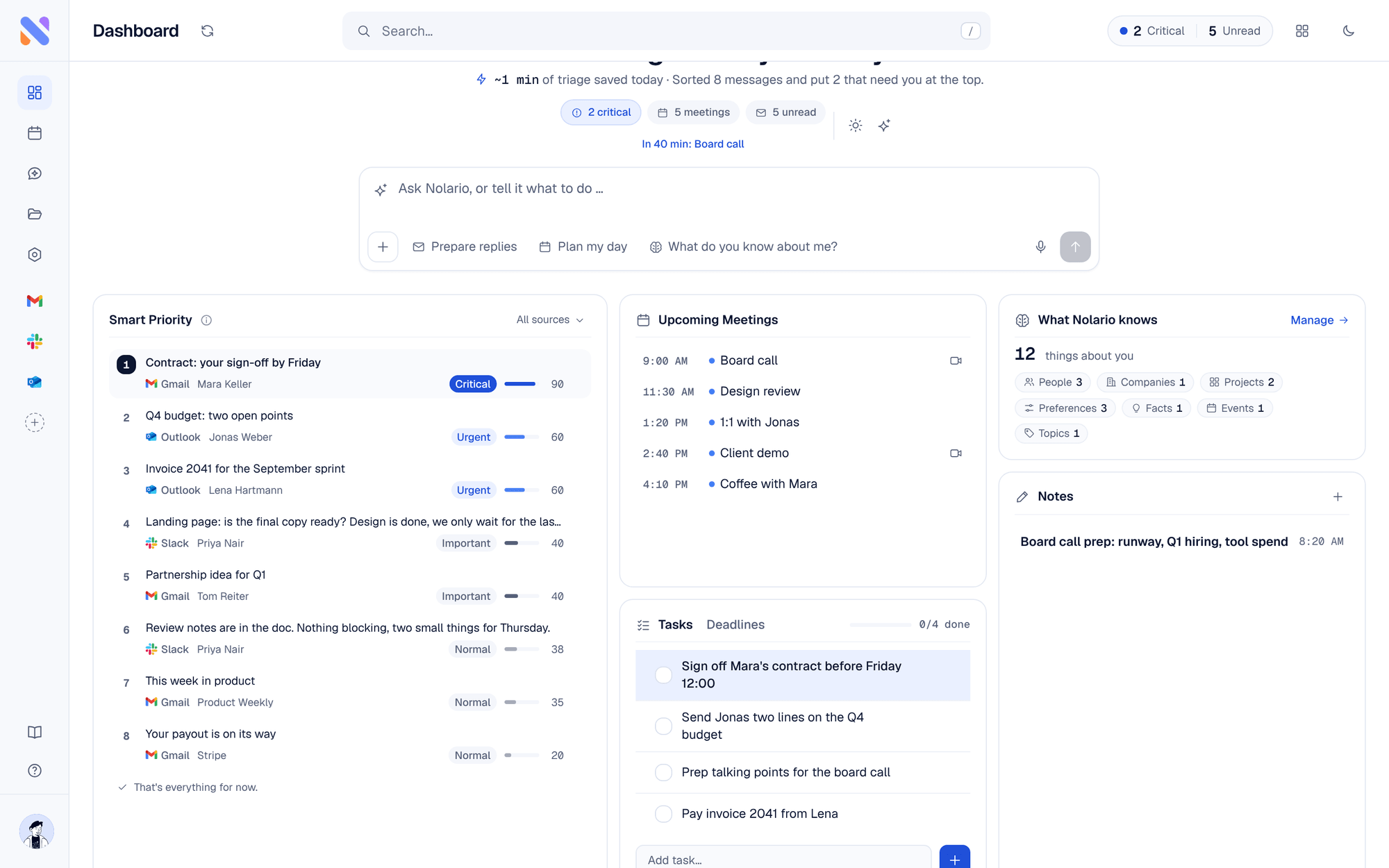
Our pick: if messages, not tasks, wreck your day
1. Nolario
Our pickOne AI-prioritized feed for every channel.
- Best for
- Founders whose day is eaten by email, Slack and Teams, not tasks
- Price
- €29/mo (waitlist)
If you tried Motion hoping to feel on top of things but the chaos is really incoming messages, this is the fix. Nolario unifies Gmail, Outlook, Slack, Teams and calendar, scores each item for importance, and drafts replies in your voice, so you handle the few things that matter and let the rest wait. A planner organizes your tasks; Nolario organizes what is coming at you.
Nolario is our product, so weigh this pick accordingly. We rank it first because the most common reason founders give up on a planner is that the day is derailed by messages, and Nolario is the only tool on this list that ranks email, Slack and Teams together. The honest limits: access is by waitlist, it does not auto-schedule your tasks the way Motion does, and it never sends anything for you. If you want a planner, start with Reclaim.ai below.
If you want an AI planner (direct Motion swaps)
2. Reclaim.ai
Smart calendar that defends time for tasks and habits.
- Best for
- Google Calendar users who want auto-scheduling without the price
- Price
- Free tier; paid from ~$10/mo (billed yearly)
Reclaim auto-blocks time for tasks, habits and meetings and reshuffles as your day changes. A strong Motion alternative for pure scheduling, with a free-forever Lite plan and support for Google and Outlook calendars.
3. Akiflow
A command bar that consolidates tasks and calendar.
- Best for
- Power users who want fast capture and time-blocking
- Price
- From ~$19/mo (billed yearly), 7-day trial
Akiflow pulls tasks from many tools into one place and makes time-blocking quick with keyboard-first flows. Less automated than Motion, more in your control.
4. Sunsama
A calm daily planner with a shutdown ritual.
- Best for
- People who want intentional daily planning, not automation
- Price
- From ~$17/mo (billed yearly), 14-day trial
Sunsama has you plan each day deliberately and pulls in tasks from other apps. The anti-Motion: manual and calming rather than automated and dense.
5. Todoist
The dependable task manager, now with AI.
- Best for
- Anyone wanting a simple, cross-platform to-do system
- Price
- Free tier; paid Pro plan
If Motion felt like overkill, Todoist is the reliable, affordable core: fast capture, natural-language due dates, calendar sync. Planning stays in your hands.
6. TickTick
Tasks, calendar and habits in one tidy app.
- Best for
- Budget-conscious users who want tasks plus a calendar view
- Price
- Free tier; Premium ~$50/yr
TickTick blends to-dos, a calendar, habits and a Pomodoro timer affordably. A great-value generalist for people who do not need AI auto-scheduling.
If your real problem is communication overload
7. Superhuman
The fastest way through a single mailbox.
- Best for
- Email-heavy users who want speed
- Price
- ~$30/mo
If most of your inbound is email, Superhuman's speed and AI writing will do more for your day than a scheduler. Email-only, but excellent.
8. Sunsama + Slack/Email
Plan the day around your messages.
- Best for
- Planners who still triage channels separately
- Price
- From ~$17/mo (billed yearly)
A common workaround is to plan in Sunsama while triaging channels by hand. It works, but the triage, the hard part, still happens app by app.
If you want an all-in-one workspace
9. Notion (with Calendar)
Docs, databases and a calendar in one workspace.
- Best for
- Teams who want planning inside their knowledge base
- Price
- Free tier; paid from ~$10/user/mo
Notion plus Notion Calendar covers tasks, docs and scheduling in one place. Flexible, but it does not triage your incoming communication.
10. ClickUp
An everything-app for tasks, docs and goals.
- Best for
- Teams wanting one tool for projects and planning
- Price
- Free tier; paid from under $10/user/mo (billed yearly)
ClickUp bundles tasks, docs, goals and a calendar with AI features. Powerful and configurable for teams; heavier than a personal planner and not a communication hub.
Quick comparison
| Feature | Nolario | Motion | Reclaim | Sunsama | Todoist |
|---|---|---|---|---|---|
| AI calendar scheduling | Reads calendar | Yes | Yes | Manual | No |
| Unifies email/Slack/Teams | Yes | No | No | No | No |
| AI importance triage | Yes | No | No | No | No |
| Free option | Waitlist | Trial | Yes | Trial | Yes |
| Starting price | €29/mo (waitlist) | ~$19/seat/mo | ~$10/mo | ~$17/mo | Free |
The bottom line
Our pick is Nolario, for the founder whose day is wrecked by messages rather than tasks, with access by waitlist. For pure AI scheduling, Reclaim and Akiflow are the cleanest Motion swaps. For intentional planning, Sunsama. But be honest about the problem: if your days are wrecked by messages, not by a messy task list, no planner fixes that. That is the gap Nolario is built to close.
