
If you are shopping for an AI chief of staff in 2026, the honest answer is that no single tool does the whole job yet, and the ones that come closest split into two halves: tools that watch your messages and tell you what needs you, and tools that defend your calendar. Of the seven below, Fyxer AI reaches the most channels you can actually buy today, Cora is the cheapest tool that behaves like a chief of staff rather than a chatbot, and Motion owns the calendar half. This page is for founders and executives who have already tried asking a chatbot to sort their inbox and want to know what is genuinely different.
What an AI chief of staff actually does
The phrase is doing sales work. Cora's own site calls the product "the $150,000 chief of staff that only costs $20 per month", which tells you exactly what the term is for: a human chief of staff decides what reaches the principal, and software that only summarizes threads after you open them is not doing that. So when you compare these tools, the useful question is not what the page promises but what happens while you are not looking.
There is a reason the category got loud this year. Notion shut down Notion Mail on September 22, 2026, and the reason it gave was not low usage: it said more than half of Notion Mail users were managing their email without ever opening the inbox. Whatever you think of that decision, it is a vendor reporting that the inbox has stopped being the place people work, which is the same bet every tool on this list is making. If you came here from that shutdown, the Notion Mail alternatives page covers the migration itself.
What none of these tools do is decide. Every one of the seven drafts, ranks, schedules or summarizes, and then waits for a person. That is the right design at this stage, and it is worth checking against any vendor that claims otherwise.
How we ranked these AI chief of staff tools
Four criteria, in this order. First, does it act on new work without being prompted, or does it sit still until you ask it something? Second, how many of your channels can it see, taken from the integrations each vendor names on its own site. Third, can you start using it this month. Fourth, what one person pays. Every price below is a list price at the time of writing, read from the vendor's own pricing page on September 27, 2026.
Availability is a real criterion and it costs two products the top of the list. Nolario sits third and Bond fourth because both are waitlist only, and a tool you cannot install is not a chief of staff yet, however well it is designed.
Fyxer AI
The widest channel coverage you can buy this month
Best for
Founders who want one assistant across Gmail, Outlook, Slack and Teams today
Price
From $30/user/mo, or $22.50 billed annually
Fyxer works in the background rather than waiting for a prompt: it sorts arriving mail into categories, drafts replies in your tone, and sends a notetaker into your video meetings. Its site names Gmail, Outlook, Google Calendar, Outlook Calendar, Slack, Teams, Google Meet and Zoom, which is the broadest named list of any tool here that you can sign up for today.
Starter is $30 per user per month, or $22.50 billed annually, and covers one inbox and one calendar. Multiple inboxes, cross team scheduling and the HubSpot integration are on Professional at $50, or $37.50 annually. There is a seven day free trial and no free plan. Drafting is genuinely a draft: the site says Fyxer sums up your calls and drafts the follow-ups, and you review and hit send. If it is your main candidate, our Fyxer alternatives page lists what else sits in that price band.
Cora
The most literal chief of staff, for one Gmail account
Best for
A Gmail-only founder who wants two briefs a day instead of a busy inbox
Price
$20/mo Professional, $39/mo Unlimited
Cora is the only tool here whose product shape matches the job title. It screens arriving mail, keeps the messages you need to answer in the inbox, drafts responses in your voice when it has enough history to do so, and twice a day sends a brief summarizing everything you should read but do not need to answer. That last part is the chief of staff behaviour: the reading happens on a schedule you set, not every time your phone buzzes.
Professional is $20 a month, billed annually at $240, and Unlimited is $39 a month at $470 annually. The hard limit is the mailbox: Cora states that it currently works with Gmail and Google Workspace, and that Outlook and other providers are not supported yet. It also states plainly that it will never send email for you, that it does not have the permission to send or delete, and that it does not train on your data, which is a better privacy posture than most of this category publishes.
Nolario
One ranked feed for every channel, with replies drafted in your voice
Best for
Founders whose urgent messages hide across Gmail, Outlook, Slack, Teams and IMAP
Price
€29/mo (waitlist)
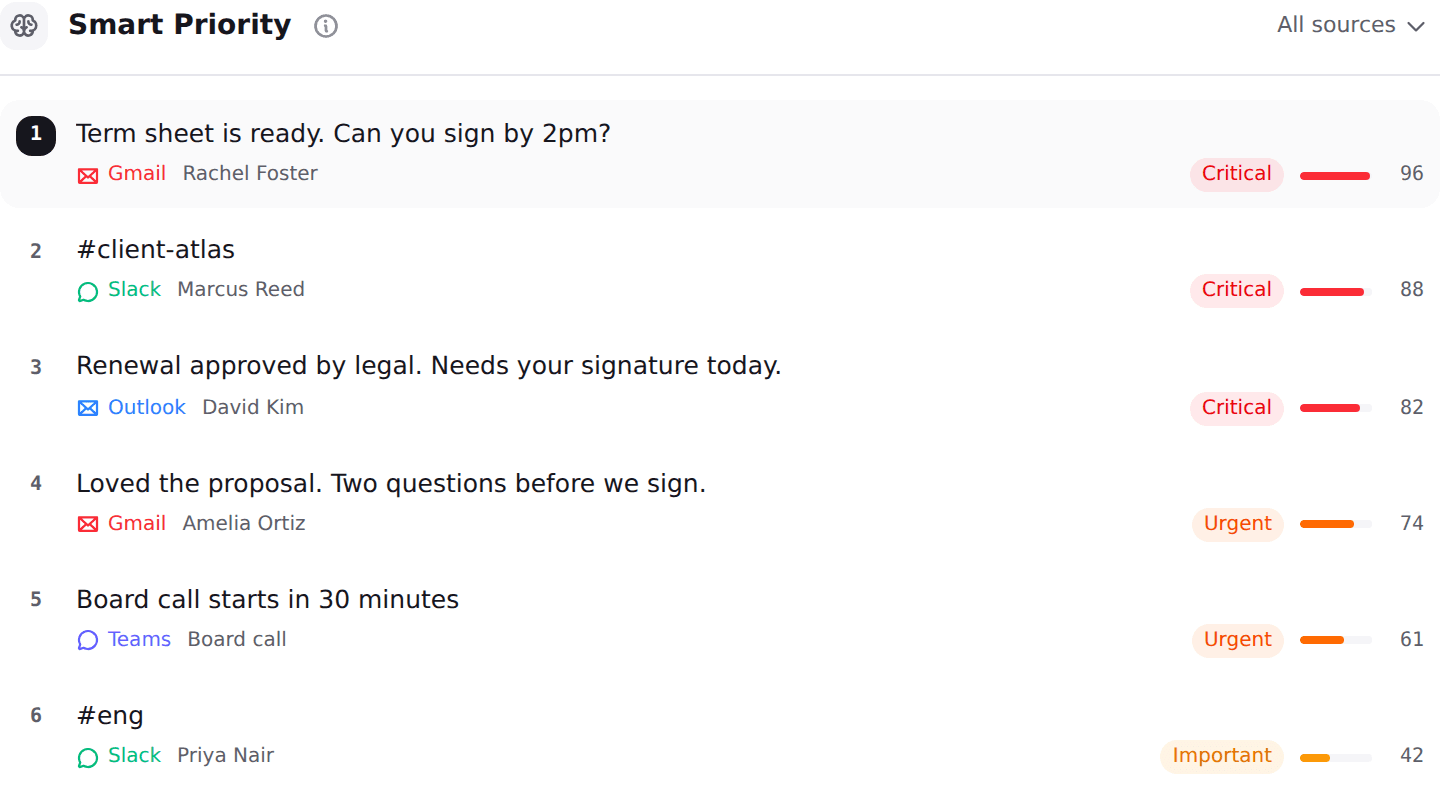
Nolario pulls Gmail, Outlook, Slack, Microsoft Teams, Google Calendar and any IMAP mailbox into one feed, scores every item for importance on a 0 to 100 scale, ranks the feed so the important thing is at the top, and drafts replies in your own voice learned from what you actually send. Two things separate it from the two tools above: the score is a number you can sort and argue with rather than a folder label, and IMAP means a mailbox that is neither Google nor Microsoft is still covered.
What it does not do is the reason it is not first. Access is by waitlist, so you cannot start this month. It is a desktop web app with no mobile app. It has no shared queue, no assignment and no SLAs, so a support team should look at shared inbox software instead. And it never sends on your behalf: it ranks and drafts, you decide. See the integrations and pricing pages for the current state.
Bond
The most ambitious version of the job, still in early access
Best for
Executives whose commitments are scattered across chat, docs and project tools
Price
Not published, early access waitlist
Bond is the tool on this list that aims at the whole role rather than one half of it. Its site describes an AI chief of staff that reads Gmail and Outlook, Slack, Google Calendar, Notion and a long list of project and CRM tools including Linear, HubSpot, Asana, Jira, ClickUp, Monday.com and Trello, then prioritizes what matters, tracks follow-ups you are waiting on, prepares meeting briefs and sends a morning summary.
It ranks fourth for one reason: you cannot buy it. The individual plan is listed as a free trial that is coming soon, access runs through an early access waitlist, and no per seat price is published, so there is nothing to compare on cost. Worth joining if the project tool coverage is the part of your week that leaks, since none of the other six read Jira or Linear at all.
Motion
The calendar half of the job, done properly
Best for
Anyone whose problem is a broken schedule rather than a full inbox
Price
From $19/seat/mo billed annually
Motion is the strongest tool here at the part of the chief of staff job that involves time rather than messages. It plans tasks into real calendar slots, reshuffles them when a meeting lands, and carries projects, docs and an AI task planner alongside. Pro AI is $19 per seat per month billed annually with 7,500 credits a month, and Business AI is $29 per seat with 15,000 credits and team capacity planning.
It is fifth because it does not do triage. Motion will not tell you which of this morning's forty messages needs you, and its pricing page does not itemize which email or chat tools it reads. If you are weighing it against the message-first tools, the Motion alternatives page compares them directly.
Reclaim.ai
Calendar defense, and the only free plan on this list
Best for
Someone who wants their focus time protected without paying anything
Price
Free Lite plan, paid seats from $10/seat/mo
Reclaim is the narrowest tool here and also the easiest to justify, because Lite is free forever. It optimizes your calendar, schedules tasks and habits around your meetings, and syncs your Slack status and do not disturb state so your calendar and your chat agree about whether you are interruptible. Paid seats start at $10 per seat per month at the time of writing, with Business and Enterprise tiers above that.
Read the Slack integration carefully before counting it as channel coverage: it syncs your status and manages your schedule from Slack, which is not the same as reading your messages and deciding what matters. Treat Reclaim as a calendar tool that is polite to Slack, not as an assistant that watches your channels.
Lindy
Build the follow-through yourself, if you have the patience
Best for
Operators who want a custom workflow rather than an opinionated assistant
Price
From $29.99/user/mo, 3,000 credits
Lindy is an agent builder that appears on every AI chief of staff list, and it is last here for a consistent reason: out of the box it does nothing unprompted. You describe the workflow, it runs it, and it is billed in credits, which it defines as a measure of the work done. Plus is $29.99 per user per month with 3,000 credits, Pro is $99.99 with 15,000 and Max is $199.99 with 35,000. Everyday requests cost roughly 2 to 250 credits and a complex build runs into the thousands.
That is a real option if your triage rules are unusual and you enjoy building. It is a poor first purchase if what you wanted was something that already knows what a founder's day looks like, and the credit model means a busy month can cost considerably more than the headline figure.
Which one for a founder, an executive or an assistant
A solo founder on Gmail should start with Cora, because $20 buys the exact behaviour the category is named for and nothing needs configuring. A founder split across Gmail or Outlook plus Slack and Teams should start with Fyxer, because it is the only tool you can buy this month that names all of them. An executive whose real problem is that commitments are lost in project tools should join Bond's early access. Anyone whose week is wrecked by the calendar rather than the inbox should stop reading lists like this one and buy Motion or use Reclaim's free tier.
If you support someone else's inbox rather than your own, the shape of the work is different enough that a general list will mislead you: our guide on triaging three inboxes with AI covers it, and the wider field is in the best AI email assistants for founders. If you are still deciding whether the problem is worth software at all, the real cost of context switching has the numbers.
| Nolario | Fyxer AI | Cora | Bond | |
|---|---|---|---|---|
| Reads Gmail | ||||
| Reads Outlook | ||||
| Reads Slack | ||||
| Reads Microsoft Teams | ||||
| Reads any IMAP mailbox | ||||
| Numeric importance score you can sort by | ||||
| Drafts replies in your voice | ||||
| Available without a waitlist | ||||
| Starting price | €29/mo (waitlist) | ~$30/user/mo | ~$20/mo | Not published |
Channel rows follow the integrations each vendor names on its own site at the time of writing, so an empty cell means the vendor does not name it rather than that it is impossible.
Where Nolario fits
Nolario is the coordination half of the chief of staff job and it is deliberately not the rest. It reads Gmail, Outlook, Slack, Microsoft Teams, Google Calendar and any IMAP mailbox, scores each item, ranks the feed, and drafts a reply in your voice. It does not manage your calendar the way Motion does, it does not read Jira or Linear the way Bond intends to, it does not run custom agents like Lindy, and it never sends anything on your behalf. Message content is scrubbed of personal data before it reaches an AI provider.
So the honest recommendation for this month is not Nolario. If you need something working tomorrow, buy Fyxer for breadth or Cora for the cleanest version of the idea. Nolario starts at €29/mo when access opens, and it is worth the waitlist if your problem is specifically that the message that mattered was in Teams while you were reading Gmail, and if you want a number behind the ranking rather than a folder someone else chose for you. Access opens in small groups, and the waitlist below is the only way in.
