
Notion is shutting the Notion Mail inbox down on September 22, 2026, so if you read your email there you need somewhere else to read it within days. The good news first: your mail is not going anywhere, because Notion Mail synced two ways with Gmail and every message you sent or received is already sitting in your Gmail account. The decision in front of you is narrower than it looks, and it is really one question: do you want another mail client, or was the inbox never the actual problem? Below are the seven Notion Mail alternatives worth your time, ordered by how closely they replace what Notion Mail did, with prices taken from each vendor today.
What actually happens on September 22
Notion announced the shutdown on June 25, 2026 and gave one reason for it: more than half of Notion Mail users were already handling email without opening the inbox at all, handing it to Notion agents instead. Rather than keep a mail client alive for the other half, Notion is folding email into the wider suite through Gmail and putting its people on the agent path.
Practically, that splits your data in two. Everything that was really Gmail stays in Gmail, untouched. Everything that was Notion Mail only gets deleted: drafts you never sent, scheduled emails, snippets, auto label instructions, custom views and reminders. Notion opened an export in the app for exactly those, and September 21 is the last day it works. Do that first, then pick a client. In that order, because the export has a deadline and the client does not.
How we ranked these Notion Mail alternatives
The ordering is by closeness of fit to what Notion Mail actually did, not by which tool we like. Notion Mail was an AI native client on a Gmail account: auto labeling, drafting in your voice, scheduling, and database style views instead of folders. So the first question for each tool was whether it connects to the same Gmail account and does that job, the second was what it costs, and the third was what it adds that Notion Mail never had. All prices are list prices at the time of writing, taken from each vendor today where the vendor publishes them, and flagged where they do not. If you want the wider field rather than the migration, we keep a ranked list of the best AI email assistants for founders.
Shortwave
The closest thing to Notion Mail that still exists.
Best for
Gmail users who want the same AI native client experience with almost no relearning
Price
From ~$30 per seat/mo (Business), 14 day trial
Shortwave sits on the same Gmail account Notion Mail sat on and does the same shape of job: an AI that labels and bundles the inbox, summarizes long threads, answers questions about your mail history and drafts replies. If you liked Notion Mail because email finally felt like a modern app rather than a 2004 web page, this is the swap that requires the least rethinking.
The constraint is the same one Notion Mail had: it is Gmail only. If you also run an Outlook account, you are back to two apps. We go deeper on the trade offs in our Shortwave alternatives roundup.
Superhuman Mail
Speed first, and it takes Outlook as well as Gmail.
Best for
People leaving Notion Mail who want the fastest possible client, on either provider
Price
~$25 to ~$33 per user/mo billed annually, ~$30 to ~$40 monthly
Superhuman is the keyboard driven end of this market: sub second interactions, a split inbox, AI drafting, summaries and auto labels, on Gmail or Outlook. It is also the vendor working hardest for your migration, with a Notion Mail comparison page of its own and a promotional two months free running at the time of writing.
It is the most expensive way to read one mailbox on this list, and the value is real but narrow: it makes the mail you already open faster to clear. It does not make the decision about what deserved opening.
Gmail with Gemini
Free, already holds all your mail, and good enough for a lot of people.
Best for
Anyone who wants to stop paying for an inbox and see whether they miss it
Price
Free with your existing Gmail account
This is the honest default and the reason it ranks third rather than last. Notion itself is pointing users back to Gmail, your entire archive is already there, and Gmail keeps adding AI of its own: Google expanded AI Overviews in Gmail search to paid plans worldwide from September 3, 2026 (English only, and not for personal accounts in the EEA, UK, Switzerland or Japan), on top of the priority markers, Help Me Write and suggested replies that were already there.
It is cruder than everything above it and the AI depth depends on your Google plan. But two weeks of plain Gmail costs nothing, and it tells you exactly which parts of Notion Mail you actually miss, which is a far better basis for a purchase than a comparison table.
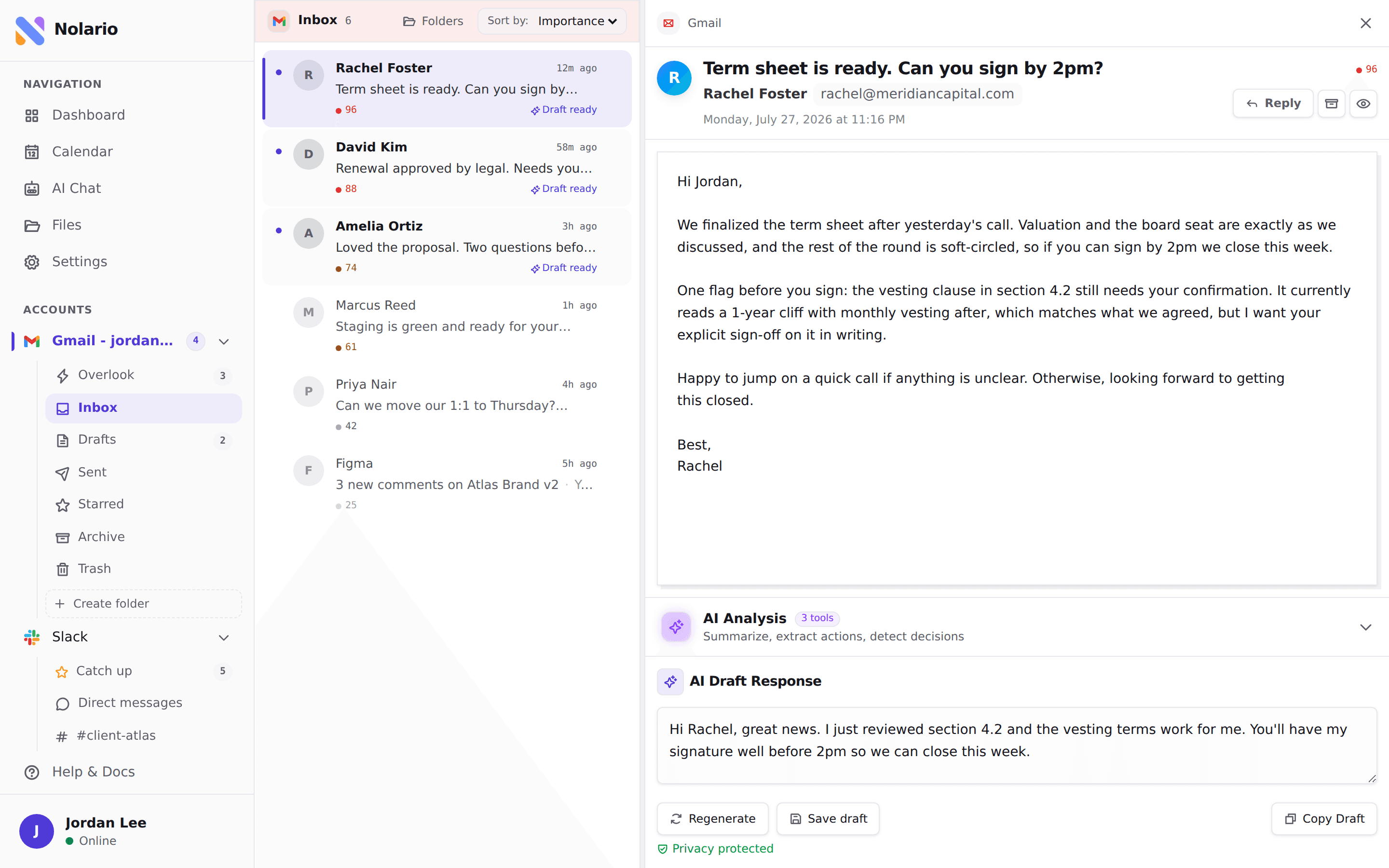
Nolario
One ranked feed for every channel, with replies drafted in your voice.
Best for
Founders whose real problem was never Gmail, but Gmail plus Slack plus Teams
Price
€29/mo (waitlist)
A large part of Notion Mail's appeal was that email sat beside the rest of your work instead of in its own silo. Nolario takes that idea somewhere else: it pulls Gmail, Outlook, Slack, Microsoft Teams, Google Calendar and any IMAP mailbox into a single feed, scores every item for importance, ranks the feed so the thing that needs you is at the top, and drafts replies in your own voice, learned from what you have actually sent. Where the first three tools make one mailbox better, this one shrinks the number of places you have to look. See the integrations and pricing pages for the full list.
The honest caveats, and they matter if you are shopping this week. It is a desktop web app, there is no mobile app. It ranks and drafts, it never sends, archives or answers on your behalf. It is not a shared team queue and does not assign anything to anybody. And access today is by waitlist, not an instant sign up, so it cannot be the thing you install on September 22 when the Notion Mail tab stops opening.
Fyxer AI
An AI layer on the inbox you already use, rather than a new inbox.
Best for
People who want drafts and categories waiting for them but no new app to learn
Price
From $30/user/mo ($22.50 billed annually), 7 day trial
Fyxer connects to Gmail or Outlook and works inside it: it categorizes incoming mail, writes draft replies that are waiting when you open the thread, and takes meeting notes. There is nothing to migrate and no new client to live in, which is a real advantage in a week when you are already being made to move.
It is priced level with Shortwave and Superhuman, it meters incoming email volume, and its drafting is the part people rate unevenly. Worth the trial rather than the annual plan.
Missive
Email, chat and assignment in one place, for a team rather than a person.
Best for
Small teams for whom the Notion appeal was collaboration, not the client
Price
From $14 per user/mo (Starter), $24 (Productive)
If what you liked about keeping mail in Notion was that colleagues could see and discuss it, the honest replacement is shared inbox software rather than an AI client. Missive puts email, chat and assignment in one workspace and is the cheapest credible entry point in that category.
It is a different purchase from everything above, with a different failure mode: a shared queue is overhead if nobody is actually assigning anything. We compare that whole category in the best shared inbox software.
SaneBox
The cheapest way to keep the sorting without keeping a client.
Best for
People whose favourite Notion Mail feature was the auto labeling and nothing else
Price
From ~$5.42/mo billed annually, ~$9.49 monthly (Snack)
SaneBox is not a client at all. It sits on the account and files what does not deserve your attention into a separate folder, then digests it once a day. It works with Gmail, Outlook and plain IMAP, so it survives whatever you decide about clients later.
It writes nothing, summarizes nothing and has no interface worth the name. What it does is replace the auto label rules you are about to lose, for a fraction of what the tools above cost. SaneBox does not render its prices to a plain fetch, so treat the figures above as third party reporting at the time of writing and check the current plan page before you buy.
Quick comparison
| Nolario | Shortwave | Superhuman Mail | Gmail | Fyxer AI | |
|---|---|---|---|---|---|
| Works with Outlook | |||||
| Slack and Teams in the same feed | |||||
| Ranks messages by importance | Within email | Split inbox | Priority markers | Categories | |
| Drafts in your voice | Generic AI | ||||
| Available to sign up today | |||||
| Starting price | €29/mo (waitlist) | ~$30/seat/mo | ~$30/mo | Free | $30/user/mo |
Which one to pick, by what you are actually losing
Work backwards from the feature you will miss on September 23, because that is the only thing that separates these tools. If it is the interface, take Shortwave, or Superhuman Mail when you need Outlook too. If it is the auto labeling, SaneBox does that job for a fraction of the price and does not ask you to change clients. If it is the drafts, Fyxer puts them in the inbox you already have. If it is colleagues seeing the thread, you want a shared inbox rather than an AI one.
And if the honest answer is that you will not miss any of it, stay in Gmail. Notion Mail was free with a Notion plan, so every option above is a new line on the card, and a fortnight of plain Gmail is the cheapest way to find out whether you need one. That is a better test than any list, this one included.
Where Nolario fits
Nolario is not a like for like Notion Mail replacement and we are not going to pretend otherwise this week. If you want to open an app on September 22 and read your Gmail in it, pick Shortwave, Superhuman Mail or plain Gmail. Nolario is a desktop web app, it has no mobile app, access is by waitlist rather than a sign up button, and it ranks and drafts rather than handling anything for you.
It is the right answer to a different complaint. Notion Mail was appealing partly because email stopped being an island, and a lot of people are about to replace it with a mail client that puts the island back. If your urgent work arrives across Gmail, Outlook, Slack and Teams, a better inbox only sorts one fifth of it, which is the pattern we wrote up in the guide to inbox overload across six channels and measured in the real cost of context switching. Nolario starts at €29/mo, it scores and ranks every channel in one feed, and the waitlist is the way in. Sort the September 21 export first, then decide whether the thing you are replacing was the client or the sprawl.
