

Most email tools sell you speed: reply faster, type less, keyboard shortcuts. But the minutes do not go on typing, they go on deciding - scanning a list of forty subject lines to work out which three matter. That is triage, and it is the job these seven tools are built for. The question to ask each one is simple: what does it use to decide, and how much do you have to teach it?
Three ways a tool can triage
Rules are what you write yourself: sender, subject, label. Predictable, free, and blind to anything you did not anticipate. Filters learn what to hide, which is a binary judgement that leaves the survivors in flat chronological order. Scoring ranks everything on one scale, which is the only approach that answers "what first?" rather than "what not?". Price roughly tracks that order, and so does usefulness.
The 7 best email triage tools in 2026
1. Nolario
Our pickOne importance score across email, Slack, Teams and calendar.
- Best for
- Founders whose urgent work does not arrive only by email
- Price
- €29/mo (waitlist)
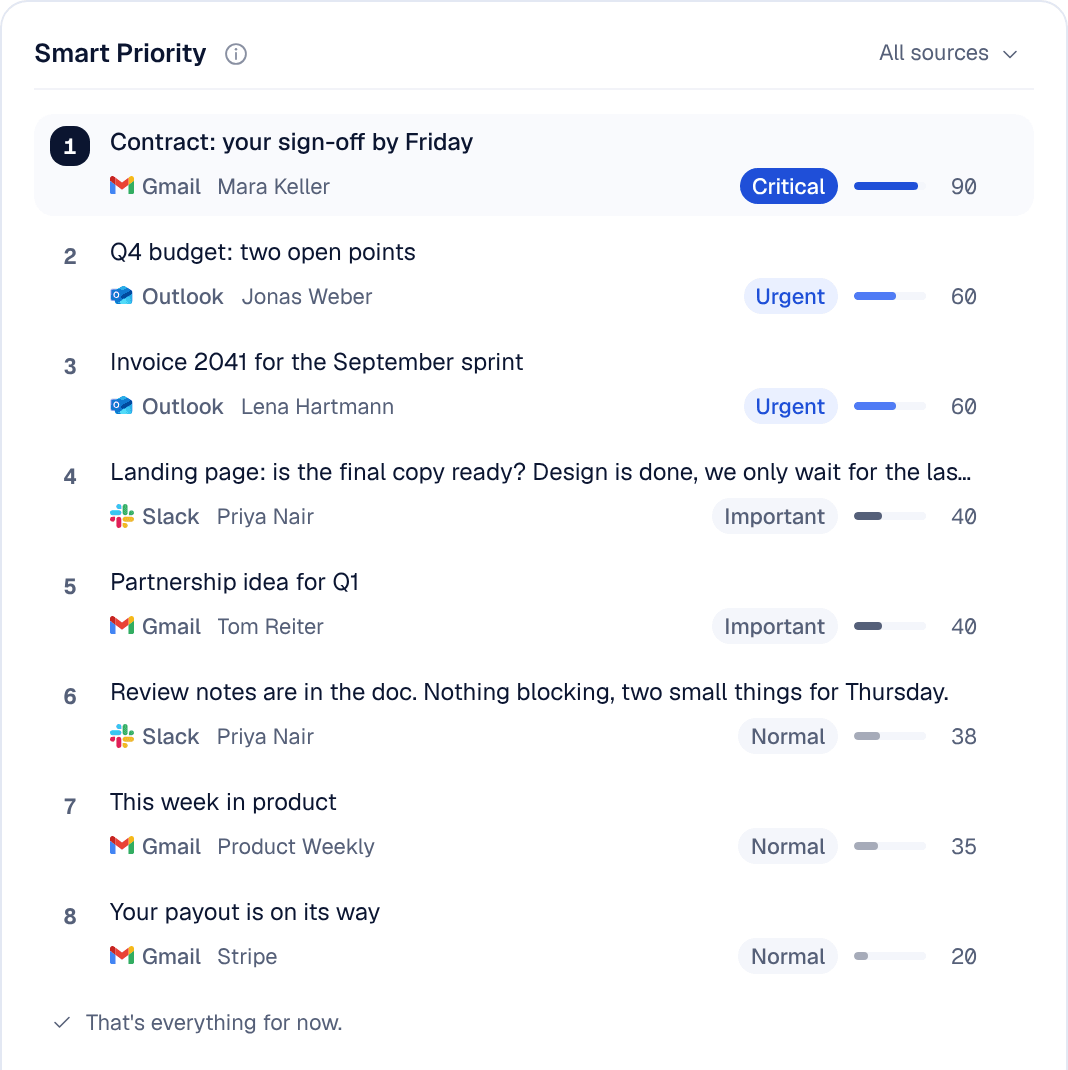
Nolario is our product, so weigh this pick accordingly. Nolario scores every incoming item and puts the few that need you at the top of a single feed. The signals are behavioural rather than keyword-based: who addressed you directly, who you actually reply to, whether you flagged the sender, how the thread is moving. It then drafts the reply in your voice.
The reason it leads a triage list specifically: a Slack mention from your biggest customer and an email from an investor are the same kind of event, and only a tool that sees both can tell you which one comes first.
2. Superhuman
Split Inbox: triage as lanes, not folders.
- Best for
- One mailbox, one person, maximum speed
- Price
- From ~$30/mo
Split Inbox separates important mail into its own lane in the foreground, so nothing is hidden away in a folder you have to remember to check. Combined with keyboard triage it is the fastest way through a single mailbox. Email only.
3. SaneBox
Server-side filtering that works with any client.
- Best for
- People who will not switch email apps
- Price
- From ~$65/year (annual)
SaneBox learns what you ignore and moves it into SaneLater, leaving a much smaller inbox. The cheapest genuine improvement here, at $65 a year for one account at the time of writing. Two caveats: it filters rather than ranks, so what survives is still in arrival order, and you have to check the folder for a while before you trust it.
4. Shortwave
AI bundles and summaries for Gmail.
- Best for
- Gmail power users who want to understand a thread fast
- Price
- From ~$30/user/mo
Bundling groups similar mail so you clear a category at a time, and summaries mean you can triage a long thread without reading it. Excellent AI, Gmail-only, and priced at the top of the market.
5. Fyxer AI
Categorizes the inbox and drafts the replies.
- Best for
- People who want triage plus a ready answer
- Price
- Free plan; Pro from ~$37/user/mo (annual)
Fyxer sorts incoming mail into categories and pre-writes responses in your style on Gmail and Outlook. The triage is categorical rather than ranked, but arriving at a written draft removes the second decision as well as the first. Both need a paid plan: the free plan does not sort your inbox.
6. Spark
Smart Inbox, free, across all your accounts.
- Best for
- Multiple accounts on no budget
- Price
- Free; paid from ~$8/user/mo (annual)
Spark automatically moves newsletters and notifications into their own inboxes, which handles the crude part of triage at zero cost. Ranking within the people bucket is minimal, so the last decision is still yours.
7. Gmail Priority Inbox
Free, already there, better than most people assume.
- Best for
- Anyone who has not yet proved they need to pay
- Price
- Free with Gmail
Importance markers plus a few filters give you a baseline version of everything above. Google says Gmail decides what is important from signals such as whom you email, which emails you open and reply to, and what you star, archive or delete, and Priority Inbox splits the inbox into sections such as important and unread. Run it for two weeks: whatever still gets buried defines exactly what you should be paying to fix.
Quick comparison
| Feature | Nolario | Superhuman | SaneBox | Shortwave | Spark |
|---|---|---|---|---|---|
| Ranks, not just filters | Yes | Lanes | No | Bundles | Buckets |
| Covers Slack and Teams | Yes | No | No | No | No |
| Keeps your current email app | No | No | Yes | No | No |
| Learns from your behaviour | Yes | Yes | Yes | Yes | Limited |
| Starting price | €29/mo (waitlist) | ~$30/mo | ~$65/yr | ~$30/user/mo | Free |
The bottom line
Start free with Gmail's priority inbox or Spark. Pay for SaneBox if you want quiet without changing apps, or Superhuman if you want the fastest possible pass through one mailbox. And if the message that decides your week is as likely to be a Slack mention as an email, Nolario is the only tool here that will rank both against each other.
