

As an executive assistant, you are the filter. Two or three inboxes, plus Slack, plus calendars, and a constant judgment call: what needs the executive, what can you handle, and what can wait? Done by hand across apps, that is exhausting and error-prone. Here is a practical playbook for using AI to triage multiple inboxes without dropping anything.
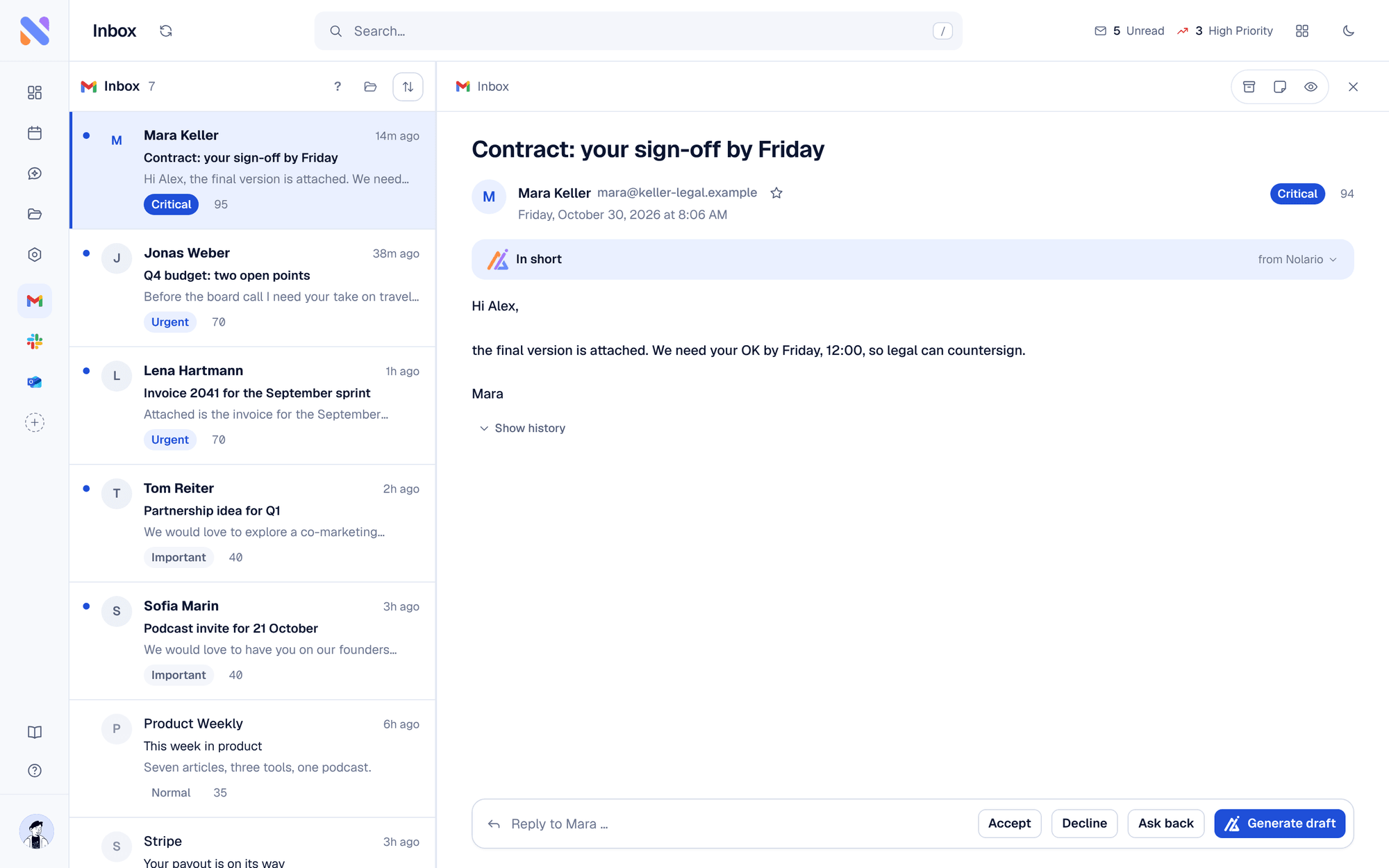
Step 1: Stop working inbox by inbox
Every mailbox and channel you check separately multiplies your work and your risk of missing something. The first move is to bring every inbox and channel into one place, so you triage a single prioritized list instead of hopping between five apps in a fixed rotation you can never quite trust.
Access is usually the easy part. A Gmail delegate can read, send and delete email in the executive's account, and Outlook delegate access lets you receive and respond to email and meeting requests on their behalf. One catch: Google lists Gemini in Gmail among the features delegates cannot use, so the built-in AI does not come with the delegated mailbox.
Step 2: Let AI sort importance before you read
Not every message deserves the same attention. AI importance scoring surfaces the board email, the investor intro and the urgent client first, and pushes newsletters and receipts down. You still make the calls, but you make them on a list that is already ranked, not a raw pile.
Step 3: Summarize before you forward
Executives do not want a forwarded 40-message thread. Use AI to summarize long chains into a two-line brief with the decision needed, then pass that up. You save the exec time and yourself the copy-paste.
Step 4: Draft replies in the exec's voice
The repetitive replies, scheduling, intros, polite declines, are where AI drafting shines. Tools that learn the executive's voice produce drafts that sound like them, so you edit rather than write from scratch. The rule that keeps this safe: you approve every send. AI drafts; a human decides.
| Feature | Old way | AI-assisted |
|---|---|---|
| Reading order | App by app, chronological | One feed, ranked by importance |
| Long threads | Read it all | AI summary, then decide |
| Routine replies | Write each one | Approve a voice-matched draft |
| Risk of missing things | High | Low |
Step 5: Protect the executive's privacy
You handle sensitive information. Choose tools that are explicit about how message content is handled and scrubbed before it reaches any AI provider, and that never send on the executive's behalf automatically. Human-in-the-loop is not just good manners here; it is risk management.
How Nolario fits an EA workflow
Nolario was built for exactly this: it unifies the inboxes and channels you manage into one AI-prioritized feed, summarizes threads, and drafts replies in the executive's voice for your approval. Instead of policing five apps, you work one ranked list, so the important things reach the exec fast and nothing quietly slips.
