
ChatGPT can read your Gmail, search your Slack, and since 23 September 2026 do both by voice. What it still cannot do is act on a message before you ask it to. There is no trigger: mail lands, and ChatGPT does nothing until you open a chat and prompt it, which is the whole difference between a writing assistant you consult and an assistant that triages your inbox while you are in a meeting. This page ranks seven ChatGPT alternatives for email that do the second job, and it leads with the restriction most listicles leave out: OpenAI's Google connectors are not offered in the EU, the UK, Switzerland or the EEA.
What the ChatGPT Gmail connector actually does
The connector is real and it is useful. On the paid tiers, Plus, Pro, Team and Enterprise, you can ask ChatGPT to find the last message from a supplier, summarize a thread you have been copied into, pull a number out of an attachment you received, or write a reply and send it from your own address. Free accounts cannot use it at all. On 23 September 2026 OpenAI wired the same connected apps into ChatGPT Voice, so Gmail, Google Calendar and Slack can now be reached by speaking rather than typing.
Every one of those actions has the same shape: you start, it responds. That is the right shape for a chat product and the wrong shape for an inbox, because an inbox is a queue that fills while you are doing something else. The question worth asking is not whether ChatGPT is good at email. It is whether the work you need done is work you will remember to ask for.
Three reasons ChatGPT is not an inbox manager
It has no trigger. Independent reviews of the connector put this plainly: a message can land in your inbox and ChatGPT does nothing, because it only moves when you prompt it. Nothing classifies the message, nothing labels it, nothing tells you it arrived. Compare that with Copilot in Outlook, which reviews mail as it arrives and assigns a priority on its own.
Everything happens in a session you start. You open ChatGPT, you ask, it acts, you leave. There is no state between sessions that keeps working, so the triage you did on Monday teaches it nothing about Tuesday. Tools built for the inbox invert that: the sorting is the default behaviour and your attention is the exception.
Sending is one message per prompt. You trigger one email at a time, review the draft and confirm, and the connector cannot send a file, so a signed contract or a PDF is still a manual job. That approval step is a sensible safety default, and it is also the reason the connector cannot clear a backlog. If what you want is faster drafting rather than triage, our guide to writing faster email replies with AI covers that narrower job.
If you are in the EU or the UK, the question is already settled
This is the part that decides the whole comparison for a large share of readers, and it is missing from most pages that rank AI email tools. Three independent write-ups of the connector, published between July and August 2026, agree that the Gmail and Google connectors are not offered in the UK, the EU, Switzerland or the EEA, on data-protection grounds. Not degraded, not waitlisted: unavailable.
So for a founder in Dublin, Berlin, Zurich or London, "use ChatGPT for my inbox" is not a plan that can be executed at all, and the practical choice is between the tools below, every one of which sells into Europe. It is worth checking the current position yourself before you commit, since availability is exactly the kind of fact a provider changes without notice.
How we ranked these ChatGPT alternatives
The ranking answers one question: what gets the job done when you are not in a chat window. First, does the tool act on new mail without being prompted, which is the gap ChatGPT leaves. Second, can you connect it today, in your region, on your mail provider. Third, how many of your channels it reaches, because a founder's urgent message is as likely to be in Slack as in the inbox. Price is a tie-breaker, not the axis. All prices are list prices read from the vendor at the time of writing, and are marked with a tilde where they are rounded or come from a third party because the vendor withholds the table from a plain fetch.
Fyxer AI
Sorts your mail and drafts the replies before you open it
Best for
Founders who want ChatGPT's drafting quality, running on its own
Price
From ~$30/user/mo, or ~$22.50 billed annually, 7 day trial
Fyxer is the closest thing to the product people imagine when they connect ChatGPT to Gmail. It sits on top of the Gmail or Outlook you already use, sorts arriving mail into categories, and writes replies in your tone without being asked. That is the trigger ChatGPT does not have, and it is why it leads here.
The limits are worth knowing. Its pricing page names Gmail, Outlook, connected calendars, a video-meeting integration and HubSpot on Professional and above, and it does not name Slack or Microsoft Teams, so chat stays outside it. There is no permanent free plan: Starter is ~$30 per user per month and Professional ~$50, each with a 7 day trial, and Enterprise starts at 50 users. If it is the shortlist you are building, we compare it against the field in the best Fyxer alternatives.
Shortwave
An AI-first Gmail client that keeps working between your visits
Best for
Gmail and Google Workspace users who want the AI inside the client
Price
From ~$30/seat/mo, 14 day trial, no free tier
Shortwave was designed around AI rather than having it added later, and the assistant runs against your mail rather than against a prompt you paste in. For a Gmail user it is the most complete replacement for asking ChatGPT about your inbox, because the context is already there.
The catch is reach, and its own documentation is blunt about it: Shortwave requires a Gmail or Google Workspace account to sign in, and Microsoft 365 and Exchange accounts are not supported at this time, with Outlook.com usable only by forwarding. Its pricing page today shows no free tier at all: Business ~$30, Premier ~$45 and Max ~$120 per seat per month, behind a 14 day trial. Several comparison pages still describe an older free plan, which is a good reminder to read the vendor page rather than a listicle. Our Shortwave alternatives page covers the rest of that market.
Microsoft Copilot in Outlook
Priority assigned as mail arrives, with the reasoning shown
Best for
Outlook and Microsoft 365 users who already pay for Copilot
Price
Add-on licence on top of Microsoft 365
Copilot is the clearest example of what ChatGPT is not. Microsoft's own documentation says it reviews your emails as they arrive and assigns a priority of high, low or normal based on factors such as who is on the thread, their job titles and the content, and that when you open a message it shows a few lines explaining why it believes the message matters to you. You can also give it instructions in your own words, such as mail from your manager being high priority.
It is native, it needs no extra connector, and it stops at the edge of Outlook: no Gmail, no IMAP, and Slack only through separate tooling. It also needs a Copilot licence on top of your Microsoft 365 subscription. We go deeper in the best AI email assistants for Outlook.
SaneBox
Server-side filtering that works with a mailbox ChatGPT cannot reach
Best for
Anyone on iCloud, Fastmail, a company IMAP box or a provider nobody supports
Price
From ~$5.42/mo billed annually, or ~$9.49 monthly
SaneBox is the oldest idea here and the most robust. It works at the mail server rather than in a client, which means it works with essentially any provider and any app you read mail in, and it keeps filtering whether or not you ever log in. If your mailbox is the reason the AI tools keep saying no, this is the one that says yes.
It is also the narrowest. SaneBox sorts and defers, it does not write your replies, so it replaces the triage half of what you wanted from ChatGPT and none of the drafting half. Third party pages that read the vendor's table in August 2026 put Snack at ~$9.49 a month or ~$5.42 billed annually, Lunch at ~$15.99 or ~$9.08, and Dinner at ~$42.99 or ~$26.58. See also the best email triage tools.
Fireflies
Inbox triage that drafts from your past meetings
Best for
Teams already using Fireflies to record calls
Price
From ~$10/seat/mo billed annually on Pro
Fireflies added an email assistant on 13 August 2026, which makes it the newest entry on this page. It labels arriving mail so you can prioritize at a glance, drafts replies, suggests follow-ups when a thread goes quiet, and produces a daily brief that draws on meetings, email and Slack. Its distinguishing trick is context nobody else has: it drafts from the thread plus your own meeting transcripts.
That is also the condition. The value depends on already recording your calls with Fireflies, and the email side is young. It supports Gmail and Outlook, and the assistant sits on the Pro plan at ~$10 per seat per month billed annually or ~$18 monthly, with Business and Enterprise above it.
Gemini in Gmail
Free AI inside Gmail, with the prioritization still in testing
Best for
Gmail users who want something at no cost right now
Price
Free for the writing features, Google AI Pro for the rest
Google announced on 8 January 2026 that conversation summaries, Help me write and suggested replies were rolling out to everyone at no cost, with question-answering over your inbox and the Proofread feature reserved for Google AI Pro and Ultra subscribers. For a Gmail user that is a genuinely free way to stop pasting threads into a chat window.
It is ranked here rather than higher because the part that would replace ChatGPT's triage is the part you probably cannot use yet. Google describes a new AI Inbox that filters clutter and identifies your VIPs from signals such as who you email often, and at the time of that announcement it was available to trusted testers with a wider rollout planned for the months after. Free beats paid only once the feature is actually on.
Nolario
One ranked feed for every channel, with replies drafted in your voice
Best for
Founders whose urgent messages hide across Gmail, Outlook, Slack and Teams
Price
€29/mo (waitlist)
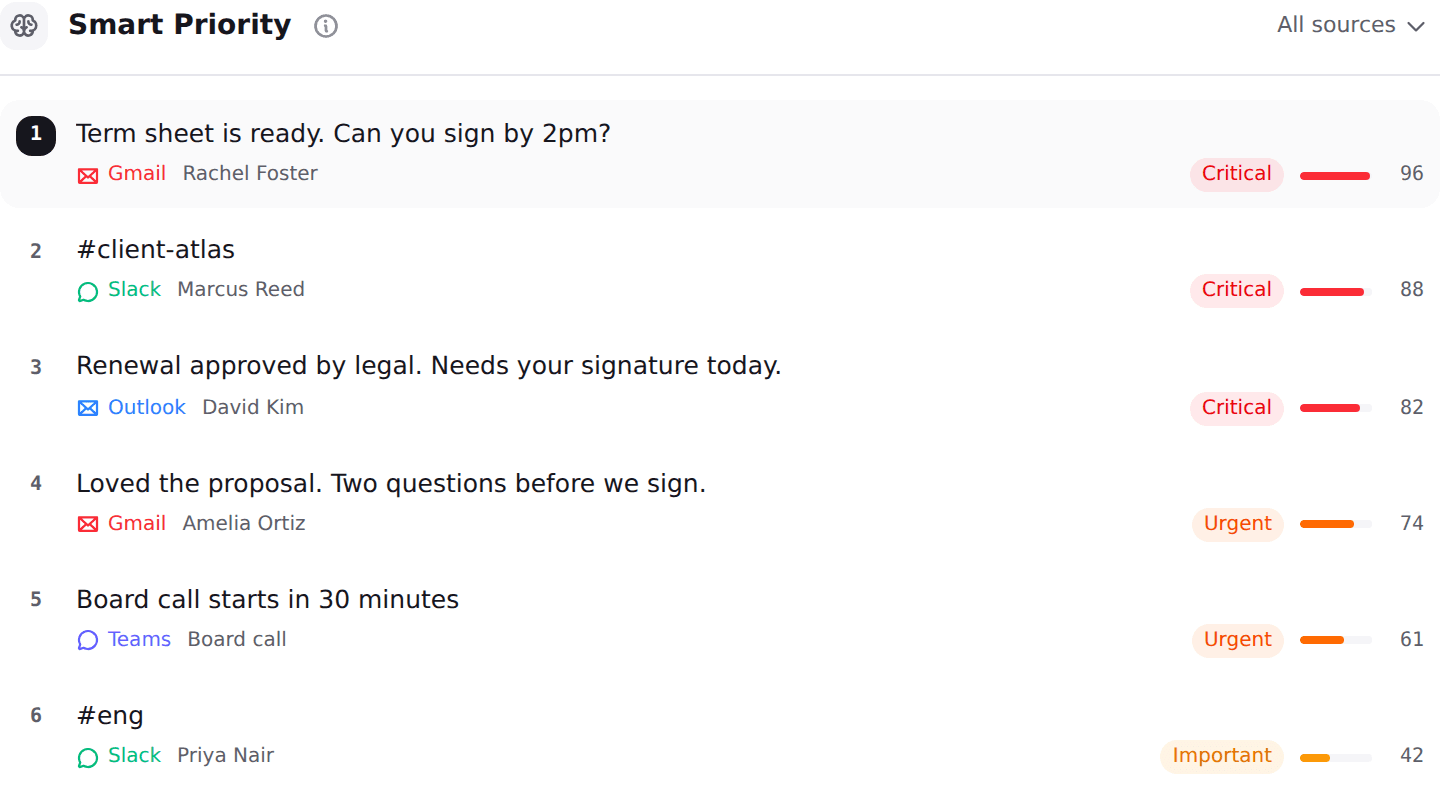
Nolario pulls Gmail, Outlook, Slack, Microsoft Teams, Google Calendar and any IMAP mailbox into one feed, scores every item for importance, ranks the feed so the important thing is at the top, and drafts replies in your own voice learned from what you actually send. On the two axes this page ranks by, it has the widest channel list of anything above, and it scores without being asked.
It is last for one honest reason: you cannot use it this afternoon. Access is by waitlist, with the product opening through 2027, so every tool above it wins on availability today. It is also a desktop web app with no mobile app, it has no shared queue and no assignment, and it never sends on your behalf: it ranks and it drafts, and you press send. See the integrations and pricing pages.
ChatGPT and the alternatives, side by side
The table is the argument of this page in one screen. ChatGPT wins the one row nothing else does, sending a message for you, and loses the two rows that decide whether a tool reduces your workload. For the wider cross-channel picture see the best AI assistants for Gmail, Slack and Teams.
| ChatGPT | Fyxer | SaneBox | Nolario | |
|---|---|---|---|---|
| Acts on new mail without a prompt | ||||
| Available in the EU and UK | ||||
| Reads Slack as well as email | ||||
| Learns your voice from sent mail | ||||
| Sends a message for you | ||||
| Works with any IMAP mailbox | ||||
| Starting price | Paid plan required | From ~$30/user/mo | From ~$5.42/mo | €29/mo (waitlist) |
Which one should you pick
If you are in the EU or the UK, skip the connector question entirely and start with Fyxer if you want drafting, or SaneBox if you mainly want the noise gone and your mailbox is unusual. If you live in Gmail and want the AI in the client, Shortwave. If your company runs on Microsoft 365 and already pays for Copilot, you have inbox prioritization included and should turn it on before buying anything. If you already record every call with Fireflies, its assistant is the cheapest thing on this page that both sorts and drafts.
And keep ChatGPT. None of this argues for cancelling it: for rewriting a difficult paragraph, reasoning through a thread you paste in, or handling a one-off in your own words, it remains the better tool, and the voice access added in September 2026 makes it genuinely pleasant. The point is narrower than a verdict on ChatGPT. A chat window cannot be the thing that notices, and noticing is most of the job. Our roundup of the best AI email assistants for founders covers the field beyond these seven.
Where Nolario fits
Nolario is not the answer to "what do I install instead of ChatGPT this afternoon". Access is by waitlist, so if your inbox is painful today, pick Fyxer, Shortwave, Copilot or SaneBox from the list above and get relief this week. We would rather say that than rank ourselves first on a page about tools you can use now.
Where it does fit is the version of this problem a chat window cannot reach at all: the message that mattered was a Slack DM, the follow-up was in Teams, and the thing you actually missed was buried under sixty newsletters in Gmail. Nolario scores every item across all of those, ranks them into one feed, and drafts the reply in your voice, and it never sends for you. If that is the shape of your week, from €29/mo, the waitlist below is the way in.
