
If your work is split across Gmail, Slack and Microsoft Teams, most AI assistants will only ever see a third of it. The assistants built into the platforms are the clearest case: Google lists Gemini inside Gmail, Docs, Sheets, Slides, Drive and Meet and names no Slack or Teams anywhere, while Slackbot reads Slack and nothing else. The tools that genuinely cross all three are a short list, and this is that list, ranked by how much of your Gmail, Slack and Teams an assistant can really read today and what it costs to get there.
How we ranked these AI assistants
The ranking is by one question: can a founder connect Gmail, Slack and Microsoft Teams to this assistant this week, and how much does it see once they have? Channel coverage was weighted first, because an assistant that cannot read the channel your urgent message landed in cannot help with it whatever else it does. Set up effort came second, since a connector that needs an administrator is not the same product as a login and an OAuth prompt. Price came third. Every price below is the vendor's own list price at the time of writing, taken from the vendor's pages on September 23, 2026, as is every channel claim.
Two notes on what that produces. Tools that read only email are not ranked here at all, even excellent ones, because they cannot answer this query; they are covered in the best AI email assistants for founders. And the assistant with the widest channel list is not first, because it is not yet something you can install.
Lindy
An agent platform that connects the four channels and then acts on them
Best for
Teams that want an assistant to do work across tools, not just summarize it
Price
$29.99/mo (Plus)
Lindy is the most complete answer to the literal query. Its integrations pages list Gmail, Microsoft Outlook, Slack and Microsoft Teams by name, alongside what it describes as more than a thousand apps and any MCP server, so the four channels a founder actually lives in are all first class rather than roadmap items.
Plans run $29.99 per month for Plus with 3,000 credits, $99.99 for Pro with 15,000 and $199.99 for Max with 35,000, with Enterprise on request. The credit model is the thing to read carefully before committing: Lindy prices work in credits, from a couple of credits for a quick answer up to roughly a thousand for research and triage, and credits are shared across the workspace and do not roll over, so the bill tracks what you run rather than the plan name. There is no permanent free plan, though Lindy says new teammates who join through Slack get their first week free.
The trade off is that Lindy is a builder, not a finished inbox. It rewards someone willing to configure agents and permissions, and that same power is why the permissions deserve a careful read before you connect a mailbox.
Fyxer AI
A drafting and sorting layer over mail, chat and meetings
Best for
Founders who want their mail categorized and drafted without changing email client
Price
$30/user/mo, $22.50 billed annually
Fyxer is the closest thing here to a finished product that spans channels. Its own site names Gmail, Outlook, Google Calendar, Outlook Calendar, Google Meet, Zoom, Slack and Microsoft Teams, and it works as a layer over the mail client you already use rather than asking you to move in. It labels new mail, lifts what matters to the top, writes first drafts in your style and turns calls into follow ups.
Pricing is $30 per user per month for Starter, or $22.50 billed annually, and $50 per user per month for Professional, or $37.50 annually, with a seven day free trial and an Enterprise tier that starts at fifty users. It is worth knowing where the tool draws its line: Fyxer states plainly that it cannot send emails on your behalf and only drafts them, which is the right default and also means the reading still lands on you.
If you are weighing it against the rest of its own category, we compared it in the best Fyxer alternatives.
Superhuman Go
An assistant that follows you across the apps instead of pulling them together
Best for
People who want help where they already are, without a new inbox to learn
Price
Included with a Superhuman account
Superhuman Go takes the opposite approach to everything else on this list. Rather than collecting your channels into one place, it rides along on top of them: Superhuman describes it as an assistant and agent platform that works everywhere you work, across more than a million apps and websites, and the page names Gmail and Outlook for email, Slack for messaging where you can mention Go directly, and task tools such as Asana and Jira. It ships as a desktop app for Windows and Mac, browser extensions for Chrome and Edge, and mobile apps.
Superhuman says you can get started with Go for free by signing up for a Superhuman account and that it is available in all Superhuman plans, with custom agent building reserved for Pro, Business and Enterprise. The company has been widening it steadily: a February 23, 2026 announcement added partner agents from Box, Gamma and Wayground.
The honest caveat is that an overlay helps you inside whichever window you have open. It is excellent at the moment of writing and weaker at the question this article is really about, which is what you have not looked at yet.
Microsoft 365 Copilot
Deep in Outlook and Teams, further out only through an admin
Best for
Companies already standardized on Microsoft 365
Price
Paid add-on licence on top of Microsoft 365
If your company runs on Outlook and Teams, Copilot is the assistant with the least friction, because it is already inside both. Microsoft kept shipping there through September 2026: a meeting Facilitator that runs a Copilot web search when a factual question goes unanswered and posts the answer into the chat, multilingual meeting recaps, and a route for third party agents through the Teams admin center, in preview for October general availability.
Reaching beyond Microsoft is where it gets specific. Microsoft's support page for consumer Copilot lists connectors for OneDrive, Outlook.com, Google Drive and Gmail, Calendar and Contacts, and Slack is not on that list. In a business tenant, Microsoft 365 Copilot connectors go much further, with more than 100 prebuilt connectors to services including Google, Salesforce, Box and Confluence, either syncing data into the index or querying it live. That is real reach, but it is configured by an administrator in the Microsoft 365 admin center, so it is an IT project rather than a founder's afternoon.
Google Gemini for Workspace
Excellent inside Google, absent everywhere else
Best for
Teams entirely on Google Workspace
Price
$14/user/mo (Business Standard, annual)
Gemini is included with paid Google Workspace plans rather than sold as a separate seat, with Business Standard listed at $14 per user per month on annual billing. Inside Google it is genuinely useful: Google describes Gemini summarizing threads, finding key details and drafting mail in Gmail, plus drafting in Docs, building in Sheets, generating Slides, searching Drive and taking notes in Meet. Google also states that your company data is not used for AI model training or ads.
For the query this article answers, the limit is the whole story. Google's own Workspace AI page names no Slack, no Microsoft Teams and no Outlook. If half your day happens in Slack, Gemini cannot see that half, and no plan upgrade changes it.
Slackbot and Slack AI
The best assistant inside Slack, and only inside Slack
Best for
Teams where Slack genuinely is the system of record
Price
$15/user/mo (Business+, annual)
Slack has invested heavily in its own assistant, and it shows. Slack lists basic AI on the Free and Pro tiers, including conversation summaries, AI search, daily recaps and file summaries, with Slackbot described as a personal AI agent that understands conversations, files and projects in Slack, and advanced AI from Business+ upward. Pro is $8.75 per user per month billed monthly or $7.25 annually, Business+ is $18 monthly or $15 annually, and Enterprise+ is quoted on request.
The boundary is the same as Google's, in the other direction. Slackbot is superb at the Slack half of your attention and structurally blind to the mail that arrived while you were reading a thread, which for most founders is where the expensive misses happen.
Nolario
One ranked feed for every channel, with replies drafted in your voice
Best for
Founders whose urgent messages hide across Gmail, Outlook, Slack and Teams
Price
€29/mo (waitlist)
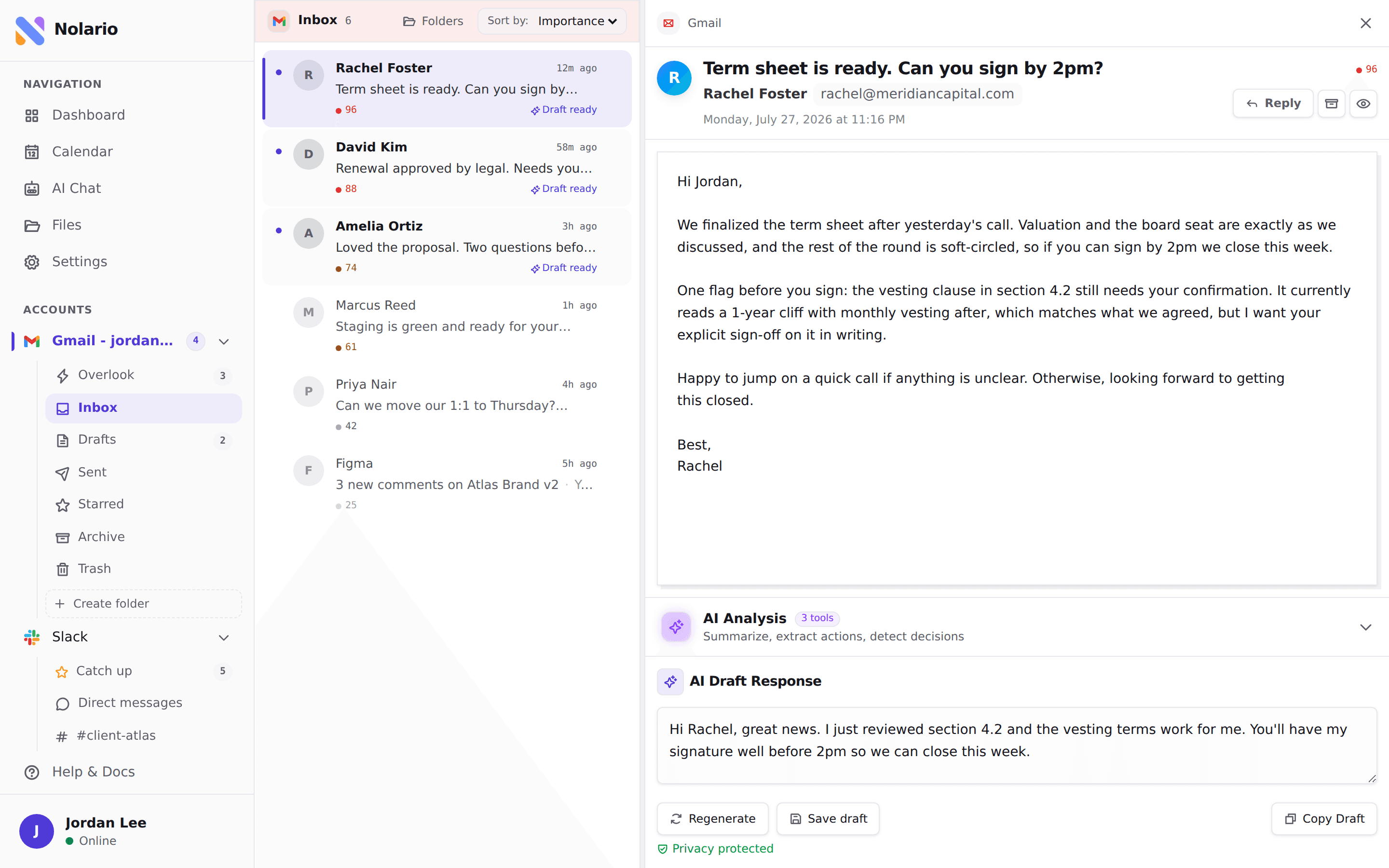
Nolario pulls Gmail, Outlook, Slack, Microsoft Teams, Google Calendar and any IMAP mailbox into a single feed, scores every item for importance and ranks the feed so the thing that most needs you sits at the top, then drafts replies in your own voice learned from what you actually send. Message content is scrubbed of personal data before anything reaches an AI provider. It is the shape this query describes: not an assistant inside one app, but one ranked view across all of them.
It ranks last here for a reason that has nothing to do with the channel list, which is the widest on this page. Access today is by waitlist, so you cannot connect Slack to it this week, and that is the criterion this ranking is built on. It is also a desktop web app with no mobile app, it has no shared queue and no assignment, and it never sends or archives anything for you. See the integrations and pricing pages.
Why so few AI assistants read Slack
The thinness of this category is not an accident of taste, and it is worth understanding before you judge a tool for missing a channel. Slack tightened the terms and rate limits that govern apps distributed outside the Slack Marketplace: those apps are held to one request per minute and a maximum of 15 objects per request on the two methods that read conversation history and replies, while Marketplace apps keep their previous limits and internal apps built by a customer for their own workspace keep a far higher ceiling. Slack also stated that the Marketplace is the only appropriate channel for commercially distributing apps built with Slack APIs, and reinforced safeguards around how third party applications store, use and share data accessed through those APIs.
Read that as a product constraint rather than a legal footnote. Fifteen messages a minute is not enough to mirror a busy workspace, so an assistant that wants Slack has to go through the Marketplace and work within what Slack permits. That is why so many otherwise capable AI email tools stop at the inbox, and why the cross channel list is six or seven names long instead of thirty.
Microsoft Copilot versus Google Gemini: each covers its own half
The two biggest assistants in the world are the two least likely to solve a cross platform problem, because each is a reason to buy its own suite. Gemini is a Workspace feature and Copilot is at its best in Outlook and Teams, and neither vendor has any commercial reason to make its assistant excellent inside the other's product. For a company that is entirely on one stack, that is fine and the native assistant is usually the right answer, included in a bill you already pay.
The mixed case is the common one and the expensive one. A founder on Outlook whose team lives in Slack, or one on Gmail whose enterprise customers insist on Teams, gets two assistants that each see a fraction and no single view of what needs answering. That gap is what makes the switching itself costly, which we put numbers to in the real cost of context switching for founders, and it is the same gap that unified inbox apps approach from the other direction, by combining the channels rather than adding intelligence to one of them.
| Nolario | Lindy | Fyxer AI | Copilot | Gemini | |
|---|---|---|---|---|---|
| Gmail | |||||
| Outlook | |||||
| Slack | |||||
| Microsoft Teams | |||||
| Ranks every channel in one feed | |||||
| Drafts replies in your voice | |||||
| Usable without an administrator | |||||
| Starting price | €29/mo (waitlist) | $29.99/mo | $30/user/mo | Add-on licence | $14/user/mo |
The Slack and Teams cells for Copilot are the ones worth reading twice. Copilot reaches Teams natively because Teams is a Microsoft product, and it does not reach Slack in the consumer connector list, though a business tenant can index Slack through an administrator configured connector. The table records the founder case, which is what someone can switch on themselves.
Which one should a founder pick
If your company is genuinely on one stack, buy the native assistant and stop reading: Gemini if everything is Google, Copilot if everything is Microsoft. You are already paying for the suite, the assistant sits inside the apps your team opens anyway, and no third party tool will beat that on friction.
If you are on two stacks, or on Slack plus any mailbox, the choice is between three shapes. Fyxer is the quickest to feel useful, because it layers on the client you already use. Lindy is the most capable if you are willing to build, and the most demanding on setup. Superhuman Go is the lightest touch, helping inside whatever window you have open. And if the real problem is not writing faster but knowing what to open first, that is a ranking problem rather than a drafting one, which is the case for a unified inbox with scoring on top.
Where Nolario fits
Nolario is built for exactly one of the cases above: the founder whose attention is split across Gmail or Outlook, Slack, Teams and a calendar, and whose problem is not that replies take too long to type but that the message that mattered was three apps away. It pulls all of those into one feed, scores each item and puts the important thing at the top, then drafts the reply in your voice. That is a different job from Gemini's or Copilot's, and it is deliberately narrower than Lindy's.
It is not the answer if you need an assistant today, because access is by waitlist and Fyxer or Superhuman Go will be running in your inbox within the hour. It is not the answer for a team that needs a shared queue, assignment or SLAs, which is what shared inbox software is for. It is not the answer on a phone, since it is a desktop web app. And it will never send, archive or resolve anything for you: it ranks and it drafts, and the decision stays yours. Plans start at €29/mo, and if that is the shape of your problem, the waitlist below is the way in.
