

If your clients live in shared Slack channels, an outage is more than a technical problem: a client may be writing into a channel you cannot load. Slack's own help pages explain how to confirm an outage, and we link to them below. They say nothing about the client on the other end, so this post adds a short routine for that part and says where the sources stop.
How do I tell whether Slack is down or it is just me?
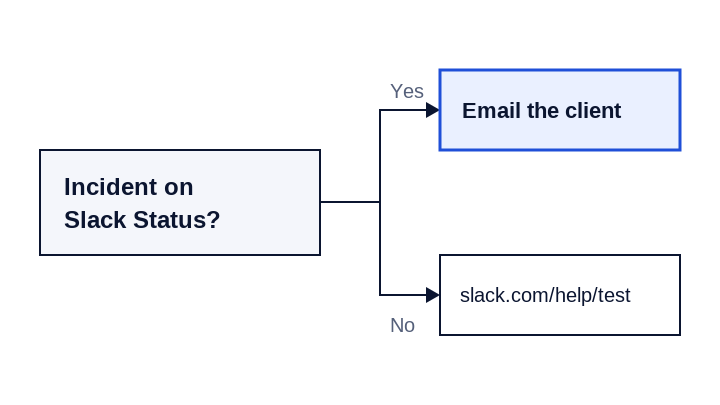
Start with Slack Status, then test your own connection. Slack says that for issues that affect its customers, you will find the most up-to-date information on Slack Status, and the dashboard shows the current status by feature.
The order matters because Slack's help center names both causes for the same symptom. It says that when the desktop app cannot connect, the settings for your network or security devices, such as a proxy, firewall, antivirus software or VPN, may be interfering. It also says that if WebSocket connections fail, you will not automatically receive new messages from your channels or direct messages. So a quiet channel may come from your network instead of Slack. For a server error, the same article tells you to visit the Slack Status site to see whether there are issues Slack is working on. It recommends slack.com/help/test to check your connection to Slack.
We have not checked what that test page shows, so we cannot describe its result. We can only confirm that Slack's article points to it.
| Feature | Slack Status page | Slack connection test |
|---|---|---|
| What it checks | Whether Slack reports an incident, by feature | Your own connection to Slack |
| Slack's wording | Most up-to-date information on Slack Status | Visit slack.com/help/test to check your connection |
| If it points to a problem | Wait for Slack's updates and contact the client another way | Look at proxy, firewall, antivirus and VPN settings |
| What we verified ourselves | Dashboard and an incident page, opened 2026-11-23 | Help article read; the test page itself not checked |
What does a real Slack incident look like?
On Wednesday, November 11, 2026, Slack Status listed an incident titled "Trouble loading Slack and saving changes." It affected four feature areas: Connectivity, Messaging, Apps/Integrations/APIs and Workspace/Org Administration.
When we read that page on 2026-11-23, Slack's first post said it was investigating a new incident with delays loading Slack and when using Slack features. A later update said some users might also be unable to log in, create channels, install apps or publish workflows, and named a recent database change as the likely trigger, leading to a database storage capacity issue. Slack stated that error rates returned to normal levels at 16:15 UTC, and its incident history lists the incident as resolved at 10:58 AM PST on Nov 11. The page and the history use different time zones, so we quote each as Slack wrote it and have not converted them.
Slack's own updates spoke of some users, not all, so an outage can be partial. The incident page also does not mention Slack Connect or shared channels, and it does not say whether messages were lost. We cannot tell you how a client channel behaved that day, so do not assume your client could or could not see your messages.
How do I reach a waiting client while Slack is down?
Write to the client by email, the channel that does not depend on Slack. Treat the Slack channel as unreliable until Slack Status says otherwise, because no source we opened says what a client sees in a Slack Connect channel during an outage.
Keep the message short and put the answer or next step first. Something like this works:
Slack is not loading for me right now, so I am writing by email. [Your answer, or what happens next and when.] If anything is urgent, reply to this email and I will see it.
Nolario can draft a reply like this in your voice, but it never sends for you. You read it and press send. If you want the wider picture of how clients reach you across channels, see how to check Gmail, Slack and Teams without missing a client and Slack Connect vs Teams guest access. If a client has a guest account instead of a Slack Connect channel, the comparison of the two explains the setup.
What should I check after Slack comes back?
Reread every client channel and direct message from the start of the outage, and compare it with a note you made while Slack was down. The Slack help pages we opened do not cover how to find unreads or missing messages after recovery, so we do not claim that any particular Slack view does it for you.
Our suggested routine, in order:
- Confirm the outage is over. Look at Slack Status, not only at whether the app loads.
- Open each client channel and DM and read upward from the last message you remember seeing before the outage.
- Compare it with your note of what each waiting client asked and what you promised by email.
- Resend or restate anything that looks missing. Ask the client to resend anything urgent if you cannot find it.
- Close the loop in the channel. Tell the client you answered by email so the thread does not look unanswered.
- Read Slack's issue summary. Slack says that after resolving an issue, it will publish an issue summary on Slack Status within 24 hours.
If you want a rule for what to check on a normal day too, the Slack notification settings for founders post covers what to mute, keep and pause.
Can I find out about an outage before the client does?
Yes, you can subscribe to Slack's status updates. Slack's help center says to visit slack-status.com and select Subscribe to Updates to receive email notifications whenever Slack creates or updates an incident.
The status site also offers an Atom feed and an RSS feed of updates, and Slack points to its API documentation for building a custom tool that sends updates when Slack services are affected. We did not open that API page, so we cannot describe its format. For a small agency, the email subscription is the simplest start.
Where Nolario fits when Slack is down
Nolario does not fix a Slack outage and cannot bring Slack back. It pulls Gmail and Outlook into the same feed as Slack, scores every item for importance and ranks the feed, so a client's email stays in view while the Slack channel is unreliable. We make no claim about how its Slack items behave during an outage, because we have not tested that.
It also has limits you should know. Nolario never sends a message for you: it drafts, and you press send, because one wrong auto-sent reply to a key customer costs more than the time it saves. It is a desktop web app with no mobile app available, it has no shared queue, and access is by waitlist. See the integrations page for the channels it connects, and how to combine Gmail and Slack in one inbox if you want the setup question answered first. For client email specifically, getting notified when a client emails shows what Gmail and Outlook offer on their own.
Before you add another inbox tool
Two doubts are fair here. The first is privacy: Nolario has to read messages to rank them, and message content is scrubbed of personal data, such as names, addresses and IDs, before anything reaches an AI provider.
The second is having one more tool to look after. Nolario connects the Gmail, Outlook and Slack accounts you already use and pulls them into one feed, so there is nothing to move. It does not replace Slack or your email: client conversations stay where they are, and a reply goes out only when you press send.
