

An AI decides which emails are important by adding up signals: who wrote to you, whether the message asks for something or names a deadline, whether it is addressed to you, how fresh it is, and what you did with similar mail before. Noise signals, like a newsletter or a no-reply sender, subtract. The result is a score or a marker. What differs between tools is which signals they use and whether they show you the reasons.
What Gmail looks at
Google's help page on importance markers names five behavioural signals: whom you email and how often, which emails you open, which you reply to, keywords in emails you usually read, and which you star, archive or delete. You can correct a marker with a click, hover over it to see why Gmail set it, or turn off the use of past actions in the Inbox settings. The limit is reach: this works on one Gmail mailbox, and it does not see your Slack or Teams.
What a cross-channel scorer adds
Once mail, chat and calendar are in one feed, the signals can be read the same way across channels. A VIP sender in a mail and an @mention in a chat both say "this is for you". A message that asks a question or names a date counts the same in either place. That is the idea behind a unified inbox with ranking on top, and it is why the same deadline should not rank differently because it arrived in Teams.
The signals Nolario scores
Nolario scores every item from 0 to 10. We build the scorer ourselves, so we can say what goes in. Points are added for a sender on your VIP list, for ask and deadline wording (in English and German), for time sensitivity such as same-day times, for a direct mention or an ongoing thread, for recency, and for people you really talk to. Points are removed for newsletters and no-reply automation. If you starred or flagged a message yourself, it scores at least 9, and Gmail's own importance flag sets a floor of 7.5. You can add your own keywords and people, and the scorer learns from what you open and answer, with a weight that decays over time. Each score comes with its reasons.
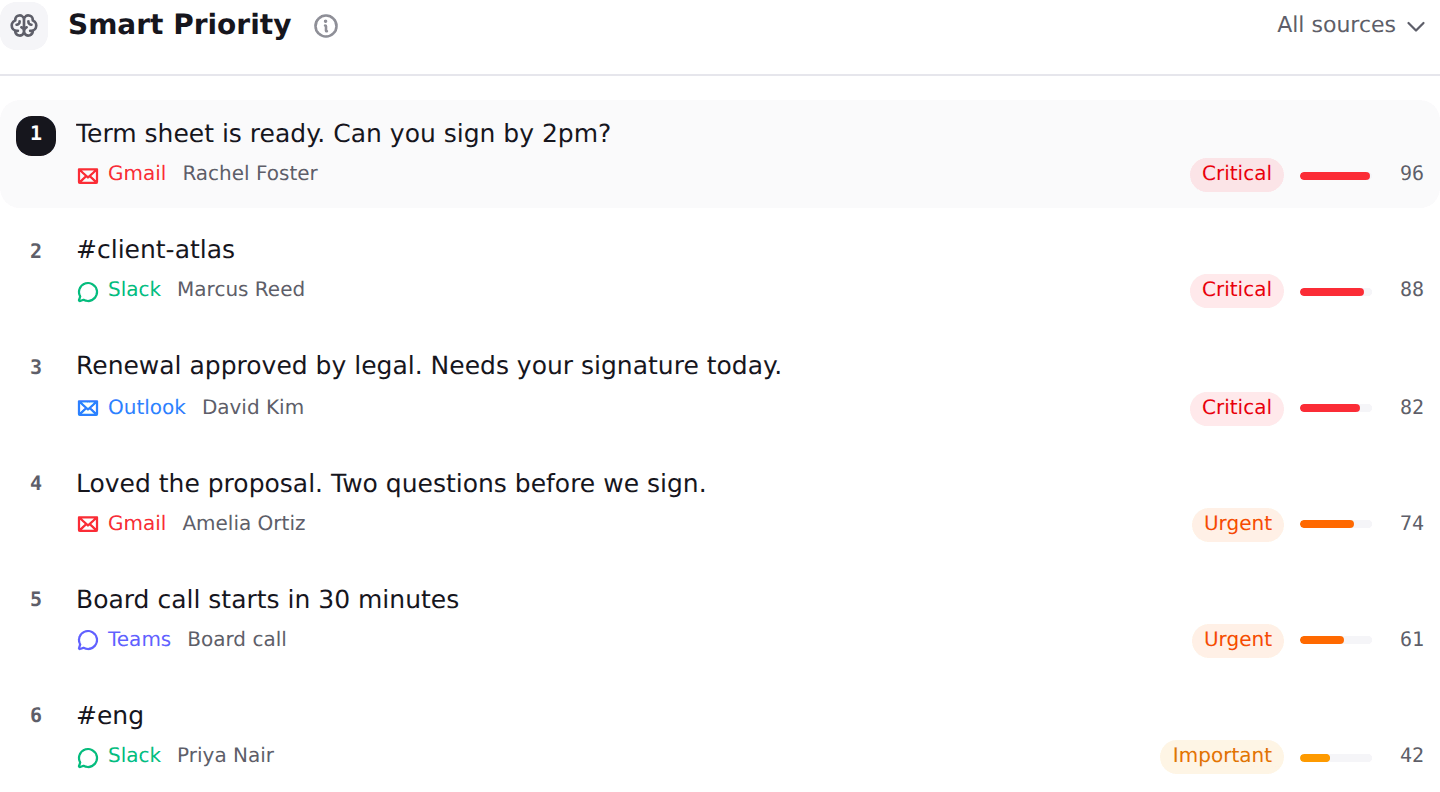
Why showing the reason matters
A ranking you cannot question is a ranking you will stop trusting. If a message you consider unimportant lands on top, you want to know whether it was the sender, the wording or the time, and change that signal. For the people who use this for decisions, see how an AI triage of the inbox works in practice, and how it compares with Gmail's AI Inbox.
Where Nolario fits
Nolario brings Gmail, Outlook, Slack, Microsoft Teams and Google Calendar into one ranked feed and drafts replies in your voice. It never sends anything. Teams chats only work for work and school accounts, and scores are an aid for deciding what to open first, not a guarantee that nothing important is ranked low. Access today is by waitlist; see integrations and pricing.
