

Microsoft is rolling out Copilot Chat in shared and delegate mailboxes in classic Outlook on the desktop, but the sources are messier than the announcement. When we read two Microsoft support pages on November 27, 2026, they disagreed on permissions and prompt wording, only one of them mentioned a license, and no source we read covers other Outlook versions. This post sets out what the sources say, where they conflict and what is still marked "coming soon".
Which Outlook gets Copilot Chat in shared and delegate mailboxes?
Classic Outlook on the desktop. The roadmap item names it, and its status is Rolling out, so the change has not reached every tenant yet.
We read the item, RM573698, through the mirror mc.merill.net on November 27, 2026, not on Microsoft's own site. It was published on Oct 13, 2026 and last updated on Nov 26, 2026. It lists Worldwide (Standard Multi-Tenant), GCC, GCC High and DoD as clouds. There is no end date for the rollout, no percentage and no build or version number, so "rolling out" is all the roadmap item says.
If you have classic Outlook and still see no Copilot button in a shared mailbox, one possible reason is that the rollout has not reached your tenant yet. That is our guess; no source we read gives a reason. For the general checks (license, app version, admin settings) see Copilot button missing in classic Outlook.
What permissions does Copilot Chat need in a shared mailbox?
The roadmap says read and manage (Full Access) and/or mail folder-level permission, and the mailbox must be added as a resource. Microsoft's Outlook support page adds that access follows the folders you are allowed to view.
The roadmap item says shared mailbox users and delegates with those permissions can open Copilot Chat directly from their shared and delegate mailboxes in classic Outlook, "when added as a resource". Microsoft's Outlook support page, which shows no page date and which we read on November 27, 2026, says folder-level permissions are supported along with Full Access, and that no additional configuration is required to enable Copilot Chat for these mailboxes. The existing mailbox and folder permissions decide access.
The sources do not say how to add a mailbox "as a resource". Microsoft links a separate page for that, which we did not read, so we give no steps here. For the permission model behind delegate access, see our guide to giving an assistant access to your inbox.
Why do two Microsoft pages disagree on permissions, licenses and prompts?
Our reading, which Microsoft does not state itself, is that the Outlook support page and the Copilot app page describe different surfaces: Copilot Chat inside Outlook, and the Copilot app as of its February 2026 update. The Outlook page shows no date, so we cannot compare the two by date.
| Feature | Outlook support page | Copilot app page |
|---|---|---|
| Page date | No date shown | Last updated: February 2026 |
| Permissions in a delegate mailbox | Folder-level permission supported along with Full Access | Shared folder permissions not enough, full delegate access needed |
| License | Not mentioned | A Microsoft Copilot license is required to read or act on items |
| Prompt wording | No special syntax needed, no mailbox address in the prompt | Include the word mailbox in the prompt |
The second page is the Copilot in shared and delegate mailboxes page, read on November 27, 2026. Its license sentence applies to the Copilot app. The Outlook page is silent on licensing, so the pages we read do not say whether Copilot Chat in Outlook needs a license for shared mailboxes. Check with whoever manages your Microsoft 365 plan before assuming either way.
What can Copilot Chat do in a shared mailbox today?
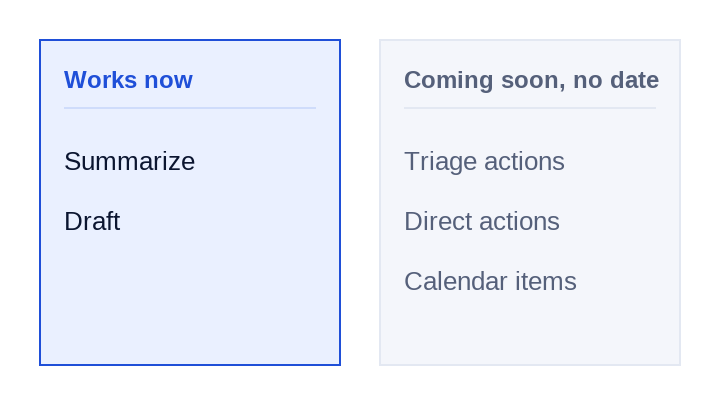
It can understand, summarize and draft. According to Microsoft's Outlook support page, read on November 27, 2026, it cannot yet take direct actions or manage calendar items there.
The same page lists email triage as coming soon: marking emails as read or unread, deleting, categorizing, pinning, flagging and applying mailbox rules. It gives no date. Treat sending and scheduling as not available from Copilot Chat in these mailboxes until Microsoft says otherwise. Conversation history is saved to your primary account, so others who use the same shared mailbox do not see your chats. The page does not cover retention or compliance access for those histories.
What should I check before asking for Copilot in a shared mailbox?
Check your Outlook version, your permission, the resource setup and, for the Copilot app, your license; then ask your admin about the rollout. This order is our suggestion, built from the pages above. Microsoft does not publish it as a checklist.
- Confirm you are in classic Outlook on the desktop, the only version the roadmap item names.
- Confirm you have Full Access and/or folder-level permission on the mailbox.
- Confirm the mailbox is added as a resource, using Microsoft's own page on shared mailboxes.
- If you use the Copilot app instead, check the license and put the word "mailbox" in your prompt.
- If the button is still missing, ask your admin whether your tenant has received the rollout.
Does Copilot Chat work in shared mailboxes in new Outlook, on the web or on Mac?
No source we read says either way. The roadmap item names classic Outlook (Desktop) only, and the Outlook support page just says "Outlook" without a version or platform.
We found nothing about new Outlook, Outlook on the web, Mac or mobile having the same feature, and nothing that explains a missing button there. Until Microsoft documents other versions, assume only classic Outlook is covered, and watch the roadmap item for changes after its Nov 26, 2026 update.
Where does Nolario fit next to Copilot in a shared mailbox?
Nolario does not replace Copilot Chat in a shared mailbox, and we do not claim it supports shared or delegate mailboxes. Copilot Chat, as Microsoft's pages describe it, works inside Outlook and the Copilot app. Nolario works differently: it pulls Outlook, Gmail, any IMAP mailbox, Slack and Microsoft Teams into one feed, scores every item for importance and ranks the feed, and drafts replies in your own voice.
Nolario never sends a message for you. It drafts, you press send. It has no shared team queue, it is a desktop web app without a mobile app, and access is by waitlist. For how the two compare in a single Outlook inbox, read Nolario vs Microsoft Copilot in Outlook; for the wider field, see the best AI email assistants for founders. The accounts it connects are on the integrations page.
Before you try another inbox tool
Two worries are fair before adding a tool next to Copilot: privacy and one more app. On privacy, message content is scrubbed of personal data before anything reaches an AI provider, and Nolario never sends on its own. For the wider question, see five checks before an AI reads your email.
On adding another tool: Nolario connects the accounts you already have, and you do not move anything. It does not replace Outlook, your shared mailbox setup or Copilot.
