

A common way to catch up on email after vacation is to start at the top and read down. That can put a receipt from day three ahead of a customer who wrote on day eight. The fix is to work by who is waiting, not by date, and to run each pass across all your mailboxes before you start the next one. Below is a four-pass routine with the Gmail operators and Outlook filters for each pass, a cap in minutes, and a short list of things to set before you leave.
How do you catch up on email after vacation without losing a day?
Give the backlog a budget and sort it in four passes: what you flagged, mail sent to you, mail you were copied on, then bulk. Each pass has a cap, and when the cap ends you move on even if the pass is not empty. Our budget adds up to about 80 minutes before replies.
Take a seed founder with three mailboxes (an illustration, not a customer). The habit on a normal return is to finish mailbox one, then two, then three. Under this routine pass 1 runs in all three mailboxes, then pass 2 in all three. The most urgent item is often in whichever mailbox would have been opened last.
What is the triage order, pass by pass?
Four passes, in this order: flagged and important, mail sent to you, Cc and group threads, then bulk. The table is our own suggested routine, not a study result, and the caps are our judgment. The operators and menu names come from Google and Microsoft Help pages we opened on 2026-10-31.
| Feature | Gmail (search box) | Outlook (search bar, Refine group) | Cap and what to skip |
|---|---|---|---|
| Pass 1: flagged and important | is:starred, then is:unread is:important after:YYYY/MM/DD | Select All Mailboxes, then Refine: Flagged, then Important | 15 min. Decide only, reply later. Skip anything not flagged or important. |
| Pass 2: mail sent to you | is:unread to:me category:primary after:YYYY/MM/DD (category: only works if you use inbox categories) | Refine: Sent To, Sent to You, then Unread | 30 min. Skip threads where someone else already answered. |
| Pass 3: Cc and group threads | is:unread cc:your-address after:YYYY/MM/DD | Refine: Sent To, Not Sent Directly to You, then Unread | 20 min. Read the last message only. Skip reply-all chains. |
| Pass 4: bulk | is:unread (category:promotions OR category:updates OR category:forums) after:YYYY/MM/DD | Refine: Unread, whatever is left | 15 min. Scan sender names, then stop. Skip everything else. |
Replace YYYY/MM/DD with the first day you were away. Gmail Help gives the format as after:2004/04/16, and newer_than:10d works if you prefer a day count (d, m or y). The Refine names above are from Microsoft Support's page for Outlook for Microsoft 365, Outlook 2024 and Outlook 2021. For the Outlook mobile apps, a separate Microsoft Support page says to tap the Filters icon at the top right, then select Unread, Flagged or Attachments.
When we read Gmail Help's operator page on 2026-10-31, one line changed how we wrote the table. Google says that with negative operators, conversations with excluded criteria may still appear, because Gmail matches messages first; its example is a search for -is:starred returning a conversation that also contains starred mail. So the table uses positive operators (to:me, category:primary) instead of exclusions such as -category:promotions, which could let a promotion thread into pass 2.
Why cap each pass instead of clearing the inbox?
Because trying to make up for lost time tends to backfire. In Stop Overworking After Vacation (Harvard Business Review, September 7, 2023), Darin Rowell and Kandi Wiens write that post-vacation overwork increases stress and undermines the effort to catch up. The full text is behind a subscription, so we could read only the summary and the opening lines, where they report seeing more return-to-work anxiety among clients.
There is also a reason to read in batches rather than all day. A UC Irvine study reported by UC Irvine News on May 7, 2012 found that office workers with email switched windows about 37 times an hour, against about 18 for colleagues with no email for five days. That was an Army research site, not a vacation, so treat it as a hint. The researchers suggested that controlling email login times or batching messages might help, which is what the passes do. For how often to open the inbox once you are back, see how often you should check email.
What should you set before you leave?
Four small things, all done in the tools you already use, make pass 1 shorter. They also stop the backlog growing while you are away. Here is our suggested checklist.
- Turn on the Gmail vacation responder with a date range. Per Google: on a computer, open Gmail, click Settings, then See all settings, go to the General tab, find Vacation responder, select Vacation responder on, fill in the date range, subject and message, and click Save Changes. The reply starts at 12:00 AM on the start date and ends at 11:59 PM on the end date. Outlook and Slack steps are in our out-of-office guide.
- Name one person for urgent matters in that message. Fewer urgent items reach you, so pass 1 has less in it.
- Star or flag the threads that must be answered on your return. Pass 1 starts with
is:starredin Gmail and the Flagged filter in Outlook. - Write down the first day you are away. It becomes the date in
after:YYYY/MM/DD.
Rules that mark important senders in advance help too; the steps are in setting up priority rules in Gmail and Outlook. We did not verify the filter menu paths in a Help page for this post, so we do not repeat them here.
What about Slack and Teams after a break?
Use the same order: what names you directly, then what copies you, then everything else. We did not open Slack or Teams Help pages for this post, so the table covers email only and we give no chat menu paths. Take an agency founder on Gmail, Slack and Teams (also an illustration). Run pass 1 in email, then check direct messages in both chat tools for the same people, because a client who wrote in Teams and again in Gmail is one problem, not two.
If you want the longer routine for a daily flood rather than a one-off backlog, read triaging 200 messages a day without an assistant and the founder's inbox overload guide.
Where Nolario fits
Nolario is our product, so weigh this section accordingly. It pulls Gmail, Outlook, IMAP, Slack, Teams and Google Calendar into one feed, scores every item from 0 to 100 and ranks the feed. After a break that means pass 1 can start from the highest score across every channel instead of the newest message in one mailbox. How the score is built is explained in how AI decides which emails are important.
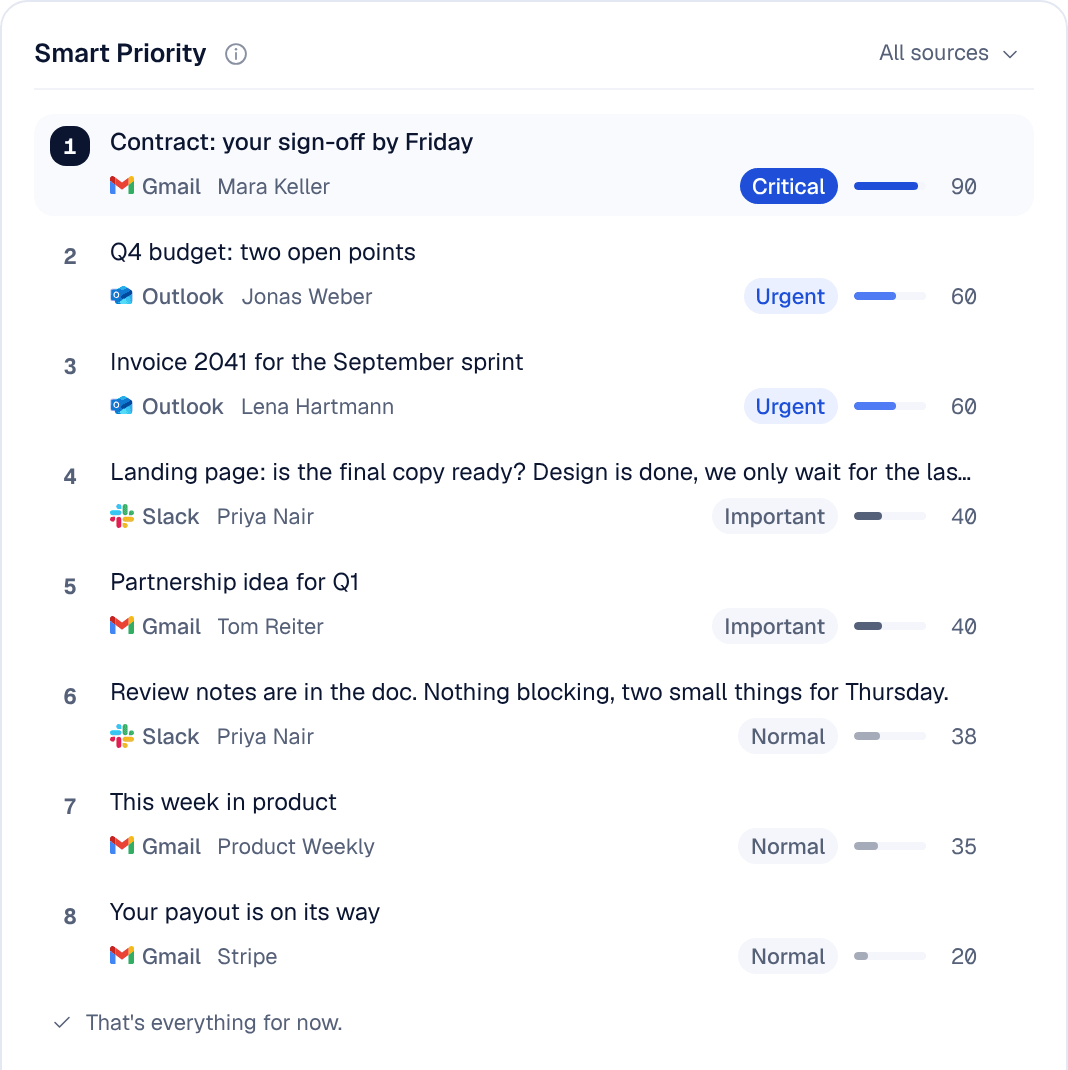
The limits are real. Nolario never sends anything for you, it is a desktop web app with no mobile app, and we make no claim about time saved or about nothing being missed: a score is a ranking, and you still read and decide. Access is by waitlist; see integrations and pricing. If you are back at your desk next week, the table above works today with the tools you have.
