

How often should you check email? No study has found an ideal number, but the best experiment we found points to a small set of planned checks with alerts off as a sensible starting point. In it, adults who limited themselves to three checks a day reported less daily stress than in an unlimited week. A second study, which logged what 40 workers really did, found that batching alone did not lower stress. Below, both papers are read closely, shows what they do and do not prove for a founder with three or more inboxes, and ends with a three-window routine that is our own suggestion, not a study result.
Does checking email less often reduce stress?
Yes, modestly, in one randomized two-week field study. Kostadin Kushlev and Elizabeth Dunn of the University of British Columbia published "Checking email less frequently reduces stress" in Computers in Human Behavior in 2015 (DOI 10.1016/j.chb.2014.11.005). 142 adults agreed to take part and 124 finished. For one week they limited email to three checks a day, with the mailbox closed in between and alerts off. For the other week they checked as often as they could, with alerts on. The order was assigned at random.
In the limited week, participants reported less daily stress (Cohen's d of 0.37), less tension during an important activity and less distraction by email. The number of emails they received did not differ between weeks, about 16 a day in both, so the change came from checking behavior, not from a lighter inbox.
When we opened the full paper on October 31, 2026, one detail changed how we read the headline. The instruction was three checks a day, but participants in the limited week self-reported 4.70 checks on average (SD 4.10). In the unlimited week they reported 12.54 (SD 8.02), and on a normal workday before the study 15.48 (SD 8.69). The realistic comparison is about five checks against about thirteen, not three against unlimited. The authors say they picked three as a moderate limit so a diverse sample could comply, so the number is a compromise, not a discovery.
The limits matter as much as the result. The authors describe the work as exploratory, with many outcomes tested. They had no control condition, and checking frequency was self-reported. About two-thirds of the sample were students, and the recruits were heavy email users who had some flexibility over how often they checked. Weekly recalled stress did not change (d of 0.04), and the authors stress that checking less is by no means a panacea for well-being. They also warn that people whose jobs depend on constant updates might find checking less often more stressful, and that other people's reply expectations matter. The UBC Department of Psychology release adds that most participants found it hard to check only a few times a day.
Does batching email help? What the 2016 logging study found
Not for stress, in the one study we opened that tested it with logged data. Gloria Mark of UC Irvine and colleagues at Microsoft Research and MIT tracked 40 information workers for about 12 workdays, combining computer logging, a chest heart rate monitor and daily surveys. The paper is "Email Duration, Batching and Self-interruption" (CHI 2016).
Two findings carry the argument. First, the longer people spent on email in a day, the lower they rated their productivity, and the longer they spent in an hour, the higher their measured stress for that hour. Second, the authors report no evidence that batching email leads to lower stress. They sorted participants into 11 batchers (at least half of their daily email use fell in their three busiest hours), 23 consistent checkers and 6 with a mixed pattern. Batchers rated their productivity higher than the mixed group, but only on days with a lot of email time. Whether people checked because of notifications or on their own had no significant link to stress either.
Our reading, which is ours and not the authors': how long you stay in the inbox looks like the lever, and the schedule is a way to cap it. The paper also cites earlier work by Iqbal and Horvitz finding that returning to an interrupted task took over nine minutes when the diversion went beyond the email client. We unpack interruption costs in the cost of context switching for founders.
How often do people actually check email?
More often than most plans assume, and the number depends on how you count it. When we read Table 2 of the 2016 paper, the 40 workers averaged 77.27 checks a day (median 58, range 1 to 408), where a check is a separate time the email client came to the foreground. They spent a mean of 1 hour 23 minutes a day in email, out of 4 hours 34 minutes at the computer. In the UBC study the same question, answered by self-report, gave about 15 checks on a normal workday. Logging and self-report are different measures, so we would not average them.
Survey data on time spent is easier to find than data on frequency. Adobe's consumer email survey of over 1,000 white-collar workers in the U.S., described in a post dated August 21, 2018, put work email at 3.1 hours on a typical weekday. A CIO Dive report of September 18, 2019 on the next Adobe survey of 1,002 U.S. adults gives 3.4 hours, and states 3.3 hours for 2018, which differs from Adobe's own 3.1. Read it as roughly three hours a day, self-reported, from a vendor survey. It says how much, not how often. We could not open a primary page for other check-frequency surveys, so we left them out.
What the studies tested, what they found, and what it means for you
The table lines each study up against the situation of a founder with three or more inboxes. Everything in the first two columns comes from the pages we opened; the third column is our interpretation.
| Feature | What the study tested | What it found | What it means for a founder with 3+ inboxes (our reading) |
|---|---|---|---|
| Kushlev and Dunn, 2015 (UBC) | 124 adults, two weeks, within-subjects: one week limited to 3 checks a day with alerts off, one week unlimited with alerts on | Self-reported checks: 4.70 a day (limited) vs 12.54 (unlimited). Less daily stress in the limited week (d of 0.37) and less distraction by email. Emails received were the same. | Supports fewer, planned checks. Participants got about 16 emails a day and had flexibility, so run your own one-week test before trusting it. |
| Mark et al., 2016: duration (UC Irvine, Microsoft Research, MIT) | 40 information workers, about 12 workdays, logged email use, heart rate variability and daily surveys | Mean 1 h 23 min of email and 77.27 checks a day. More time on email went with lower rated productivity and higher measured stress. | Minutes in the inbox matter, not only visits. Cap each window with a timer. |
| Mark et al., 2016: batching (same study) | 11 batchers, 23 consistent checkers and 6 mixed, compared on productivity and stress | No evidence that batching lowered stress. Batchers rated productivity higher only on high-email days. | A schedule alone is not a stress fix. Use windows to keep each pass short and the day in blocks. |
| Adobe consumer email surveys, 2018 and 2019 | Self-reported time with email: over 1,000 U.S. white-collar workers (2018), 1,002 U.S. adults (2019) | Work email at 3.1 hours a day (Adobe, 2018) and 3.4 hours (CIO Dive on the 2019 survey). | Context for how much time email takes, not evidence about frequency. Vendor survey, self-reported. |
A three-window email routine for founders with several inboxes
Open every inbox, Slack and Teams together in three fixed windows a day, cap each window at 20 to 30 minutes, and keep alerts off in between. This is our own suggestion, built on the studies above, and no study tested this exact routine. It has to fit two setups: a seed founder with three mailboxes, and an agency founder working across Gmail, Slack and Teams.
- Pick three windows tied to your day. For example 9:30, 13:00 and 16:30. A founder with three mailboxes can keep all three; an agency founder may need a fourth short one if clients expect same-day answers on Slack. The three checks a day in the Kushlev and Dunn study were a compromise, so adjust the number.
- One window, every channel. Work Gmail, the second mailbox, Slack, Teams and the calendar in one pass. Opening three inboxes separately in each of three windows is still nine visits; five separate looks at three inboxes is fifteen. One pass per window is three. That is arithmetic, not a finding.
- Close the mailbox and silence alerts between windows, as the limited week in the UBC study did.
- Set a timer for 20 to 30 minutes. In the 2016 Mark et al. study, time in email was the factor linked to higher stress, so end the window when the timer ends.
- Read the important items first. Reply, defer or drop, and do not dig through old threads mid-window. Our guide to triaging 200 messages a day covers the sorting.
- Tell people when you read. One line in your signature with your windows and a way to reach you for something urgent. The UBC authors note that reply expectations from other people shape the stress.
- Run it for one week, as the study did, and count what slipped. Then fold the result into a weekly email review.
How do you avoid missing something urgent between windows?
Write down in advance who and what may interrupt you, and make sure each window starts with the items that matter. Checking less often is only a good trade if nothing important sits unseen for hours. Keep the exception list short, two to five senders or channels, and agree the route with them, such as a call. For everything else, the order you read in decides whether the first ten minutes go to the client escalation or to a newsletter. Our founders' inbox overload guide covers the wider system.
Where Nolario fits
Nolario is our product, so weigh this section accordingly. It does one job in this routine: it pulls Gmail, Outlook, any IMAP mailbox, Slack, Microsoft Teams and Google Calendar into one feed, scores every item from 0 to 100 and ranks the feed, so a check window starts with the items that most need you. How the scoring decides is explained in how AI decides which emails are important. See the integrations and pricing pages.
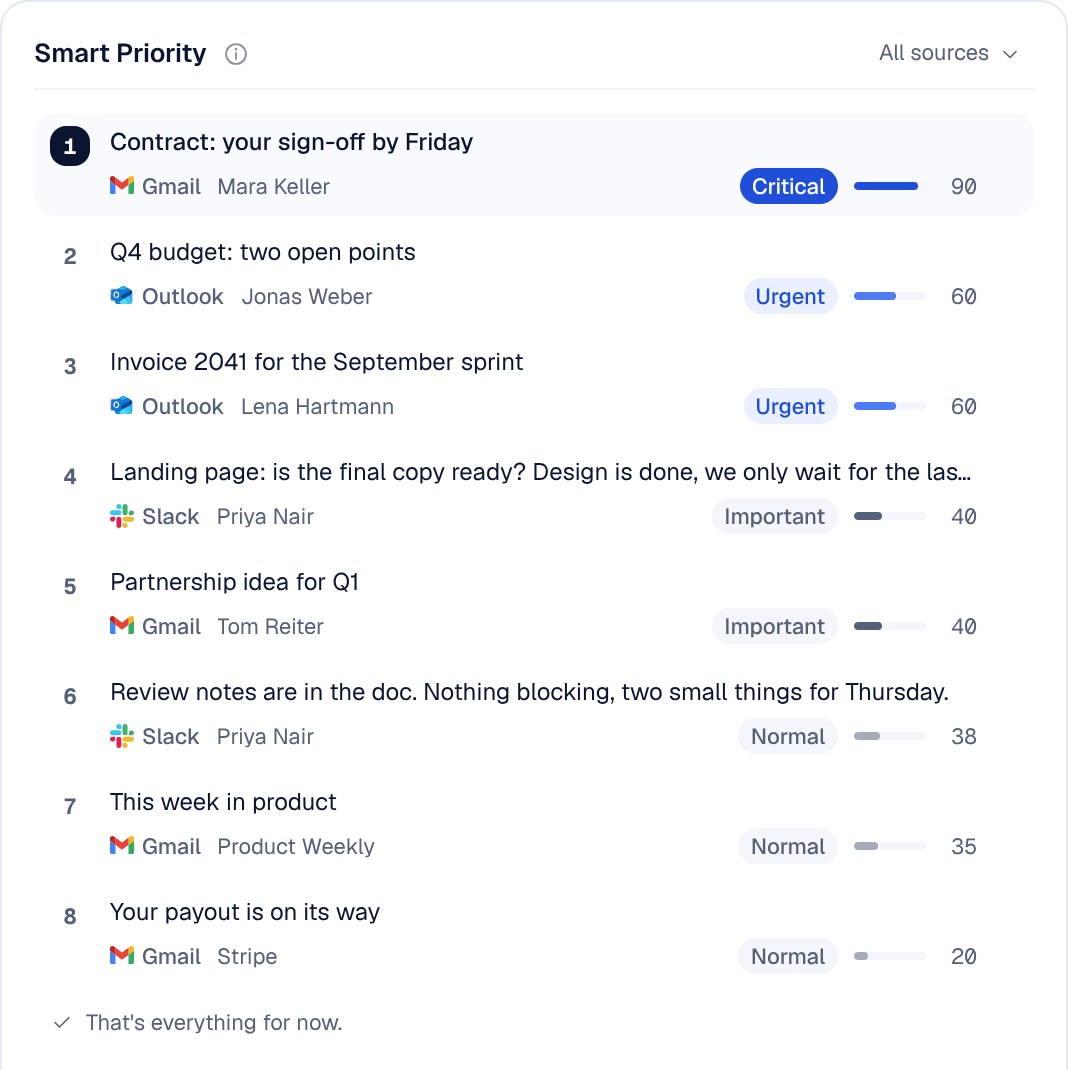
The limits are plain. Nolario never sends anything on your behalf. It is a desktop web app and there is no mobile app. Access is by waitlist, and the product opens May to August 2027. A score is a ranking aid, not a guarantee that nothing urgent sits lower in the feed, so keep your exception list. We make no claim that it lowers stress or saves a set amount of time; none of the studies above tested a tool. If you need a routine today, the three windows work with any mail client and a kitchen timer.
