

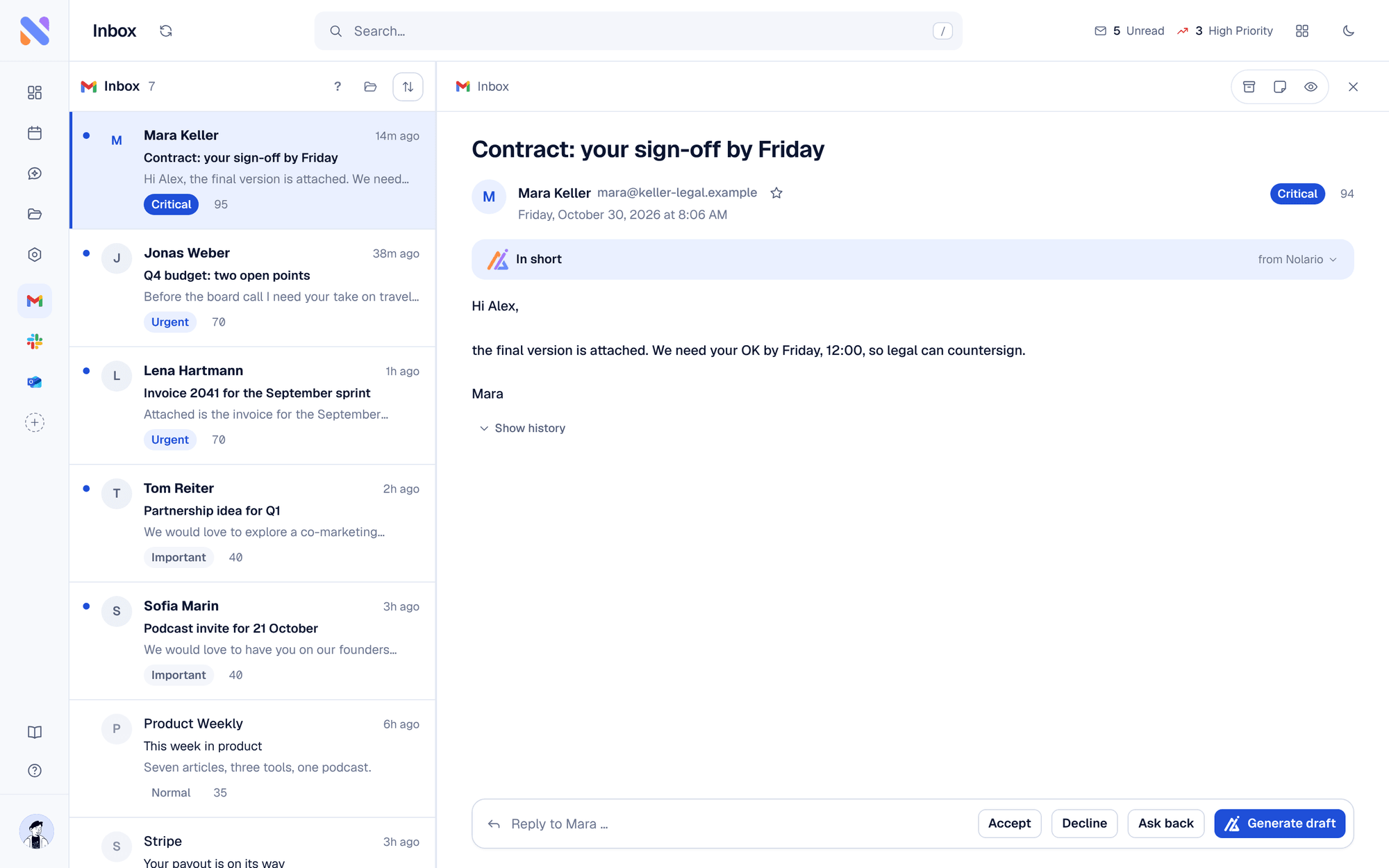
Spark and Nolario both try to cut the time you spend in email, but they start from different places. Spark is an email app: it replaces your mail client with a smart inbox, an AI assistant and team tools, and you can start on its free plan. Nolario is an AI-ranked feed: it pulls Gmail, Outlook, IMAP, Slack, Teams and Google Calendar into one list and scores each item from 0 to 100. As a Spark alternative, Nolario fits a founder whose problem is that important things arrive in Slack and Teams as well as in mail. If you want a better mail app today, Spark is available now.
What is the difference between Spark and Nolario?
Spark is the place you do your email; Nolario decides what deserves your attention across email and chat. Spark's homepage, which we read on October 26, 2026, names IMAP, iCloud, Exchange, Outlook, Yahoo and Google accounts, a Smart Inbox, priority emails, Snooze, Send Later and follow-up reminders, and an AI assistant that can "find, summarize, and take action on anything in your inbox." Nolario scores every message with visible reasons and drafts replies in your voice, and it reads Slack and Teams next to mail.
Spark vs Nolario at a glance
| Feature | Nolario | Spark |
|---|---|---|
| Replaces your mail app | No | Yes |
| Importance score per item with reasons | 0 to 100 | Priority emails, no score shown on its homepage |
| Gmail, Outlook, IMAP | Yes | Yes |
| Slack and Teams messages in the feed | Yes | Not described on its integrations page |
| Drafts replies in your voice | Yes | AI writing assistant |
| Shared inbox and delegation | No | Yes |
| Sends mail for you | Never | Yes, it is your mail app |
| Price (October 2026) | €29/mo (waitlist) | Free, or $10/mo (Plus), $20/mo (Pro) |
Spark's prices come from its pricing page, checked on October 26, 2026: Free at $0, Plus at $10 per month or $99 per year, Pro at $20 per month or $199 per year, and Enterprise on request. Plus and Pro include a seven-day trial. Pro adds Autopilot, Auto-Drafts, read statuses and a HubSpot integration. The page also mentions a Premium plan in its FAQ that does not appear in the plan list.
What do Spark's Slack and Teams integrations do?
Spark's Slack and Teams integrations move content out of email, not messages into it. On its integrations page, which we opened on October 26, 2026, Spark lists Slack with the line "Turn your emails into Slack messages or send email content directly into channels" and Microsoft Teams with "Add a Microsoft Teams call link when creating an event in Calendar." The same list names 23 services, from Asana and Todoist to Notion, Zoom and OneDrive. The page does not say that a Slack message that needs your answer shows up in Spark's inbox, so plan on checking Slack on its own. That gap is the reason checking Gmail, Slack and Teams without missing clients is a separate problem from reading mail faster.
Where Spark is the better choice
Pick Spark if email is the whole problem and you want a better mail app now. Spark is free to start, takes unlimited accounts, works on iOS, Mac and Windows according to its homepage, and has team features Nolario does not: shared composing, delegation, private comments and deadlines on threads. A small team that shares a mailbox is a better fit for Spark.
Good
- A free plan with a Smart Inbox and unlimited email accounts
- AI assistant and writing help on paid plans, with a limited preview on Free
- Shared composing, delegation and private comments
- Available today, with a seven-day trial on paid plans
Not so good
- Slack and Teams messages are not described as arriving in its inbox
- Priority is a feature set, not a score with reasons
- You still run your day from the mail client
Where Nolario is the better choice
Pick Nolario if the thing you miss is in Slack, Teams or the calendar, not in the inbox. Nolario puts Gmail, Outlook, IMAP, Slack, Teams and Google Calendar in one feed, scores each item from 0 to 100, and shows the reasons behind the score. Related reading: the best unified inbox apps, best Superhuman alternatives and Nolario vs Shortwave.
Limits of Nolario, stated plainly
Nolario is not a mail client. You still read and send in Gmail or Outlook, and it never sends a message for you. It has no shared inbox, no assignment and no delegation, and it is a desktop web app with no mobile app yet. Microsoft Teams works with work and school accounts only. Nolario is in early access. Access is by waitlist, joining the waitlist is free, and the product opens to waitlist members between May and August 2027.
Verdict
Spark is the better tool for running email today, alone or with a small team. Nolario is the better fit when the problem is deciding which email or chat message matters. Nolario is our product, so weigh this pick accordingly. We put it first because it is the only one of the two that scores Slack and Teams next to mail, and its limits are above. See integrations, pricing and the free tools.
