

Teams already formats markdown while you type, and a second mode arrives in December. The help page lists a handful of shortcuts and the message center post covers the change, but neither says in one place what to type, what still needs the toolbar and which clients get what. This post puts that in two tables.
We checked Microsoft's markdown help page on November 24, 2026 (the page is dated April 17, 2026). It did not mention the new mode, even though MC1562278 links to it. The original message center post sits behind an admin login, so we read its text on a public mirror, mc.merill.net, and we say so wherever we rely on it.
Does Microsoft Teams support markdown?
Yes, in a Markdown-style syntax. Microsoft's help page, dated April 17, 2026, says you get a live preview of your formatted text inside the compose box as you type, and that you can always undo the formatting with Ctrl+Z.
The same page warns that the syntax doesn't fully match standard Markdown and that some formatting may behave differently. Think of it as Teams' own shorthand that resembles Markdown, and test anything unusual before you rely on it. The help page is short enough to read yourself.
Which markdown syntax works in Teams today?
The documented set is short: bold, italic, strikethrough, two kinds of lists, links, headings 1 to 3, block quotes, inline code and code blocks. The table below follows the syntax table on Microsoft's help page as we read it on November 24, 2026.
| Feature | What you type | What you get |
|---|---|---|
| Bold | *bold text* | Bold text |
| Italic | _italic text_ | Italic text |
| Strikethrough | ~strikethrough~ | Strikethrough text |
| Bulleted list | * Item one, or - Item one | Bulleted list |
| Numbered list | 1. Item one | Numbered list |
| Link | [Text](URL) | Hyperlink |
| Headings | # Header text, ## Header text, ### Header text | Heading 1, 2 and 3 |
| Block quote | > text | Block quote |
| Inline code | `code text` | Inline code |
| Code block | Start with three backticks, then paste the code | Multi-line code block with live preview |
Two details stand out. Bold uses single asterisks, one of the places where Microsoft says its syntax doesn't fully match standard Markdown. The pages we read don't say whether **double asterisks** also work, so we won't claim either result. For code blocks, the page only describes starting pasted text with three backticks, and we found nothing on whether other pasted markdown gets converted.
What can't you format with markdown in Teams?
Underline, highlighting and font size have no markdown syntax in Microsoft's table, so they stay with the toolbar. Microsoft's page on formatting a message, dated October 27, 2026, lists highlighting, font size and lists among the options in the expanded compose box.
If you want a highlight or a larger size, use the formatting toolbar. Typing symbols won't do it.
What does MC1562278 change in December 2026?
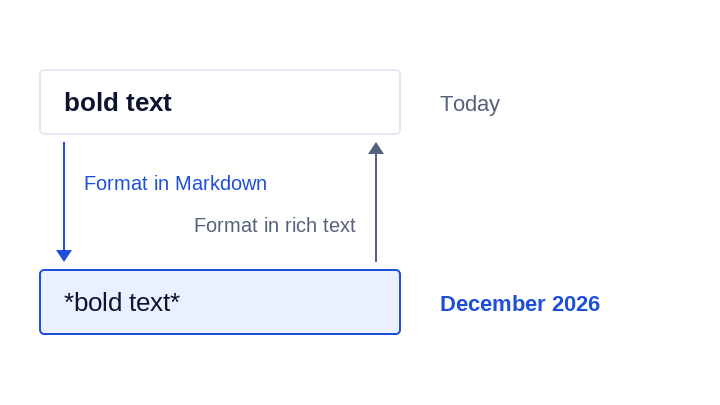
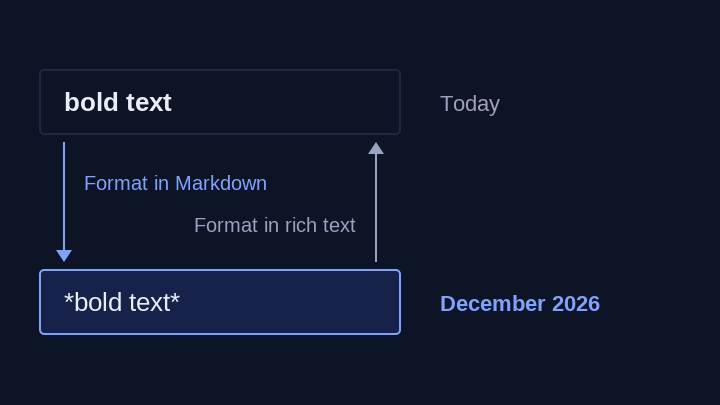
It adds a second compose mode in which the markdown stays visible as text. Microsoft's message center post MC1562278, dated November 20, 2026, says Teams will launch an expanded Markdown compose experience in early December 2026 for people who compose messages in chats and channels.
| Feature | Today | From December 2026 (MC1562278) |
|---|---|---|
| While you write | Live preview of the formatting in the compose box | Syntax stays visible and editable, no live rendering |
| How you get it | Type the syntax; no setting is documented | Select Format in Markdown from the Actions and apps (+) menu |
| Toolbar | Rich text toolbar with highlighting, font size, lists | A dedicated Markdown toolbar that inserts syntax |
| Clients | Write on desktop or web; mobile is view only | Windows, Mac and web; mobile is not listed |
| Rollout | Already available | Early to mid-December 2026 (Worldwide, GCC, GCC High, DoD) |
| Admin action | No setting documented | None needed |
| Going back | Ctrl+Z undoes a formatting step | Format in rich text; Teams remembers your mode until you switch |
Some things are still unknown. The post doesn't say which buttons the new Markdown toolbar has, or whether standard markdown such as double-asterisk bold applies in that mode. Wait for the rollout before you rewrite any team guidance.
How do you switch to the new mode, and do admins need to act?
You switch it yourself, and admins don't need to do anything. MC1562278, Microsoft's message center post from November 20, 2026, says users will be able to select Format in Markdown from the compose box's Actions and apps (+) menu, and states: "No admin action is needed."
Teams will remember the mode you picked and apply it across chats and channels until you switch modes. Format in rich text takes you back to the editor you know.
Can you write markdown in Teams on a phone?
Not today. Microsoft's markdown help page, dated April 17, 2026, says you can view but not generate Markdown-formatted messages on a mobile device and recommends the desktop or web app for that.
MC1562278 names Teams for Windows, Mac and web and does not list mobile. None of the sources we read says whether the new mode will reach iOS or Android later, so plan to write formatted messages on a computer. If you also want to time a message from a computer, see how to schedule a message in Slack or Teams.
Where Nolario fits
Nolario doesn't change how Teams formats a message, and it is not a Teams compose tool. It works upstream. It pulls Teams chats into one feed with Gmail, Outlook and Slack, scores every item for importance, ranks the feed so the message that needs you is at the top, and drafts replies in your own voice from your sent mail. You edit the draft and send it yourself, because Nolario never sends a message for you.
There is one limit: Teams chats work only for work and school accounts. While building the connector, we found that Microsoft Graph does not expose chats for personal Microsoft accounts, and Nolario says so when you connect instead of failing silently. It is a desktop web app and access is by waitlist. The integrations page lists every channel, and our guide to checking Gmail, Slack and Teams without missing a client shows the routine around it. If a chat you meant to answer slipped by, Teams message reminders and marking a chat as unread cover the manual route.
Before you add another inbox tool
On privacy: message content is scrubbed of personal data before anything reaches an AI provider. Names, emails and numbers are removed on our side before a provider gets the text. And Nolario never sends anything for you. It drafts and you press send, since one wrong auto-sent reply to a key customer costs more than the minutes it would save.
As for "another tool": Nolario connects the accounts you already use, so there is nothing to move, and it does not replace Teams. You keep writing in Teams the way you do today. See pricing for plans.
