

A shared mailbox such as info@ in new Outlook raises one practical question: how do you get notifications for it? This post answers it from two Microsoft support pages that show no page date, read on November 27, 2026, and flags what they leave open. We did not test anything below. The pages cover new Outlook and Outlook on the web; classic Outlook, mobile and Exchange on-premises are not covered.
How do I get notifications for a shared mailbox in new Outlook?
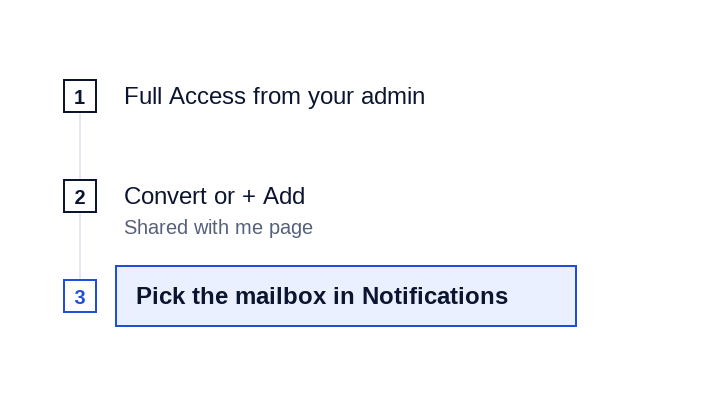
Add the mailbox as an account. Microsoft's support page Manage shared mailbox settings in new Outlook, read on November 27, 2026, says you can manage settings such as Categories, Notifications, Rules and Automatic Replies for a shared mailbox by adding it as an account.
A second Microsoft page, Open and use a shared mailbox in Outlook, also read on November 27, 2026, puts it plainly: adding a shared mailbox as an account provides support for notifications, unread count and automatic replies. The first page gives these steps:
- Get Full Access permission. The first page says you must have Full Access granted by your organization's IT admin.
- If the mailbox was auto-mapped, open the Shared with me page and select Convert. Microsoft says this automatically adds the mailbox as an account.
- If it was not auto-added and you have not added it to Outlook yet, select + Add on the Shared with me page and follow the prompts.
After that, the same page says the shared mailbox appears in the Account selector for each setting supported for shared mailboxes, such as Categories, Notifications, Rules and Automatic Replies. It does not describe the options inside the Notifications settings, so we list none here.
There are two caveats. Microsoft says adding a mailbox as an account may not be available in your version of new Outlook at this time, and neither page says which version has it or when it arrives for everyone. The pages also word the permission differently: the first requires Full Access, while the second says that once your admin has added you as a member, you should restart new Outlook and the mailbox should display in your Folder pane. They do not say how the two relate, so if the mailbox is missing, ask the admin which one applies to you.
If alerts fail for your own mailbox too, the general checks for new Outlook notifications are a separate post. If what you need is an alert for one sender rather than a whole mailbox, see a rule for one sender and the client notification setup for Gmail and Outlook.
Account or shared folder: what do the pages say changes?
Microsoft says what the account route provides and says nothing about notifications for the shared folder route. The comparison below uses only what the two pages say.
| Feature | Added as an account | Added as a shared folder |
|---|---|---|
| How you add it | Convert or + Add on the Shared with me page | Right-click your account name in the Folder pane, then Add shared folder or mailbox |
| What Microsoft says you need | Full Access granted by your IT admin | Admin must add you as a member before you can use it |
| Notifications | Supported, along with unread count and automatic replies | Not stated on the pages |
| Appears in the Account selector of settings | Yes, including Notifications | Not stated on the pages |
| Change it later | More, then Use as shared folder | Not stated on the pages |
What about Outlook on the web?
On the web, notifications of new messages in a shared mailbox's Inbox need the mailbox in its own window. Microsoft's page Open and use a shared mailbox in Outlook says that to receive notifications of new messages in the Inbox of a shared mailbox, you must open it in a separate browser window.
You get that window by entering the other mailbox's address under Open another mailbox. Microsoft says another Outlook on the web session then opens in a separate window. The pages do not say what the browser itself needs, such as an open tab or a notification permission.
What can new Outlook still not do with shared mailboxes?
Several things, and the two Microsoft pages do not give the same list. The page on managing shared mailbox settings lists searching for calendar events within a shared mailbox among its known gaps (searching emails works as expected). The second page says contacts for shared mailboxes, and other users' mailboxes, are currently unavailable in new Outlook.
The second page also says other capabilities are not available today but will be added in a future update. We could not read that list in full, and neither page gives dates. If your team depends on one of these, ask your admin before you rely on the new Outlook setup.
Where Nolario fits
Nolario does not replace a shared mailbox in new Outlook, and we make no claim that it supports shared or delegate mailboxes. It does a different job: it pulls your connected Outlook, Gmail, Slack and Teams accounts into one feed, scores every message for importance and ranks the feed, so the important message is at the top.
It drafts replies from your sent mail, and it never sends anything for you: you press send. It is a desktop web app, there is no mobile app, and it has no shared team queue. If the problem is a team working one mailbox, read shared inbox vs unified inbox. If it is one person across several channels, see how to check Gmail, Slack and Teams without missing a client and the integrations page for what connects today.
Before you try another inbox tool
Two worries are fair before adding a tool: privacy and one more app. On privacy, message content is scrubbed of personal data before anything reaches an AI provider, and Nolario never sends a message on its own. We decided that it drafts and you press send, because one wrongly sent reply to a key customer costs more than the minutes it saves.
On adding another tool: it connects the accounts you already use, and you do not move anything. It does not replace Outlook or the shared mailbox. Access is by waitlist.
