

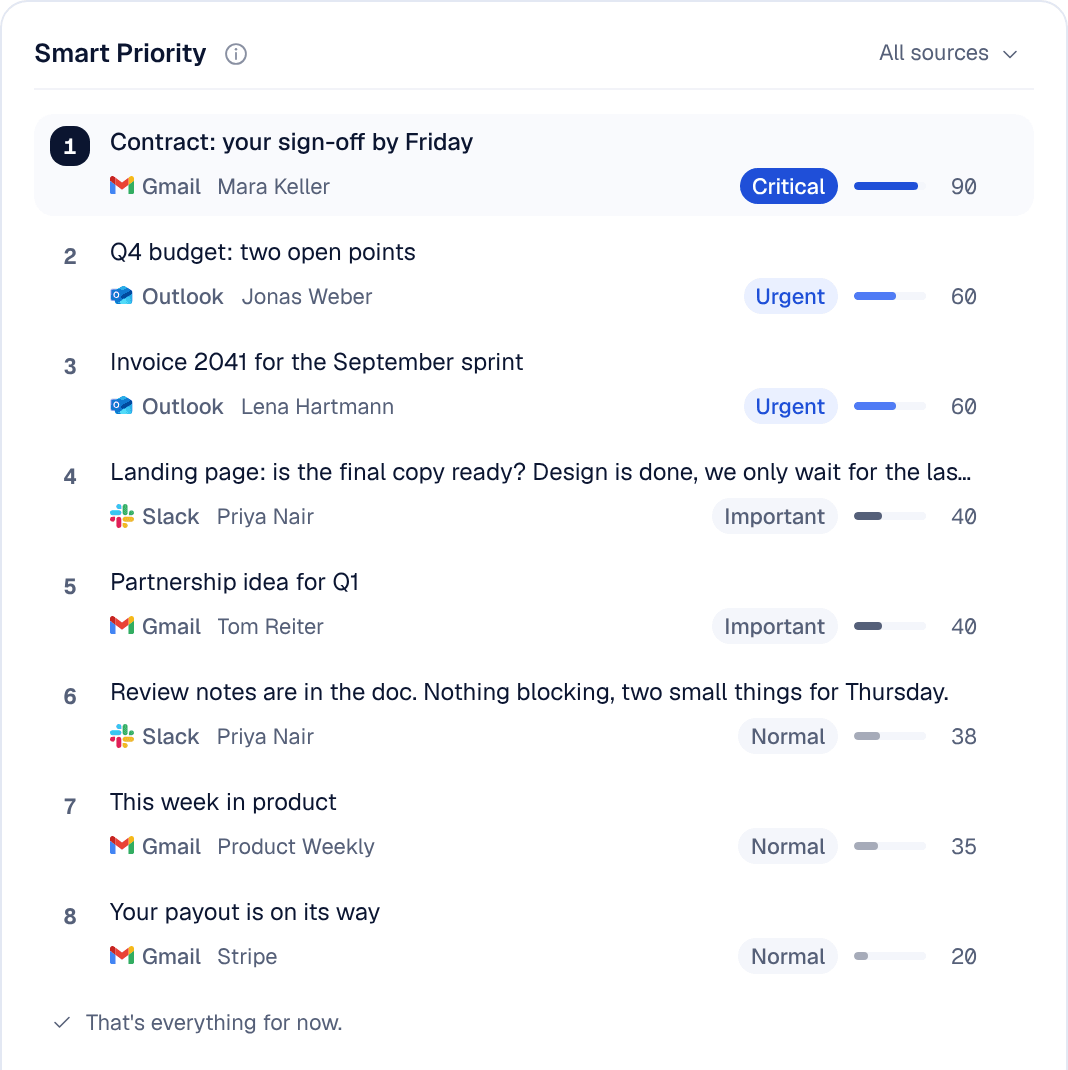
Inbox Zero and Nolario get compared because both read your mail, sort it with AI and draft replies that sound like you. The difference shows up as soon as an important message arrives somewhere other than email. Inbox Zero is built around Gmail and Outlook. Nolario pulls Gmail, Outlook, any IMAP mailbox, Slack and Microsoft Teams into one feed and ranks all of it on one scale, so the client escalation in Slack sits above the newsletter in Gmail. This comparison is for founders deciding which of the two fits how their day actually arrives.
At a glance
| Feature | Nolario | Inbox Zero |
|---|---|---|
| Gmail and Outlook | Yes | Yes |
| Any IMAP mailbox (Proton, GMX, Fastmail) | Yes | No |
| Slack and Teams messages in the same ranked list | Yes | No |
| Slack and Teams as a chat window to the assistant | No | Yes |
| Importance | Score per message, 0 to 100, with the reason | Categories and tabs |
| Drafts in your voice | Yes | Yes |
| Sends without your approval | No | No |
| What it learned about you, visible and editable | Yes | Knowledge base |
| Unsubscribe from newsletters | Yes | Yes |
| Cold email blocker and email analytics | No | Yes |
| Open source | No | Yes |
| Available to buy today | No | Yes |
| Starting price | €29/mo (waitlist) | $20/user/mo annual, $25 monthly |
Does Inbox Zero work with Slack and Teams?
It connects to them, but it does not read them as an inbox. When we checked Inbox Zero's Channels documentation on November 9, 2026, Slack, Microsoft Teams and Telegram were described as places to receive rule notifications, review drafts, get meeting briefs and chat with the assistant about your email. Teams and Telegram deliver to a direct message with the bot. Nothing on that page describes pulling a Slack thread or a Teams chat into the inbox or ranking it.
For a founder with clients in Slack and a partner on Teams, the message that costs money is often not an email. Inbox Zero will tell you in Slack that an email needs you. Nolario will tell you that the Slack message needs you, and put it above the email that does not. Our guide on checking Gmail, Slack and Teams without missing a client shows how much manual merging that otherwise takes.
Where Nolario wins
Nolario wins wherever the question is "what needs me first" across more than one app. Every message from every connected channel gets an importance score from 0 to 100 and a one line reason, such as an investor asking for a decision today, and the feed is sorted by it. One scale for every channel means mail and chat share one list instead of two half lists.
It also goes further on email itself. Proton Mail, mailbox.org, GMX, WEB.DE, Fastmail and your own server connect over IMAP with full scoring and drafting, which matters to the privacy minded and to most of Europe. The interface and public pages come in six languages. Behind the scores sits a private knowledge base of your people, priorities and writing voice where every learned fact shows its source and can be edited or deleted, so a wrong guess gets corrected once instead of quietly repeated.
Two rules keep it calm. Nolario never sends anything; you press send. And Slack content reaches an AI model only when you ask for it, by tapping, searching or asking a question, never in the background. Mail content is filtered before it reaches an AI provider, and nothing is used to train models. The full channel list is on integrations.
Good
- Gmail, Outlook, IMAP, Slack and Teams ranked in one list
- A 0 to 100 score per message with the reason next to it
- Proton, GMX, WEB.DE, mailbox.org and Fastmail with full triage
- What it learned about you is visible, editable and deletable
- Six interface languages, prices in euros
Not so good
- Access is by waitlist today, so you cannot start this afternoon
- Desktop web app, with no mobile app available yet
- No cold email blocker and no email analytics
- Its own workspace, so you change where you read
- Not open source
Where Inbox Zero wins
Inbox Zero is the stronger pick for a mail only cleanup. Its bulk unsubscriber shows senders with email frequency and open rates, and it ships a cold email blocker, bulk archive and email analytics. It works inside the Gmail or Outlook you already use, has a free email client on web, desktop and iPhone, and is available today. Its homepage says more than 25,000 professionals use it.
It also has proof a security team can check. The enterprise page lists SOC 2 Type 2 and a CASA Tier 2 assessment, and the code is on GitHub, where the repository showed 13,000 stars on November 9, 2026. If your company needs to self host, Inbox Zero is one of very few options; see our list of Inbox Zero alternatives for what self hosting really costs.
Inbox Zero pricing in 2026 compared with Nolario
The entry prices are close, and the gap is in what the entry plan covers. Inbox Zero's pricing page lists Starter at $20 per user per month billed annually or $25 monthly, Plus at $28 or $35 and Professional at $40 or $50, each with two email accounts and a fee for every extra account. The Slack integration starts on Plus.
Nolario starts at €29/mo, and a Slack workspace or a Teams account counts as a channel like a mailbox on every plan, so the entry plan already covers mail and chat. To get close to that with Inbox Zero you would pay for Plus and still only get Slack as a notification channel. Plans and channel counts are on pricing.
Open source or a filter before the AI
Both take privacy seriously and prove it differently. Inbox Zero lets you read the code and run it yourself, under AGPL v3 with extra terms that require an enterprise licence from five business users. Nolario is not open source. It filters message content before anything reaches an AI provider, names every provider it uses, does not train on your data and shows you everything it learned. If running the software on your own servers is a requirement, Inbox Zero is the honest answer. If you want a hosted product that sees less of your mail, Nolario is built for that.
Which one for a founder
Choose by where your urgent messages arrive. If nearly all of them are email in one or two Google or Microsoft accounts and the real problem is volume, Inbox Zero cleans that up well, and the comparison of Nolario and Superhuman covers the faster client route too. If clients, investors and your team reach you across Gmail, Slack and Teams, or you use Proton or GMX, Nolario is the better fit, because it is the one that ranks all of it together. Our roundup of AI assistants for Gmail, Slack and Teams covers the rest of that field.
Verdict
Nolario is the better choice for founders whose day is split across email and chat. It ranks Gmail, Outlook, IMAP, Slack and Teams in one list with a reason for every position, drafts in your voice and never sends. Today you join a waitlist rather than start a trial. Inbox Zero is the better choice if you only need email, want to start today, want bulk unsubscribe and analytics, or need to self host.
