
The honest answer for most people leaving Inbox Zero in 2026 is Fyxer AI, because it does the same three jobs on a hosted plan you can start today and now lists a free tier to test it on. If the reason you were there in the first place was the open source licence, the thing to know is that Inbox Zero stops being free at five business users, and the only other credible open source option, Zero, is not a stable release yet. This page ranks seven Inbox Zero alternatives, reads every price off the vendor's own page where the vendor publishes one, and says what self hosting actually costs once a server and a model bill are counted.
Why people look for Inbox Zero alternatives
Inbox Zero is a good product and the most popular open source thing in this category, with about 12,400 GitHub stars. People leave it for three specific reasons, and only one of them is about the software.
The licence has a ceiling. The repository's LICENSE file is AGPL v3 with additional terms, and one of those terms reads: "If you are an organization with five (5) or more employees, contractors, or users who will use this Program for business purposes, you must obtain an enterprise license from Inbox Zero Inc. before using this Program." A second term bars monetizing the software itself. Personal use, education, research and organizations under that threshold are exempt. So the code is readable and auditable, which is the part that matters for privacy, but "free forever because it is open source" is true for a founder and a co founder and stops being true the month the fifth person joins.
Self hosting is free at the licence level, not at the bill. One published breakdown of the real cost puts infrastructure at about $10 to $40 a month for a server and database, $1 to $5 for a domain and certificate, and model spend in the low tens of dollars a month for a mailbox taking around 100 substantive messages a day. Add two to six hours a month of updates and monitoring and a solo setup lands near $30 a month in cash plus your own time, which is inside a rounding error of the hosted Starter plan. That breakdown comes from a publisher that sells a competing hosted product, so treat the labour figure as motivated, but the infrastructure and model numbers are the ordinary cost of running anything.
It is an email tool. Inbox Zero connects to Gmail, Google Workspace and Microsoft Outlook. Slack, Teams and Telegram appear as surfaces for reaching the assistant rather than conversations it reads and ranks. If the message you missed arrived in a Slack channel, no amount of inbox automation was going to catch it. Our guide to assistants that cover Gmail, Slack and Teams is the right page for that problem.
How we ranked these Inbox Zero alternatives
Ranked by how completely each tool replaces the three jobs Inbox Zero actually does: sort the inbox, draft the reply in your voice, and cut the volume before you see it. After that, whether you can start using it today, because a tool you cannot get is not a replacement. Every price below was read from the vendor's own pricing page on 29 September 2026, except where that page returns no price table to a plain fetch, which the sources note. List prices move, so treat all figures as correct at the time of writing. Availability is a ranking criterion here, and it is the reason Nolario sits last rather than first: access is by waitlist, and the six tools above it can be paid for this afternoon.
The 7 best Inbox Zero alternatives in 2026
Fyxer AI
The closest hosted swap, and the only one of these with both a free plan and meeting notes.
Best for
Anyone who wants Inbox Zero's jobs done without running a server
Price
Free plan, then $49 per person per month, or $32 annual
Fyxer sits on top of the Gmail or Outlook account you already have, sorts arriving mail into priority categories, drafts replies in your voice and takes notes from calendar meetings. That is Inbox Zero's feature list plus the notetaker, delivered as a hosted service, so the licence question disappears entirely.
Its pricing page today lists a Free plan at $0 that includes seven days of Pro features, Pro at $49 per person per month or $32 on annual billing, Team at $99 per person per month or $64 annual, and a custom Enterprise tier with an annual contract from 50 users. That is worth stating plainly because third party roundups published earlier this year still quote $30 a month for the entry paid tier: the figures above are what the vendor page says now. The page also names Gmail, Outlook, Slack, Microsoft Teams, calendars, CRM connections and access through MCP. Our Fyxer alternatives page covers the other direction if you have already tried it and bounced.
Shortwave
A full Gmail replacement with the AI built into the client rather than bolted beside it.
Best for
Gmail users who want a new inbox, not an automation layer on the old one
Price
$30 per seat per month, no free tier
Shortwave is the option to take if what frustrated you about Inbox Zero was working inside Gmail's own interface while a separate tool moved things around behind you. It is its own client, with search, thread summaries, drafting and its own assistant, and the experience is coherent in a way a layer cannot be.
Its pricing page lists Business at $30 per seat per month, Premier at $45 and Max at $120, with a 14 day free trial and no free tier shown. That is more than Inbox Zero's Starter plan for a narrower channel story, and it is the straightest trade in this list: you are paying for a better place to work rather than more automation. See Shortwave alternatives for the reverse comparison.
Serif
Drafting built for people whose inbox is mostly clients.
Best for
Consultants and agency owners who send the same shapes of reply all week
Price
Lite $30 per month, Team $50 per user per month
Serif connects to Gmail or Outlook and concentrates on the reply: it learns how you write and puts ready to send drafts in front of you, rather than spending its effort on labels and folders. If the half of Inbox Zero you used was the drafting and the sorting felt like housekeeping, this is the closer match.
The pricing page lists Lite at $30 a month, Standard at $50 for five times the usage, Pro at $200 for twenty times, Team at $50 per user with pooled usage and a custom Enterprise tier, with a seven day full access trial. The tiers are sold on usage rather than features, which is honest pricing for a product whose cost is model calls, and worth checking against your own send volume first.
SaneBox
The cheapest way to cut volume, with no AI writing anywhere in it.
Best for
People who wanted the filtering half of Inbox Zero and none of the drafting
Price
Snack $9.49 per month, Lunch $15.99, Dinner $42.99
SaneBox is the oldest answer in this category and still the cheapest. It moves low value mail out of the way and leaves the rest, and it deliberately writes nothing. If your Inbox Zero bill felt high for what you actually used, this is the honest downgrade: a fraction of the price for the one job that reliably saves time.
Its plans cover one, two and four mailboxes respectively, with a seven day trial and a steep discount for longer commitments. SaneBox does not serve its price table to a plain page fetch, so the figures above come from two independent third party explainers that agree on all three numbers. Our SaneBox alternatives page covers what you give up by stopping here.
Superhuman Mail
Speed and keyboard control rather than automation that runs while you are away.
Best for
High volume senders who process mail in sittings and want to be faster at it
Price
Starter around $30 per month, Business around $40
Superhuman is a different theory of the problem. Inbox Zero works when you are not looking; Superhuman makes the time you do spend in the inbox much faster, with a keyboard first client, AI reply suggestions and triage shortcuts. Some people leaving an automation tool find that this is what they wanted all along.
Prices here carry a caveat we will not paper over. Superhuman does not return a price table to a plain page fetch, and the explainers filling the gap disagree about whether the standalone Mail tier is still sold to new customers since the company rebrand. One recent breakdown lists Starter at $30 a month, or $25 annual, and Business at $40, or $33 annual, with no free trial for Mail. Check the current offer before planning around a number.
Zero (Mail0)
The other open source option, with no user ceiling and no stable release either.
Best for
Developers who want to read and run the code, and can live on a moving target
Price
Free, MIT licensed, you pay for hosting and model use
If the licence clause is the specific reason you are here, Zero is the only credible alternative that answers it. It is MIT licensed with about 10,800 GitHub stars, supports Gmail and Outlook, and describes itself as an open source Gmail alternative built to be self hosted. MIT has no business user threshold, so the wall you hit at five people does not exist.
The trade is maturity. The repository is under active development rather than shipping a stable release, and independent coverage describes the project as early stage with its hosted version still maturing. Running your own mail front end on a fast moving codebase is a real commitment, and the infrastructure and model costs from the section above apply here too. This is a project to adopt, not a product to buy.
Nolario
One ranked feed across email, chat and calendar, with replies drafted in your voice.
Best for
Founders whose urgent messages hide in Slack and Teams as often as in the inbox
Price
€29/mo (waitlist)
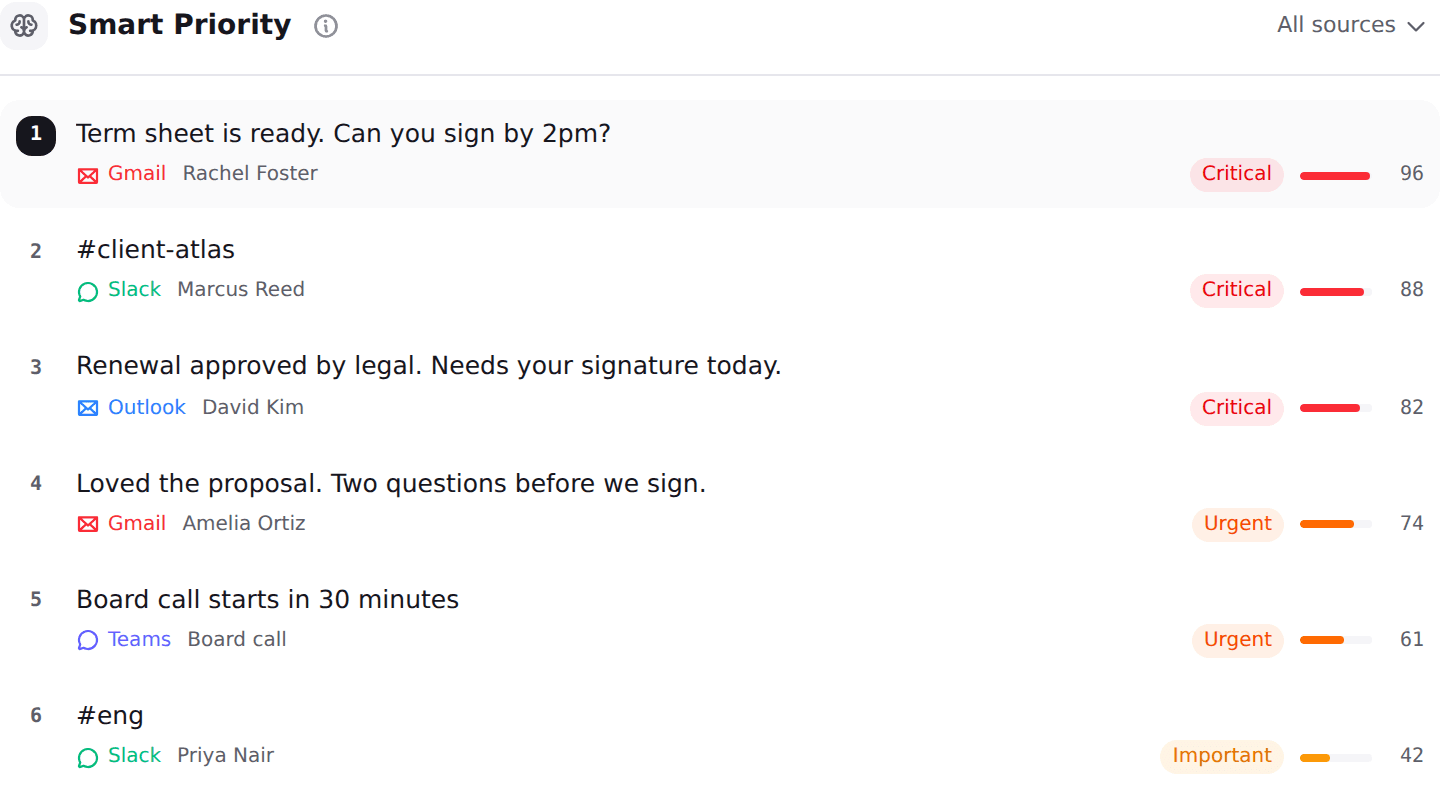
Nolario is the answer to the third reason people leave, the one no inbox tool addresses. It pulls Gmail, Outlook, Slack, Microsoft Teams, Google Calendar and any IMAP mailbox into one feed, scores every item for importance, ranks the feed so the thing that matters is at the top, and drafts replies in your own voice learned from what you actually send. It ranks and drafts. It never answers for you and never sends on your behalf.
It is last on this list for reasons worth stating. Nolario is not open source and cannot be self hosted, so it does not answer the licence question at all. It is a desktop web app with no mobile app. There is no shared queue, no assignment and no SLAs, so it is not a team inbox. And access today is by waitlist rather than a sign up, with the product opening to waitlist members between May and August 2027, which means the six tools above can be in use before you finish reading. See the integrations and pricing pages.
What Inbox Zero costs, hosted and self hosted
Worth doing the arithmetic, because the two paths cost about the same for one person and diverge sharply for a team. The hosted product runs a seven day trial and then three per user tiers, reported at $20 for Starter, $35 for Plus and $50 for Professional, with up to 20 per cent off annual billing and a custom Enterprise tier. A second independent source puts the band at roughly $18 to $42 per user per month, which is close enough to trust the shape. Neither figure came from getinboxzero.com directly: that pricing page returns no price table to a plain fetch, so both are third party readings.
Self hosting trades the per user fee for a server, a domain, your own model keys and your own attention, which lands near the Starter price for one mailbox. So the case for self hosting is not price. It is that you can read exactly what happens to your mail, which is the subject of our private AI email assistants comparison. If price is what you are optimizing, our pricing breakdown for the category is the faster read.
What to use if your team is five people or more
This is where the licence clause bites, and it is the one question this page exists to answer. At five employees, contractors or business users, self hosting Inbox Zero requires an enterprise licence, so the free path closes and you are buying something either way. Three of the options above publish a team price: Shortwave at $30 per seat per month, Serif Team at $50 per user with pooled usage, and Fyxer Team at $99 per person per month or $64 on annual billing. Fyxer's Enterprise tier starts at 50 users, so a team of six is buying Team, not negotiating.
Zero is the only genuinely free option left at that size, because MIT sets no threshold, and you should price the maintenance honestly before choosing it. And if the reason you have five people is that you are running shared addresses like support@ or sales@, none of these tools is the right shape: that is a shared inbox, with assignment and a queue, and our shared inbox software comparison covers it, including where Nolario is deliberately not the answer.
| Nolario | Inbox Zero | Fyxer AI | Zero (Mail0) | |
|---|---|---|---|---|
| Open source | ||||
| Can be self hosted | ||||
| Free at any team size | ||||
| Drafts replies in your voice | ||||
| Ranks every channel in one feed | ||||
| Starting price | €29/mo (waitlist) | ~$20/user/mo hosted | Free, then $49/person/mo | Free, self hosted |
Where Nolario fits
If you are leaving Inbox Zero because the licence stopped being free, buy Fyxer and stop thinking about it, or adopt Zero and accept the maintenance. If you are leaving because you only ever used the filtering, SaneBox costs a third as much and does that one job well. If you are leaving because working inside Gmail felt like the problem, Shortwave is a better place to spend the day. None of those is Nolario, and we would rather say so than rank ourselves first on a page about an open source tool we are not an open source alternative to.
Nolario is worth your attention for one reason: every tool above stops at the mailbox, and your week does not. When the thing you needed to see was a Slack thread or a Teams mention, a perfectly triaged inbox is a perfectly triaged fraction of the problem. Nolario scores and ranks all of it in one feed and drafts the replies in your voice, at €29/mo, with access by waitlist. If your missed messages are all in email, one of the six tools above is the better buy, and our guide to inbox overload across channels is for the case where they are not.
