
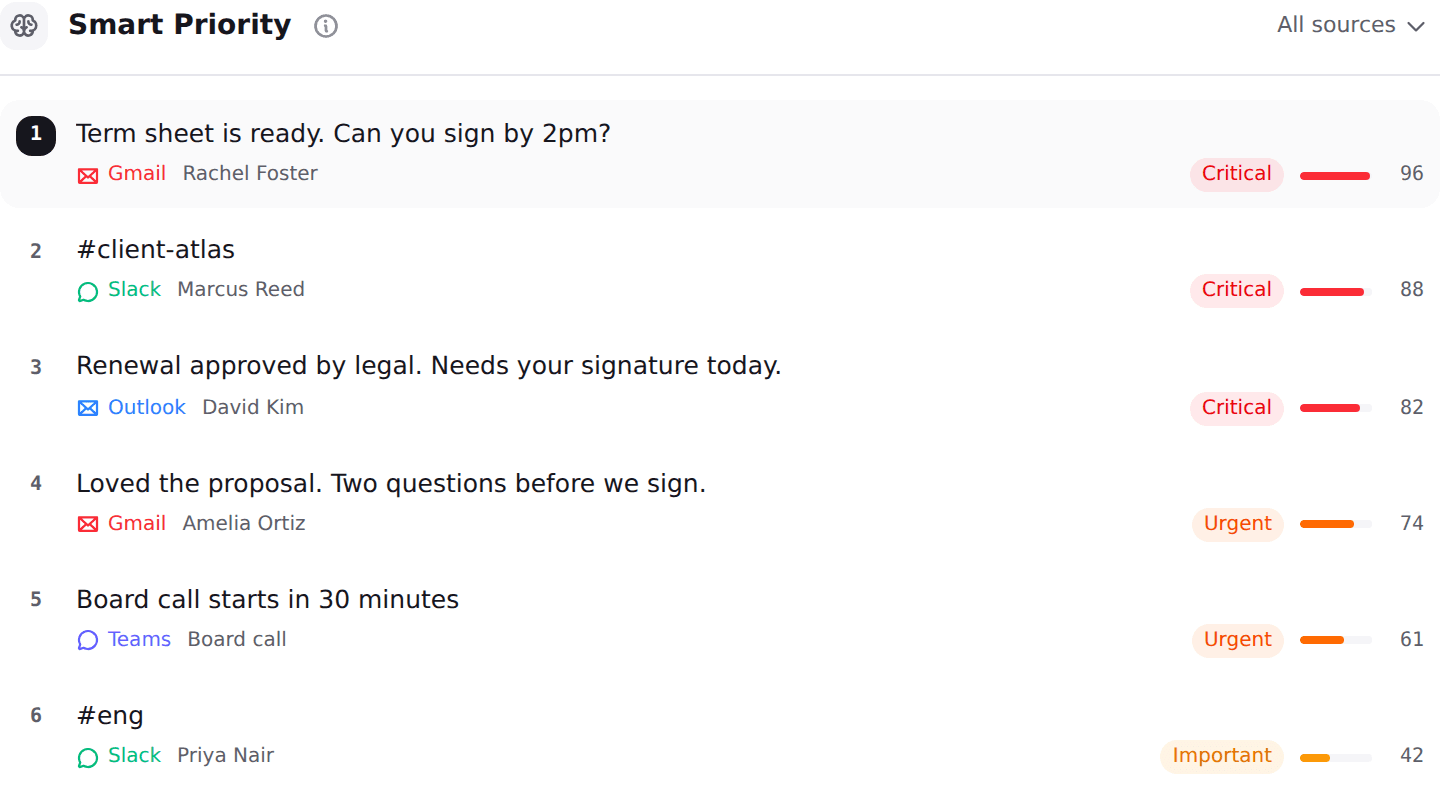
Fyxer AI and Nolario both promise to take email off your desk, and they solve different halves of the problem. Fyxer works inside the mailbox you already use: it files incoming mail into action based categories, writes reply drafts in your style, and sends a notetaker into your calls. Nolario works one level above the mailbox: it pulls Gmail, Outlook, Slack, Microsoft Teams, Google Calendar and any IMAP account into a single feed, scores every item from 0 to 100 for importance, and ranks it so the thing that actually needs you is at the top. If your urgent work all arrives as email, Fyxer is the shorter path. If it arrives in four places, a smarter mailbox cannot see three of them.
Fyxer AI pricing in 2026, and why every roundup is wrong
Start here, because it is the part a comparison article usually gets wrong. Read on 30 September 2026, the Fyxer pricing page lists four tiers: Free at $0 per month, Pro at $49 per person per month billed monthly or $32 billed annually, Team at $99 or $64 annually, and Enterprise as an annual contract with a 50 user minimum. Paid plans carry a 14 day free trial.
Now compare that with the published record. A detailed Fyxer review from 26 August 2026 states a Starter plan at $30 per month, a Professional plan at $50, no free tier at all and a seven day trial. Both readings were accurate when they were taken, which is exactly the problem: the plan names, the prices, the trial length and the existence of a free tier have all changed inside about a month, so a reader comparing tools from a listicle is working from numbers the vendor no longer charges. Our own roundup of Fyxer alternatives carries the older figures for the same reason, and our survey of AI email assistant pricing found this drift across the whole category, not just one vendor.
The practical advice: open the vendor pricing page before you buy anything in this category, including ours. Every figure in this article is a list price at the time of writing.
At a glance
| Nolario | Fyxer AI | |
|---|---|---|
| Gmail | ||
| Outlook | ||
| Any IMAP mailbox (iCloud, Fastmail) | ||
| Slack and Teams messages in the same ranked feed | ||
| Assistant you can address inside Slack and Teams | ||
| Importance score per message | 0 to 100 | Categories |
| AI drafts in your voice | ||
| Meeting notetaker for calls | ||
| Free tier | ||
| Available to buy today | ||
| Starting price | €29/mo (waitlist) | $0, paid from $32/person/mo |
Where Fyxer wins
Fyxer's biggest advantage is that it does not ask you to move. It sits in the Gmail or Outlook window you already have open, labels what arrived into buckets like To Respond and FYI, and leaves a draft waiting under the ones that need an answer. Nothing about your habits has to change, which is the single strongest predictor of whether an email tool survives week three. You can also start on the free tier and find out in an afternoon whether the drafts sound like you.
The notetaker is a genuine second product bundled into the first. It joins calls on Google Meet, Zoom and Teams, and returns a summary with action items, which for a founder whose day is half calls and half email removes a whole category of admin that Nolario does not touch at all. Fyxer also exposes your context over MCP to Claude and ChatGPT, so if you already work in one of those, your mail and meetings can be reached from there.
Pros
- Works inside Gmail and Outlook, so you do not change where you read
- Free tier, and a 14 day trial on paid plans
- Meeting notetaker for Google Meet, Zoom and Teams with action items
- An assistant you can address from inside Slack and Teams
- Available today, with no waitlist
Cons
- Gmail and Outlook only, so iCloud, Fastmail and IMAP are out of reach
- Sorts into categories rather than ranking one list, so you still process the inbox
- Priced per person, and the entry plan changed name and price within a month
- Review roundups report heavy draft editing, a weaker Outlook experience and trial billing surprises
Where Nolario wins
Nolario starts from a different premise: that the message which decides your week is as likely to be a Slack mention or a Teams thread as an email, and that no amount of intelligence inside a mailbox can see it. So it pulls all of them into one feed, scores every item on a single 0 to 100 importance scale, and puts the highest first. The score is built from behavioural signals rather than keywords, who addressed you directly, who you reliably reply to, what you flagged, whether the sender marked it important, and whether that has ever meant anything before. Then it drafts the reply in a voice learned from what you have actually sent, on whichever channel the message arrived on.
The second difference is reach. Nolario connects any IMAP mailbox alongside Gmail and Outlook, which matters more than it sounds: iCloud, Fastmail and self-hosted mail are invisible to most of this category, as we found when we looked at AI email assistants for IMAP. And because message content is scrubbed of personal data before anything reaches an AI provider, the privacy question has a concrete answer rather than a policy paragraph. The full channel list is on the integrations page and the plans are on pricing.
Pros
- One ranked feed across Gmail, Outlook, Slack, Teams, calendar and IMAP
- A 0 to 100 importance score per item, not a folder it was filed into
- Drafts in a voice learned from what you have actually sent
- Personal data scrubbed before anything reaches an AI provider
- Starts at €29/mo
Cons
- Access is by waitlist today, so you cannot start this afternoon
- Desktop web app, with no mobile app available
- No meeting notetaker and no CRM integration
- Its own workspace, so you are changing where you read
- No shared queue and no assignment, so it is not a team helpdesk
Categories or a ranking: why the difference shows up at 9am
Both products read the same mail and both claim to tell you what matters, so it is worth being precise about what each one hands you. Fyxer gives you a sorted inbox: the forty messages that arrived overnight are still forty messages, now distributed across buckets, and you open the To Respond bucket and work down it. That is a real improvement over an undifferentiated list, and it fails in a specific way: review roundups drawing on public Trustpilot and G2 reviews report important mail buried by rigid sorting. A bucket has no internal order, so the one message in it that genuinely could not wait sits wherever it happened to arrive.
Nolario gives you a ranking: one list, highest score first, so position carries information. The cost is that a ranking is a stronger claim and therefore more visibly wrong when it misjudges something, which is why the score is exposed on every row rather than hidden. Neither model is free of failure. The question is which failure you would rather debug: a message filed in the wrong folder, or a message ranked too low with the reasons printed next to it. If you want the reasoning behind that approach, we wrote it up in our comparison of email triage tools.
Does Fyxer work with Slack and Teams?
This is where the two products are most often confused, because both list Slack and Teams, and they mean opposite things by it. Fyxer's integration, announced on 27 August 2026, lets you type @Fyxer in any channel or DM to search your inbox, draft a reply or move a calendar event without leaving the conversation, and it posts meeting summaries after calls. That is Fyxer as a colleague you can ask things, living where you already chat. What it does not do is read the Slack and Teams messages arriving around it and tell you which of them need you.
Nolario is the other direction. Slack and Teams messages are ingested and scored on the same scale as email, so a direct mention in an incident channel can outrank every message in your inbox that morning, and it appears above them in the same list. Neither approach is better in the abstract. If your problem is "I keep leaving Slack to deal with email", Fyxer removes the trip. If your problem is "I saw the message that mattered two hours late", the trip was never the issue, and you need something that watches all of it at once. We compared the wider field on this exact axis in AI assistants for Gmail, Slack and Teams.
Which one for a founder
Answer one question honestly: of the last three things that genuinely needed you urgently, how many arrived as email? If the answer is three, buy Fyxer, start on the free tier, and spend the difference elsewhere. It will file your mail, draft your replies and take notes in your calls, and you will not have to learn a new window. If the answer is one or two, the tool that only sees your mailbox is solving a third of your problem well, and the ranking across channels is the part you are actually missing.
If other people share the mailbox, neither of these is the answer. Fyxer prices a Team plan at $99 per person per month, but it is still a personal assistant repeated across seats, and Nolario has no shared queue, no assignment and no SLAs at all. Support inboxes and anything with a handover belong in a different category of product, which we compared in the best shared inbox software. And if what you care about most is what a vendor stores and what leaves your account, that is its own axis: see private AI email assistants.
The second question is calls. If your week is genuinely half meetings, Fyxer's notetaker is worth real money on its own and Nolario has no answer to it. That is not a gap we are hiding: it is a different product, and for some readers it is the deciding one.
Verdict
Fyxer AI is the better buy if your work arrives as email and leaves as meetings. It is available today, it now has a free tier, it does not ask you to move, and the notetaker is a real second tool in the box. Nolario is the better fit if your attention is split across Gmail, Outlook, Slack, Teams and a calendar, and the thing you keep getting wrong is not writing the reply but noticing which message needed one first. It ranks and it drafts, it never answers for you, and today you join a waitlist rather than a checkout. Pick by where your urgent work actually lands, not by which feature list is longer.
