

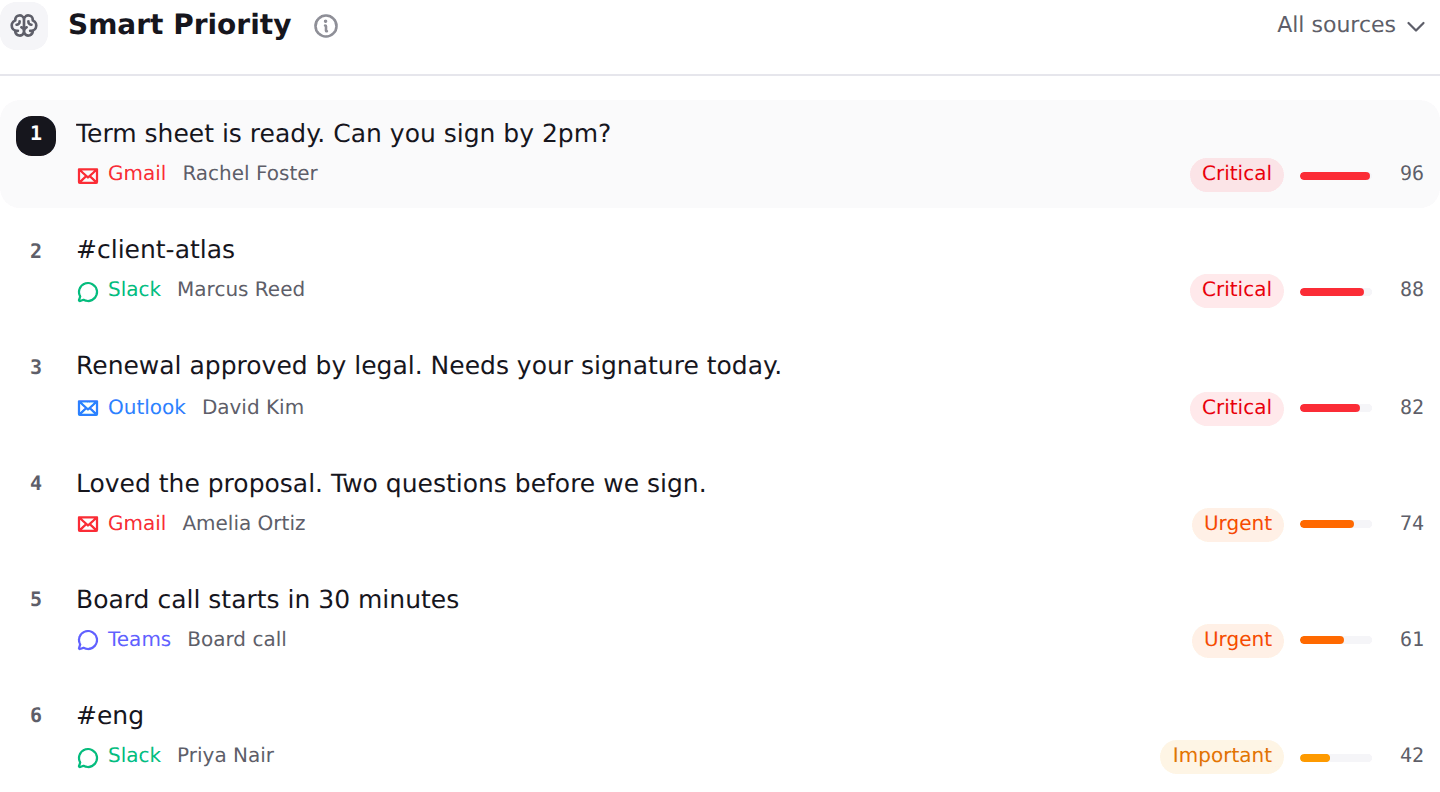
Serif and Nolario both draft your replies in your own voice, and that is where the overlap ends. Serif is a delegate that lives inside your Gmail or Outlook account: it triages, drafts, tracks follow-ups and, on its current homepage, writes and sends replies for you around the clock. Nolario is a feed above your accounts: it pulls Gmail, Outlook, Slack, Microsoft Teams, Google Calendar and any IMAP mailbox into one list, scores every item from 0 to 100 and puts what needs you first, then drafts, and never sends. If you want work taken off your desk, Serif is built for that. If you want to stop missing the one message that mattered, a delegate cannot help with the channels it cannot see.
What Serif AI is now
Read on 5 October 2026, Serif's homepage no longer describes a personal email helper. It is headed "AI Agents for Email & Document Work" and lists use cases such as chasing people for paperwork, reading what comes back, checking it against what you need, triaging an inbox and writing replies, with uncertain cases routed to staff before anything is sent. The customers it names are law firms, accountants, property managers, insurers and business brokers, and it quotes its own volume at 611,000+ emails sent a month. That is a service-business operations tool as much as a founder inbox tool, and it matters for the comparison: Serif is strongest where the work is a repeatable email process.
Earlier material describes the founder version. A comparison page Serif published on 30 April 2026 calls it an AI executive assistant for business owners and entrepreneurs, with inbox organization, priority labels, spam filtering, reply drafts in your writing style, meeting notes and delegation by forwarding to an assistant address. Both descriptions are the same product at different points in its positioning, and both assume the work lives in email.
Serif AI pricing in 2026
The Serif pricing page lists five tiers, all billed monthly: Lite at $30 per month, Standard at $50, Pro at $200, Team at $50 per user per month, and a custom Enterprise plan. Every plan includes a 7 day free trial with full access. A third-party comparison of Serif reports that the Lite plan covers triage, drafting, a meeting recorder and a task manager, and that True Voice, the feature that learns how you write, sits at the $50 Standard tier. The vendor page does not say that itself, so confirm it before you choose a plan on the strength of the voice feature.
These figures were identical to the ones we recorded on 21 September 2026, so Serif is currently stable on price, unlike some of its neighbours. We tracked how fast the rest of the category moves in AI email assistant pricing in 2026, and our roundup of Cora alternatives places Serif among the tools a reader can start the same day.
At a glance
| Feature | Nolario | Serif AI |
|---|---|---|
| Gmail | Yes | Yes |
| Outlook | Yes | Yes |
| Any IMAP mailbox (iCloud, Fastmail) | Yes | No |
| Slack and Teams messages in the same ranked feed | Yes | No |
| Importance score per message | 0 to 100 | Priority labels |
| AI drafts in your voice | Yes | Yes |
| Can send replies for you | No | Depends on mode |
| Chases documents and follow-ups | No | Yes |
| Free trial | No | 7 days |
| Available to buy today | No | Yes |
| Starting price | €29/mo (waitlist) | $30/mo |
Where Serif wins
Serif is available today, it sits inside the mailbox you already have, and its trial is a full 7 days with nothing held back. For a business that answers the same kinds of email all week, such as intake questions, document requests or scheduling, it does something Nolario deliberately does not: it carries the process to the end. It follows up when a reply goes quiet, reads the attachment that came back and can send on your behalf once you trust it. If the scarce thing in your week is typing and chasing, that is the right shape of tool.
It also has a security story a buyer can check. Serif's own comparison page states a CASA Tier 2 assessment by a Google-designated auditor and says emails are never used to train public AI models. Those are vendor claims, so ask for the report, but they are specific enough to verify, which is more than most of the category offers.
Good
- Works inside Gmail or Outlook, so you do not change where you read
- 7 day free trial on every plan, and available today
- Goes beyond drafting: follow-ups, document chasing, scheduling and meeting notes
- Can run in an autonomous mode with uncertain cases routed to a person
- Published security claims that can be checked against an audit
Not so good
- No Slack or Teams integration named, and no IMAP mailbox beyond Gmail and Outlook
- Closed source, so you rely on the vendor's description of how mail is handled
- Entry plan is $30 per month, and the writing-style feature is reported to need the $50 plan
- Pages disagree on whether it drafts or sends, so you must test the mode you will run
- Positioned toward service businesses with a repeatable email process
Where Nolario wins
Nolario starts from a different question. Not "how do I do this email faster" but "which of everything that reached me today actually needs me". It pulls Gmail, Outlook, Slack, Teams, calendar and IMAP into one feed, scores each item on a single 0 to 100 scale from behavioral signals such as who addressed you directly, who you reliably reply to and what you flagged, and ranks the list so position carries meaning. Then it drafts the reply in a voice learned from what you have sent, on whichever channel the message arrived on.
The second difference is restraint. Nolario never sends, never answers for you and never archives, so the worst mistake it can make is a draft you decline. That is a slower product than an agent that acts, and it is the point for a founder who has been burned by an automated reply. Message content is also scrubbed of personal data before it reaches an AI provider. The full channel list is on integrations, the plans are on pricing, and the wider field of assistants that read chat as well as mail is in AI assistants for Gmail, Slack and Teams.
Good
- One ranked feed across Gmail, Outlook, Slack, Teams, calendar and IMAP
- A 0 to 100 importance score per item, with position that carries meaning
- Drafts in a voice learned from what you have actually sent, and never sends
- Personal data scrubbed before anything reaches an AI provider
- Starts at €29/mo
Not so good
- Access is by waitlist today, so you cannot start this afternoon
- Desktop web app, with no mobile app available
- No document chasing, no follow-up automation and no meeting notetaker
- Its own workspace, so you are changing where you read
- No shared queue and no assignment, so it is not a team helpdesk
There is also a question of what each product asks you to hand over. Serif needs to read and, in its autonomous mode, act in your mailbox, so the trust you extend is operational: you are deciding what it may do in your name. Nolario asks for read access across more channels but never acts, so the trust is informational: you are deciding what it may see. Neither is the safer choice in general, and a founder who has never let software send mail should expect the second to feel easier on day one.
Does Serif AI work with Slack and Teams?
On everything we read, no. The Serif homepage and pricing page name Gmail and Outlook, and neither mentions Slack or Microsoft Teams. A third-party comparison of Serif states plainly that it does not integrate with either. For a founder whose urgent messages arrive in a channel, that is the whole gap: an email agent that is excellent at email cannot tell you that the message you needed was a Teams thread forty minutes ago.
Nolario ingests Slack and Teams messages and scores them on the same scale as email, so a direct mention in an incident channel can outrank every message in your inbox that morning and appear above them in the same list. This is the same axis we used in Nolario vs Fyxer, where the answer also turned on where your urgent work really lands.
Drafts or sends: who holds the last click
Serif's own pages do not give one answer. The pricing page says it pre-drafts replies so you can send or edit with a single click, and a review published on 4 June 2026 describes it as drafting for you to send rather than acting on its own. The homepage read today says the agents write replies around the clock and send, with uncertain cases routed to staff. The likeliest reading is a spectrum you set per scenario, which is a reasonable design and also a reason to test it: decide in the trial which categories of mail you would let go out unseen.
Nolario removes that decision by never sending. If your fear is the wrong reply leaving your account, that constraint is the feature. If your problem is volume, it is the cost, and a tool that acts will save you more time than one that waits. We cover the wider trade-off between assistants that act and assistants that rank in AI chief of staff tools for founders.
What a Serif trial should settle in seven days
Because the trial is free and full access, use it as an experiment rather than a tour. On the first day, check the voice: send yourself three kinds of thread, a quick yes or no, a negotiation and a message to someone senior, and see whether the draft sounds like you or like a polite stranger. If the style feature is gated to the $50 plan, test on that plan, not the cheaper one, or you will judge the product on a version you would not run.
By midweek, find the autonomy setting and decide on paper which mail you would allow to leave unread by you: a calendar confirmation probably, a reply to an investor probably not. Then count how many of your real urgent items never touched your mailbox. If most of them arrived in chat, you have your answer without reading another comparison, and the tool you want is one that watches all channels, which is the case we make in what a unified inbox actually is.
On day six, price it for the people who would use it. A single founder at $30 or $50 a month is a small line. A five-person team at $50 per user is $250 a month, and at that point you are comparing Serif with a part-time assistant, not with another app, which is a different budget conversation and a different kind of test.
Which one for a founder
Ask where your last three urgent items arrived. If all three were email and most of your inbox is routine, start the Serif trial and decide inside seven days whether the drafts and the send mode earn $30 to $50 a month. You lose nothing by trying, and you do not need to move. If one or two came from Slack, Teams or a calendar invite, a tool that only sees your mailbox is solving a part of the problem, and the ranking across channels is the piece you are missing.
Neither is a team helpdesk. Serif prices a Team plan at $50 per user per month, but it is still an assistant per seat, and Nolario has no shared queue, assignment or SLAs. Shared support inboxes belong to a different category, compared in the best shared inbox software.
Verdict
Serif is the better buy if your work arrives as email, follows a pattern and needs carrying to the end. It is available today, it comes with a real trial, and it does things Nolario does not attempt. Nolario is the better fit if your attention is split across Gmail, Outlook, Slack, Teams and a calendar, and the thing you keep getting wrong is noticing which message needed you first. It ranks and it drafts, it never sends, and today you join a waitlist rather than start a trial. Pick by where your urgent work lands, and by whether you want something that acts or something that tells you where to look.
